From the Office























 Glen Eira College

How to Submit a Future Absence on XUNO
XUNO allows you to inform the school that your child will be absent on a specific date or time in the future, including today, before or after the roll has been marked.
- Log in to your XUNO parent portal or XUNO Family app.
- Via the XUNO web portal: From the School menu click on Attendance, or on the dashboard, click the Attendance Today tile. Via the XUNO Family app: From the main menu, tap Attendance
- If you have more than one child at the school, select the name of the child you are reporting an absence for.
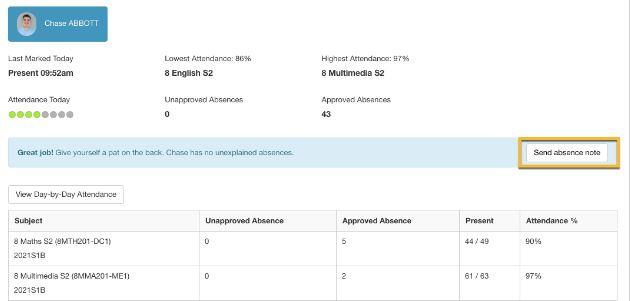
- Click/tap on the Send absence note button
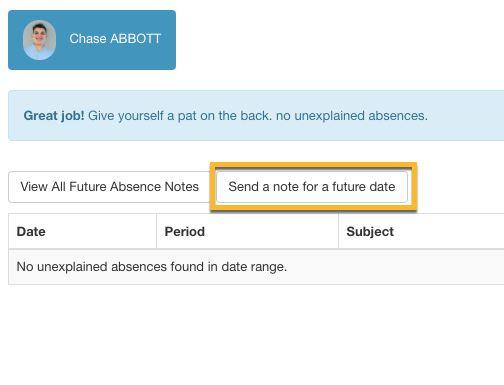
5. Then click Send a note for a future date
Update Your Details
Have you recently changed, or are about to change address, home, mobile or work phone number or email address? Please remember to ring the College on 9571 7838 or update your details on XUNO to keep us informed.
XUNO Portal
Need your login details for the XUNO portal? Contact the College on 9571 7838 or email glen.eira.co@education.vic.gov.au
Student Absences
Student absences should be reported to the school on or before the day of the absence. Both past and future absences can be added on XUNO. Parents are reminded that the College also has a designated telephone line for notification of student absence – 9571 4178.
There is also an absence proforma in the student planner that parents can complete for the student to return to the General Office on their return to school.
Early Leavers
If your child needs to leave school early parents / carers are required to provide a signed note for them to show their year level coordinator and bring down to the General Office when they sign out. Students are not permitted to leave the school early without signing out at the General Office.
Newsletter Advertisements
This newsletter is emailed home to all families three times per term. If you have any items of interest to the college community or would like to advertise your business, please contact Penny Marks on 9571 7838.
XUNO App Upgrade
A new version of the Family app was released earlier this term, optimising the push notifications and paving the way to new and exciting features to come.
After upgrading, the app will automatically log users out, requiring them to log in to the app again. Parents and students can use the same login details as they have used in the past to re-register and log back in.

Download the app from the Apple store or the Google Play Store.
Please contact the General Office on 9571 7838 if you have any questions.
Camps, Sports & Excursions Fund (CSEF)
The CSEF is provided by the Victorian Government to assist eligible families to cover the costs of school trips, camps and sporting activities.
If you hold a valid means-tested concession card or are a temporary foster parent, you may be eligible for CSEF. A special consideration category also exists for asylum seeker and refugee families. The allowance is paid to the school to use towards expenses relating to camps, excursions or sporting activities for the benefit of your child.
The annual CSEF amount per student is $225 for secondary school students. Please find attached the CSEF application form.
If you applied for the CSEF here at GEC in 2021, you do not need to complete an application form in 2022 unless there has been a change in your family circumstances (such as a change of custody, change of name, concession card number, or new siblings commencing at the school in 2022).
You only need to complete an application form if you are new to GEC in 2022 or you did not apply in 2021.
Please contact the General Office on 9571 7838 if you have any questions.
Gabrielle Darvell
Business Manager