Page 0 Banner Photo
Cover Page
For your diary  Banner Photo
For your diary Key Dates
From the Principal  Banner Photo
From the Principal
Production : It's a wrap Banner Photo
Production : It's a wrap Congratulations to our fantastic Production team
Volleyball Development Program Banner Photo
Volleyball Development Program Golden times at Volleyball Victoria Schools' Cup
Year 11 Literature Banner Photo
Year 11 Literature Deep Listening to Voices of Country 
Student Services : Careers  Banner Photo
Student Services : Careers Planning for 2025 and beyond
VCE Media : Photography Workshop Banner Photo
VCE Media : Photography Workshop Developing production skills with lighting and lenses
International Students Banner Photo
International Students Annual NHS Homestay Program Information Night , Welcome new students- Meet and Greet our ISP Captains 
VCE Italian Banner Photo
VCE Italian Immersive language learning at Model United Nations conference
Extension opportunity for 2025 Year 12 students Banner Photo
Extension opportunity for 2025 Year 12 students Opportunity to study a first year uni subject in Year 12
Art Making and Exhibiting Banner Photo
Art Making and Exhibiting My Country at the Ian Potter Centre
Year 11 Physics Banner Photo
Year 11 Physics Harnessing the principals of impulse and momentum
World at War Banner Photo
World at War Getting hands-on with History
Student Services : Wellbeing  Banner Photo
Student Services : Wellbeing Love Bites: consent education for Year 10, Supporting Foodbank, Resources for families and carers
Sports News Banner Photo
Sports News Year 7/8 Girls Regional AFL , Year 8 Regional AFL, Year 9/10 Regional AFL, Senior Girls Regional Netball , Staff vs Students Netball , Senior Regional Hockey , Senior Girls Regional Soccer , Intermediate Table Tennis , Coming Up : 
ACMI Game Creators Lab Banner Photo
ACMI Game Creators Lab Great opportunity for budding game designers
Comedy Fundraiser Banner Photo
Comedy Fundraiser Line-up announced : book now!
From the Library  Banner Photo
From the Library International friendship day in the Library
C Block Olympics Banner Photo
C Block Olympics Staff get into the Olympic spirit
School Council News Banner Photo
School Council News
2024 School Opinion Survey  Banner Photo
2024 School Opinion Survey  Parents, Caregivers and Guardians, tell us what you think! 
Financial Assistance  Banner Photo
Financial Assistance NHS Empower Fund:  Helping Students in need
Top tips : Resetting your Compass password Banner Photo
Top tips : Resetting your Compass password A guide for parents and carers, Resetting your Compass Password
Community Notices  Banner Photo
Community Notices Invitation to participate in RMIT Research study, Free Korean language lessons for students years 7-12, NGV Teens Art Party , Join Feminist Agenda Book Club at Reservoir Library, Occupational Therapy as a career , Learn to cook delicious food on a budget, French Brunch Club for French and French-speaking parents, Opportunity to perform at Merri Creek Fete , Come and try Karate in Coburg
View archive
Published by
Northcote High School
St. Georges Rd, Northcote, Victoria, 3070, AUhttp://www.nhs.vic.edu.au9488 2300
Banner Photo

Top tips : Resetting your Compass password


A guide for parents and carers


We have consolidated a range of compass help guides on a page on the Northcote High School website. Check out the Compass help page for information on:

  • Adding an attendance note
  • SMS attendance alerts
  • How to email staff
  • Confirming your Compass details


Resetting your Compass Password


A quick refresher for all families, this information is also on the Compass Help page of our website. 


Follow these easy steps if you need to reset your Compass password at any time.


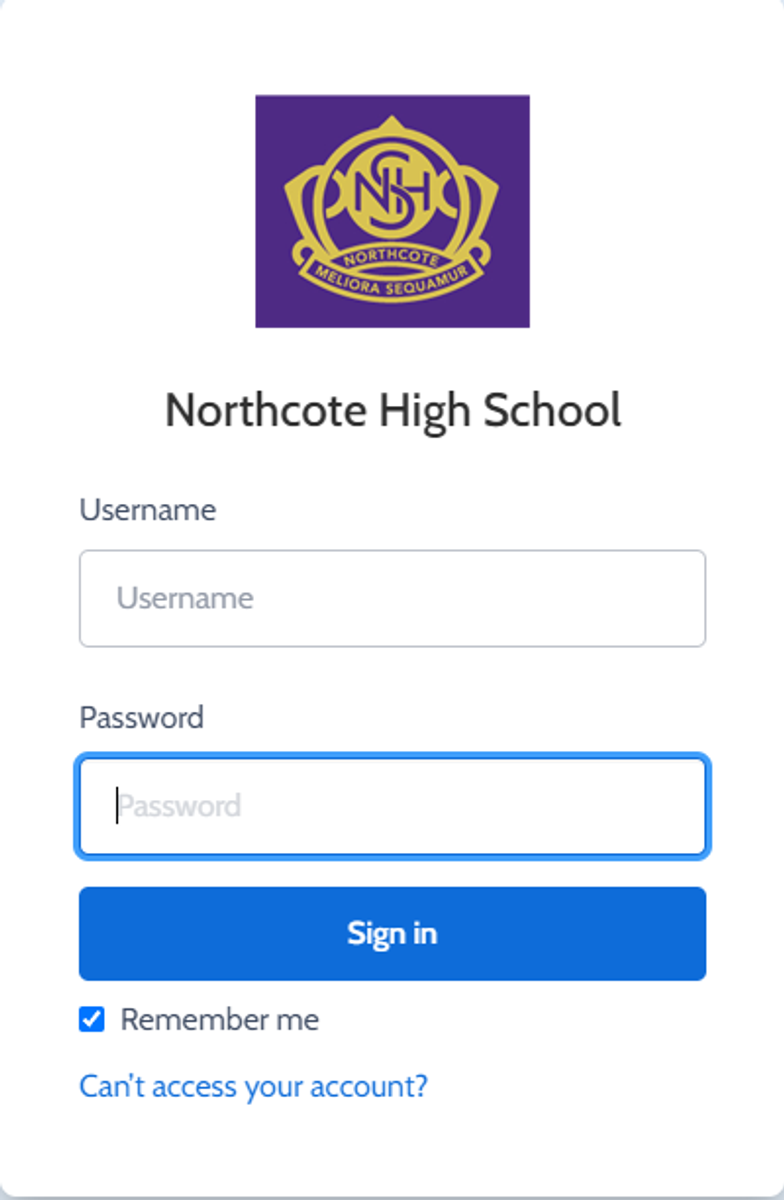
You can reset your password on the front page of the Compass login:  under “can’t access your account details” (see sample below)


Gallery Image


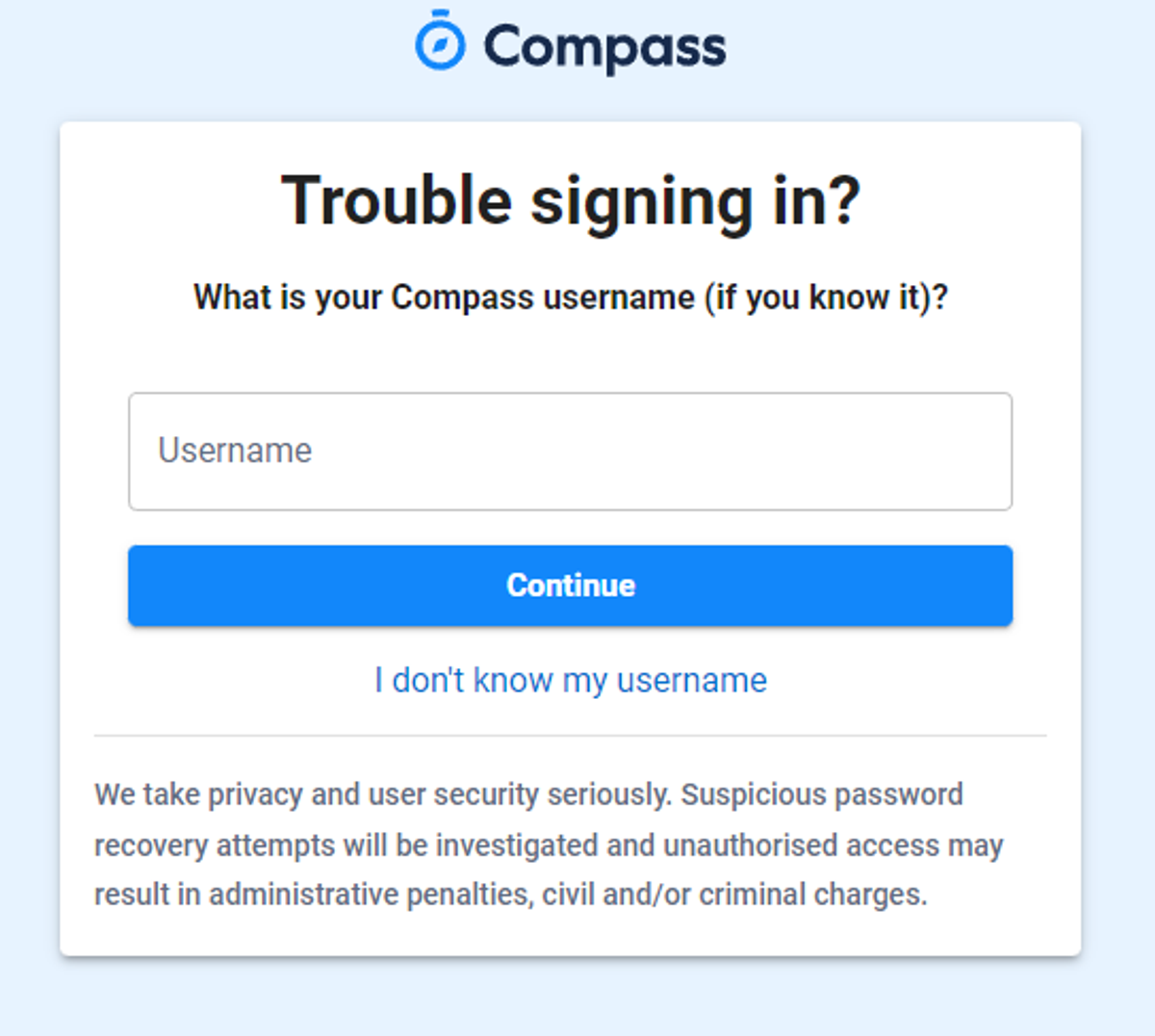
Enter your Compass username. (see example below)
 

Gallery Image


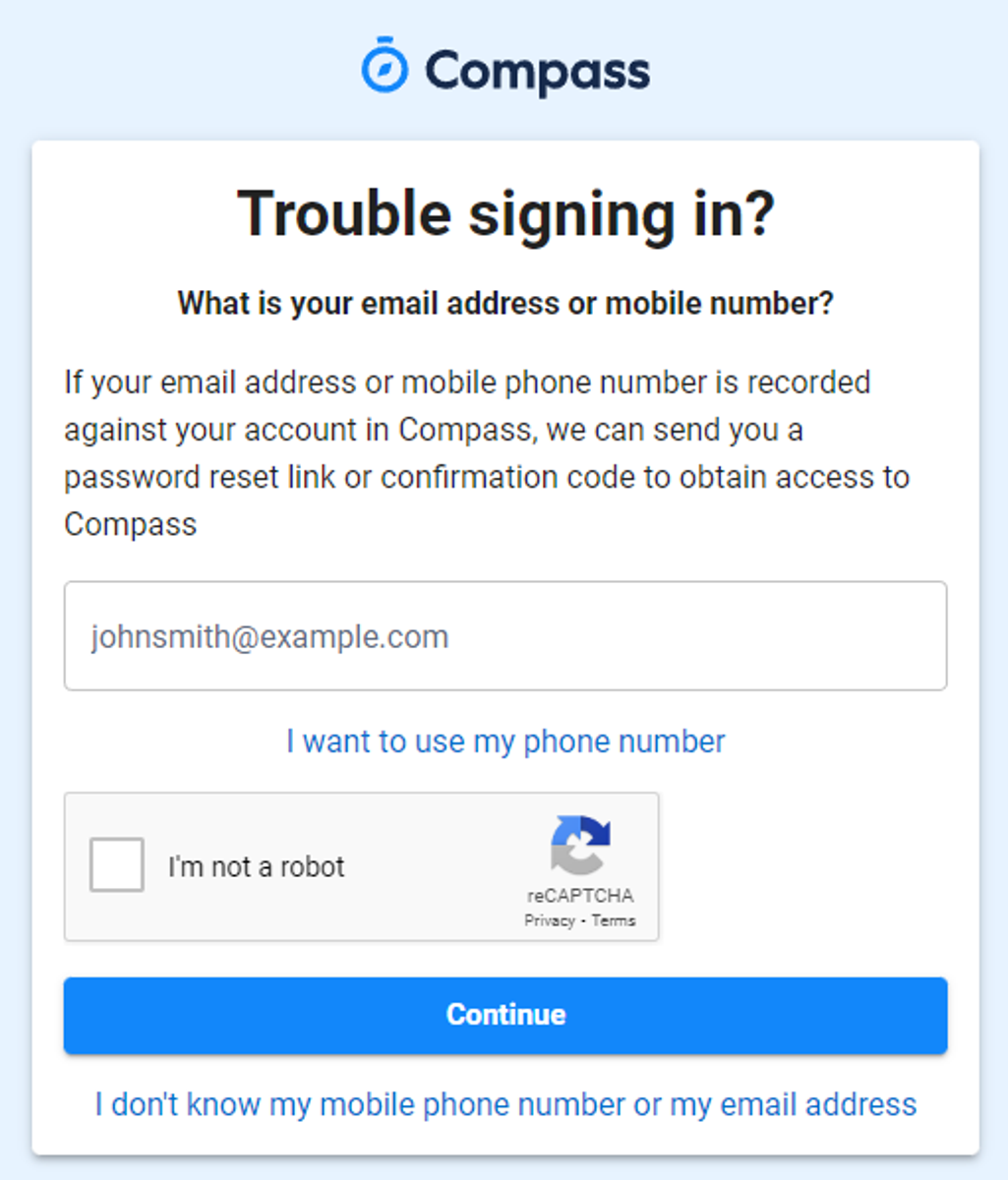
The next page will ask for your email ensure all relevant areas are completed. 


DO NOT USE MOBILE OPTION

(Families that live at the same address only: Password reset can only be sent to parent #1 recorded details and will need to match the details that are currently recorded against your Compass account) 


(see example below)


Gallery Image


An email will be sent to you with a link to change your password.


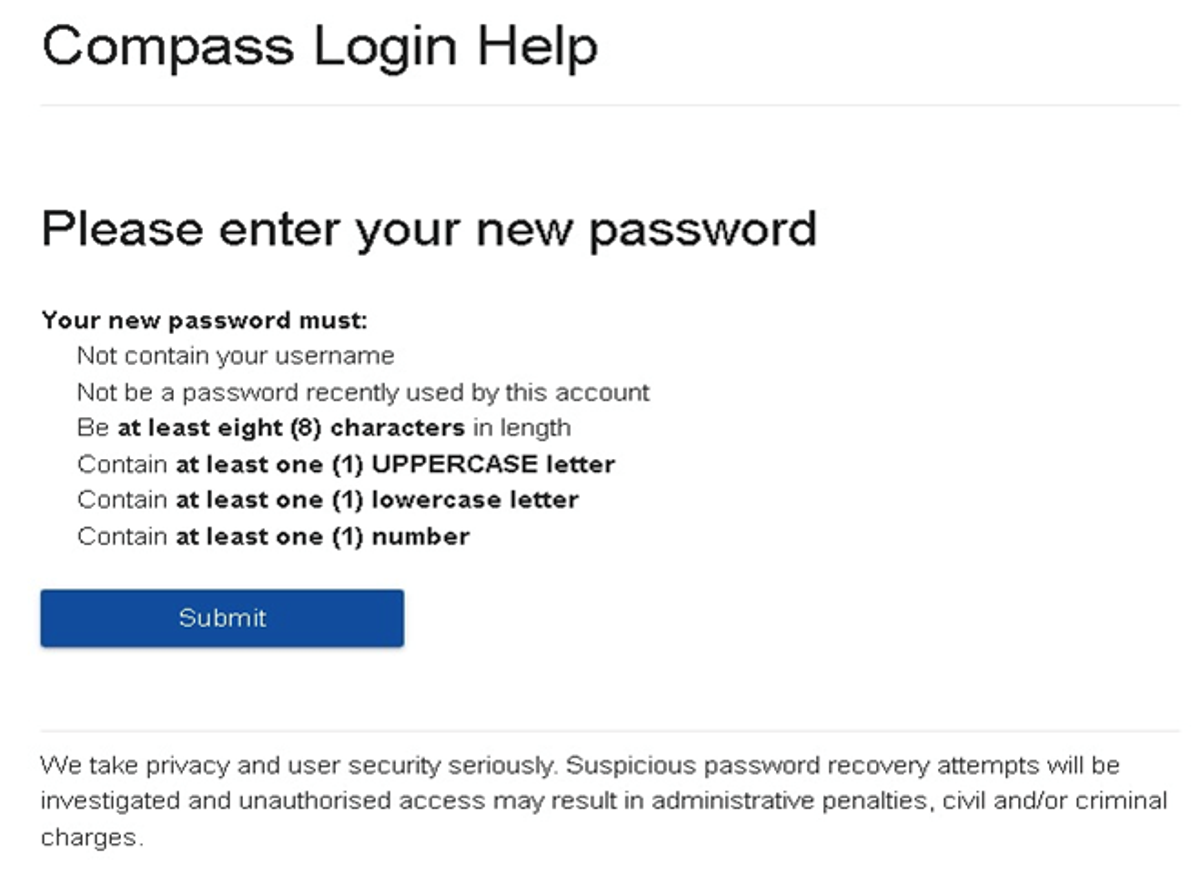
(DO NOT uses a previously entered password) See information below on how to choose a password.
 

Gallery Image


. 


Top tips

  • Compass username will be the first three letter of your surname (in capital letters) followed by 4 issued numbers
  • Email/phone number used must match parent captured details currently held in Compass.
    • Families that live together share parent # 1 user name and password (reset to parent #1 recorded details held in Compass)
    • Families who live separately will each have their own username and password
  • You must use a new password each time you reset; Compass will reject any previously used password. (if it rejects, it will ask you to contact the school, if you refresh the page it will let you try again).
  • It is best to reset your password on a Computer rather than a phone.


This information can also be accessed on our website under Communicating with Families: How to reset Compass Password