Page 0 Banner Photo
Cover Page
For your diary  Banner Photo
For your diary Key Dates
From the Principal  Banner Photo
From the Principal
Athletics Carnival Banner Photo
Athletics Carnival All the fun from the Coburg Track
Year 8 Poetry Study Banner Photo
Year 8 Poetry Study Poetry Slam energy is building!
Student Services : Careers  Banner Photo
Student Services : Careers Careers Day: abuzz with special guests, collaboration and broadened horizons
Top Screen Prize Banner Photo
Top Screen Prize Jury Prize awarded to Gabe Hartshorne
International Students Banner Photo
International Students Celebrating International Women's Day
Podcasting Workshop Banner Photo
Podcasting Workshop Creating a dystopian audio production
Youth Leadership Academy Conference Banner Photo
Youth Leadership Academy Conference Inspiring young people be change makers
Year 9 Sculpture Banner Photo
Year 9 Sculpture Creating a face with wire
National Breast Cancer Foundation Fundraiser Success Banner Photo
National Breast Cancer Foundation Fundraiser Success
Legal Studies Victorian Parliament Excursion Banner Photo
Legal Studies Victorian Parliament Excursion Bringing Legal Studies to life
Get the NHS Spiel Banner Photo
Get the NHS Spiel First issue for 2024 out now!
Year 7 Picnic and Year 12 Meet and Greet Banner Photo
Year 7 Picnic and Year 12 Meet and Greet
Have your say in the name of our new building! Banner Photo
Have your say in the name of our new building! Our new Library STEM building needs a name!
Food Studies Banner Photo
Food Studies Building skills and knowledge in the kitchen
Student Services : Wellbeing  Banner Photo
Student Services : Wellbeing School holidays in sight!, Community Resources and information: 
Learning Behaviours Reports Banner Photo
Learning Behaviours Reports Learning Behaviours Reports are now available
Great Vic Bike Ride: Expressions of Interest Banner Photo
Great Vic Bike Ride: Expressions of Interest Are you up for an adventure?
Sports Report Banner Photo
Sports Report Year 8 Volleyball, Year 8 Division Tennis
Illustration Excursion Banner Photo
Illustration Excursion Finding inspiration on a galleries excursion
From the Library  Banner Photo
From the Library Make and Take Craft Club get busy
Year 9 Total Sports Excursion Banner Photo
Year 9 Total Sports Excursion Game On! at the MCG
2024 Innovate Grants Banner Photo
2024 Innovate Grants Encouraging innovative thinking at NHS
Uniform Shop Holiday Hours Banner Photo
Uniform Shop Holiday Hours
Financial Assistance  Banner Photo
Financial Assistance NHS Empower Fund:  Helping Students in need
Top tips : Resetting your Compass password Banner Photo
Top tips : Resetting your Compass password A guide for parents and carers, Resetting your Compass Password
Community Notices  Banner Photo
Community Notices Concert, vocal workshop, and benefit gig for South Africa, 25 April, Westgarth Baseball come and try, Victorian Aboriginal Child Care Agency seeking foster Carers, Become a foster carer through Anglicare Victoria, Laser Tag night in the school holiday , New Dance School in Coburg
View archive
Published by
Northcote High School
St. Georges Rd, Northcote, Victoria, 3070, AUhttp://www.nhs.vic.edu.au9488 2300
Banner Photo

Top tips : Resetting your Compass password


A guide for parents and carers


We have consolidated a range of compass help guides on a page on the Northcote High School website. Check out the Compass help page for information on:

  • Adding an attendance note
  • SMS attendance alerts
  • How to email staff
  • Confirming your Compass details


Resetting your Compass Password


A quick refresher for all families, this information is also on the Compass Help page of our website. 


Follow these easy steps if you need to reset your Compass password at any time.


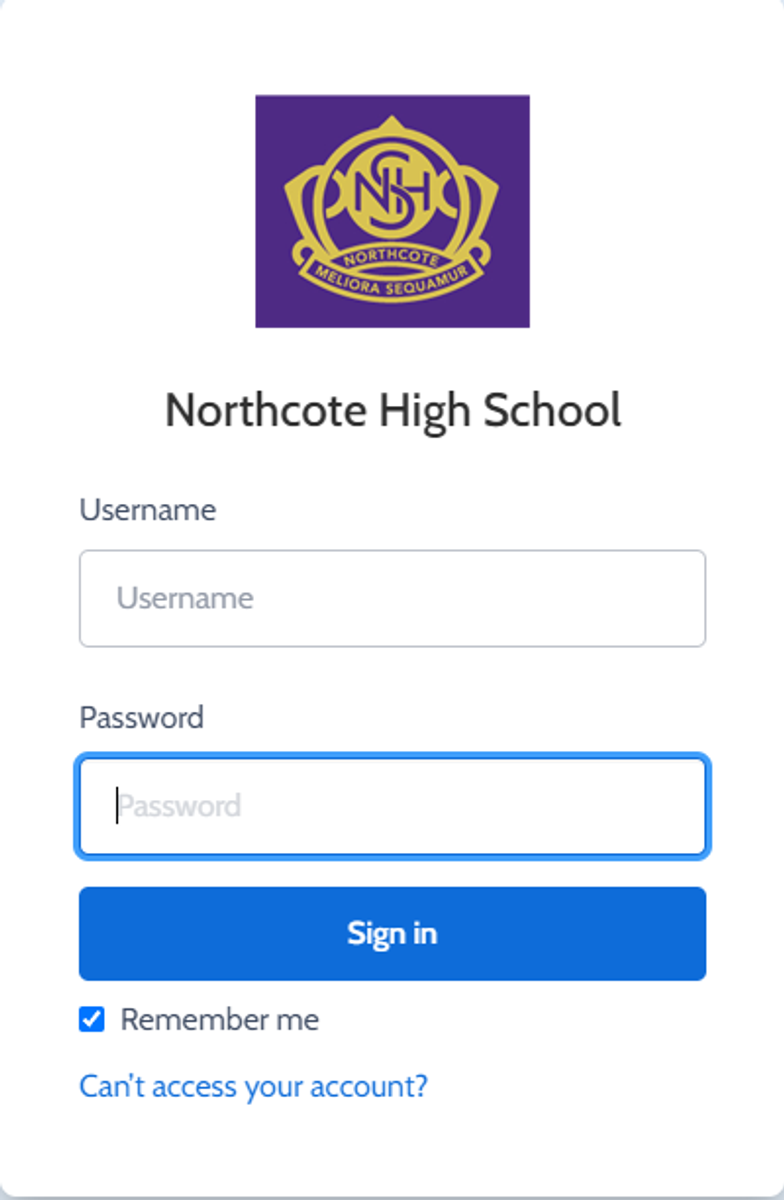
You can reset your password on the front page of the Compass login:  under “can’t access your account details” (see sample below)


Gallery Image


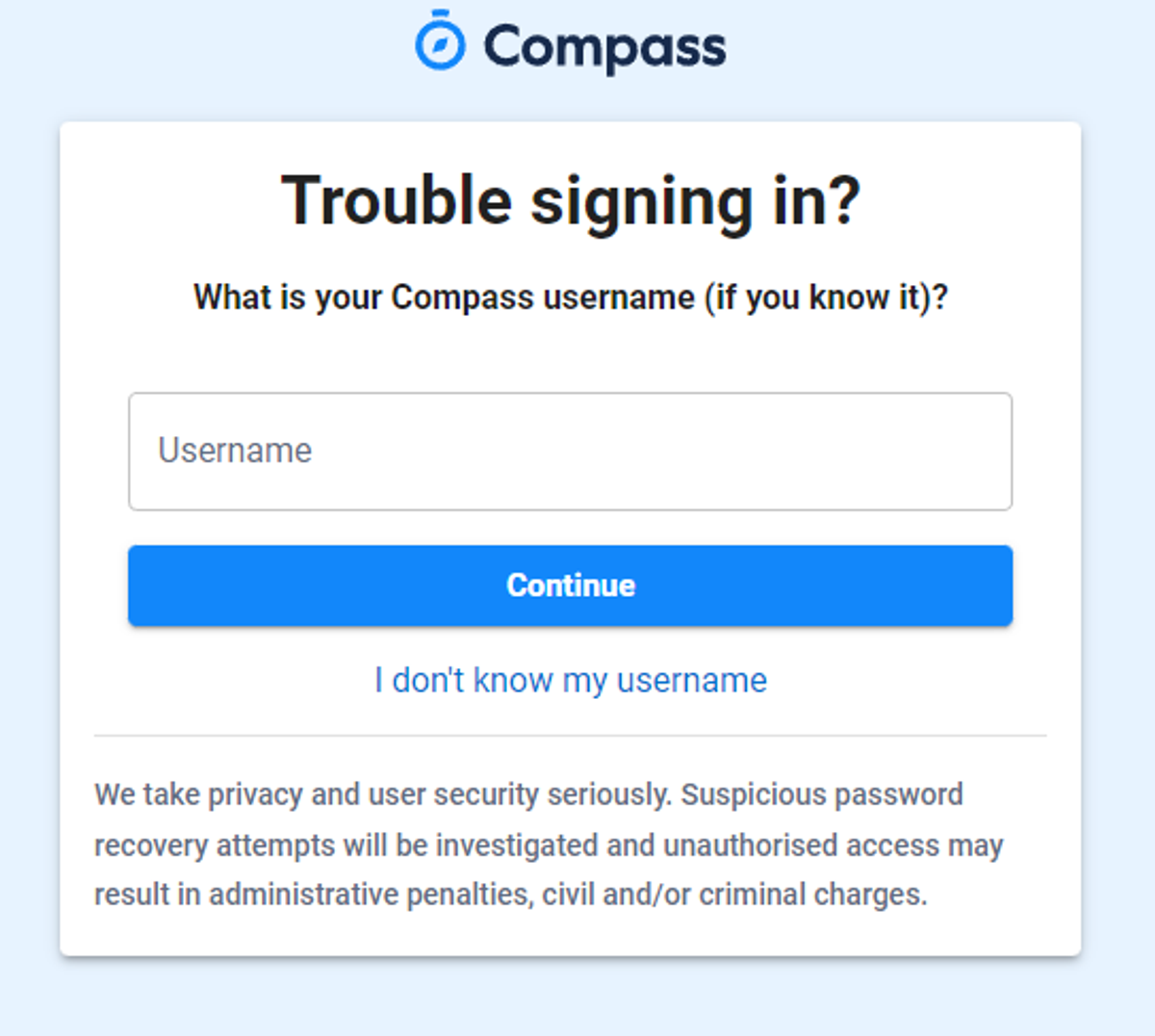
Enter your Compass username. (see example below)
 

Gallery Image


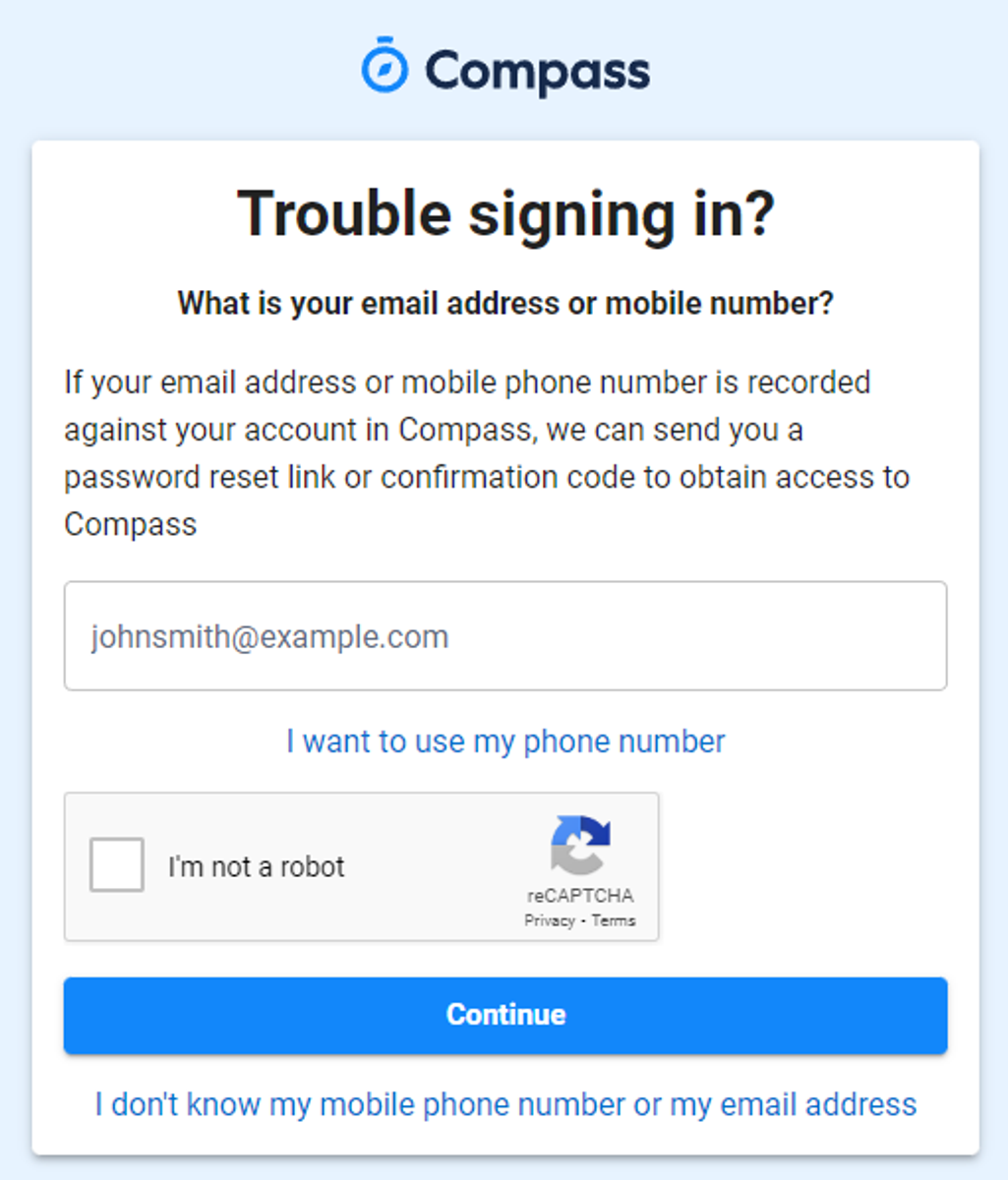
The next page will ask for your email ensure all relevant areas are completed. 


DO NOT USE MOBILE OPTION

(Families that live at the same address only: Password reset can only be sent to parent #1 recorded details and will need to match the details that are currently recorded against your Compass account) 


(see example below)


Gallery Image


An email will be sent to you with a link to change your password.


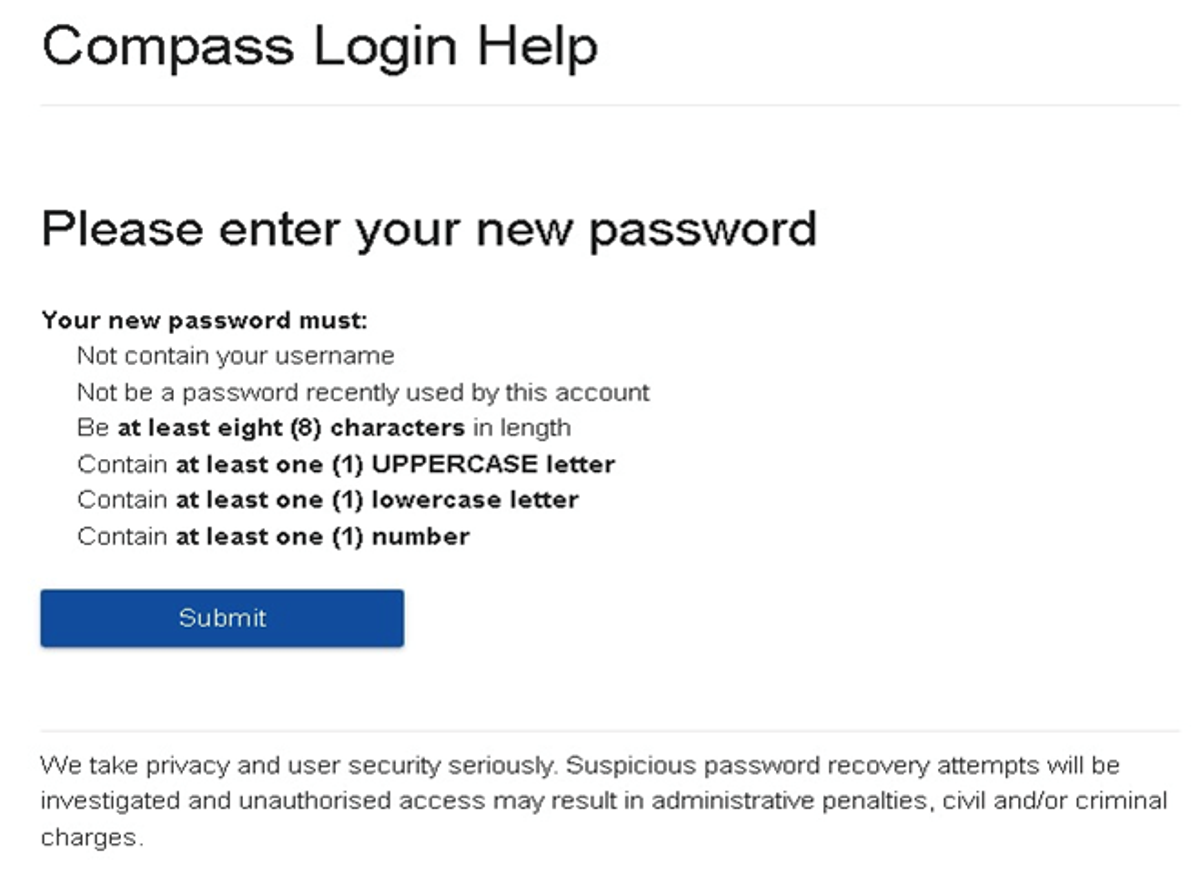
(DO NOT uses a previously entered password) See information below on how to choose a password.
 

Gallery Image


. 


Top tips

  • Compass username will be the first three letter of your surname (in capital letters) followed by 4 issued numbers
  • Email/phone number used must match parent captured details currently held in Compass.
    • Families that live together share parent # 1 user name and password (reset to parent #1 recorded details held in Compass)
    • Families who live separately will each have their own username and password
  • You must use a new password each time you reset; Compass will reject any previously used password. (if it rejects, it will ask you to contact the school, if you refresh the page it will let you try again).
  • It is best to reset your password on a Computer rather than a phone.


This information can also be accessed on our website under Communicating with Families: How to reset Compass Password