Page 0 Banner Photo
Cover Page
Principal's Message Banner Photo
Principal's Message Staff Movements, Attitudes To Schools Survey, Save The Dates!, Term 2 2026, Term 3 2026
Do you have a Prep student starting in 2027? Banner Photo
Do you have a Prep student starting in 2027?
Upcoming Events  Banner Photo
Upcoming Events  Hillsmeade Primary School calendar:
NOTICE BOARD  Banner Photo
NOTICE BOARD Next assembly , Curriculum Days, Save the date, School Uniform Shop Update - Now avalible at PSW Hampton Park.
Early Learning Centre Banner Photo
Early Learning Centre Our Learning - Weeks 7 & 8, Celebration of learning, Long Day Care, Enrolments for free 3 and 4 year old sessional kindergarten. 
Prep Update Banner Photo
Prep Update Our Learning for Term 2, Weeks 8 & 9, News and Reminders:, Celebration of our learning
Year 1 Update Banner Photo
Year 1 Update Our Learning - Term 2-Weeks 8 & 9, News and Reminders:, Celebration of our learning:
Year 2 Update Banner Photo
Year 2 Update Learning in Year 2 - Weeks 9 & 10, Hillsmeade Heroes , Reminders
Year 3 Update Banner Photo
Year 3 Update Our Learning-Weeks 7 & 8, Events and Reminders, Hillsmeade Heroes, Celebration of our learning.
Year 4 Update Banner Photo
Year 4 Update
Year 5 Update Banner Photo
Year 5 Update
Year 6 Update Banner Photo
Year 6 Update End of Term 2 Updates, Athletics Day, STARS of the Week!, Kindness Award!, Upcoming Dates
Specialist classes Banner Photo
Specialist classes Music - Mrs Scott
Digital Learning & High Abilities Banner Photo
Digital Learning & High Abilities Creativity Through Technology, How Drawing Apps Support Student Learning, Exploring Creativity in New Ways, Supporting Learning Across the Curriculum, Building Confidence and Digital Skills, Teaching Videos Students Can Use, Drawing Apps Families Can Explore at Home, Encouraging Creativity at Home
ONGOING REPORTING Banner Photo
ONGOING REPORTING
Student Eyecare Program at Hillsmeade Banner Photo
Student Eyecare Program at Hillsmeade Student Eyecare Program at Hillsmeade
CSEF Banner Photo
CSEF FINANCIAL ASSISTANCE -INFORMATION FOR FAMILIES-Applications close at the end of Term 2, CAMPS, SPORTS and EXCURSIONS FUND (CSEF)
Useful information Banner Photo
Useful information Keep Up to Date, Office Hours, School tours, Arriving Late - Late Pass Essential, Student Collection, Attendance, Breakfast Club , Food Bank Boxes, Hillsmeade Facebook page, Uniform, Sun hats, Curriculum and Other Contributions, Canteen, Staff Carpark, Email, Excursions, Incursions & Camps, Student Mobile phones, How Hillsmeade will communicate with you in an emergency., ACE Foundation Free Glasses Program, Dogs on school grounds - an adult must have full control on a leash, Scholastic Book Club
MUSIC LESSONS – 2026 Banner Photo
MUSIC LESSONS – 2026 MUSIC LESSONS – 2026
OSHC - Team Kids Banner Photo
OSHC - Team Kids The TK Big Skip is here! , To enrol for Team Kids
First Aid Update Banner Photo
First Aid Update Please pack spare uniform , Medication at School, Information on Head Lice, Dental Care , How to get Care without going to Hospital
School Attendance Banner Photo
School Attendance
Privacy Policy Banner Photo
Privacy Policy
From Our Community Banner Photo
From Our Community
View archive
Published by
Hillsmeade Primary School
82 The Promenade, Narre Warren South, Victoria, 3805, AUhttps://www.hillsmeade.vic.edu.au/hillsmeade.ps@education.vic.gov.au03 9704 6313 Facebook X / Twitter Vimeo
Banner Photo

Digital Learning & High Abilities

Mr Hardev Singh: Learning Specialist in Digital Learning & High Abilities Students

Creativity Through Technology

Gallery Image

How Drawing Apps Support Student Learning

At Hillsmeade Primary School, students are using digital drawing apps to explore their creativity, share ideas, and build important learning skills in fun and engaging ways.

Exploring Creativity in New Ways

Drawing apps on iPads and laptops give students opportunities to create artwork, design characters, plan projects, and express their thinking visually. These tools are easy to use and allow students to experiment confidently using different colours, brushes, shapes, and effects. Features such as the “undo” button also encourage students to take risks and try new ideas without worrying about making mistakes.

Supporting Learning Across the Curriculum

Using drawing apps can support learning across many subjects. Students may use them to:

  • create self-portraits and illustrations
  • design posters and presentations
  • plan animations and media projects
  • explain ideas visually in classroom tasks
  • develop creativity and problem-solving skills


Digital drawing can also help students who sometimes find writing difficult by giving them another way to communicate their understanding and ideas.

Building Confidence and Digital Skills

Many students enjoy the creative freedom these apps provide, and they often feel proud sharing their finished work with classmates, teachers, and families. Activities like these also help students develop confidence using technology safely and responsibly.

Teaching Videos Students Can Use

Families and students looking to continue developing their digital art skills at home may enjoy these beginner-friendly tutorials and resources:

Drawing Apps Families Can Explore at Home

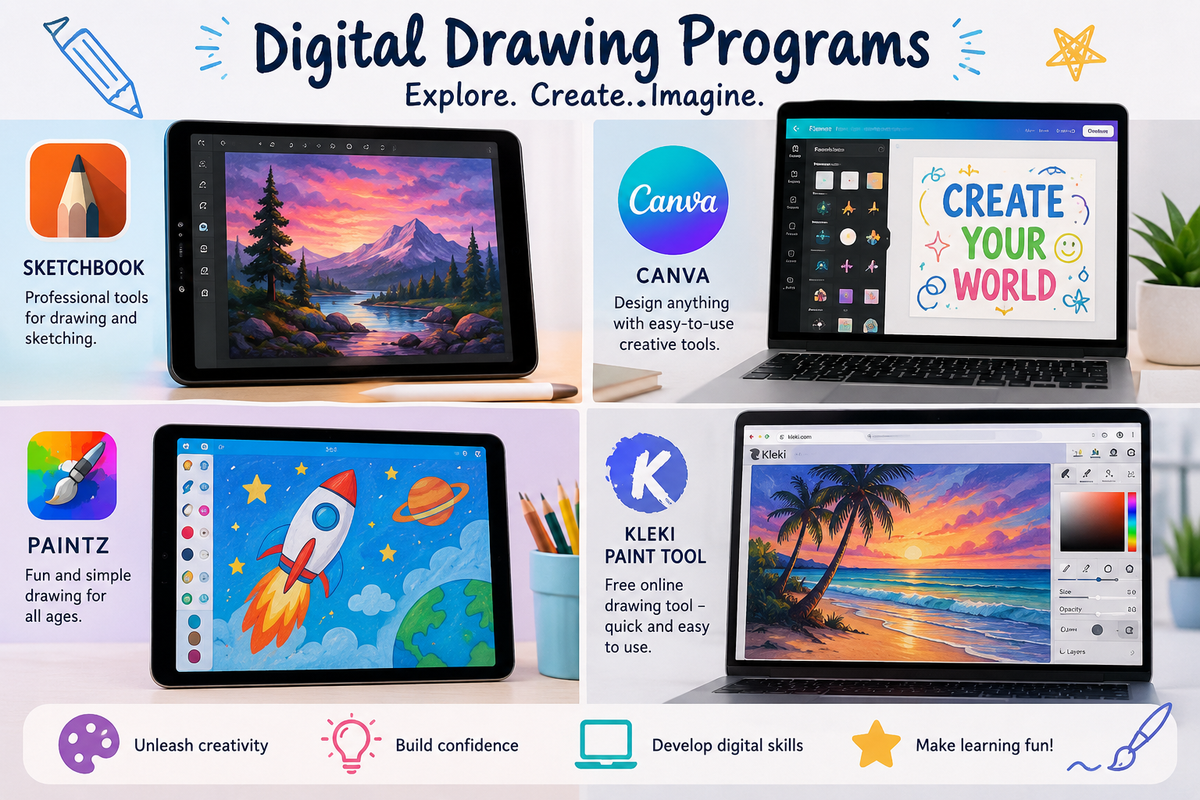
Families who would like to explore drawing apps at home may enjoy:

Encouraging Creativity at Home

Encouraging children to draw digitally at home can be a wonderful way to support creativity, imagination, and confidence while also helping them build important digital skills for the future. Parents and carers are encouraged to supervise online activity and help students select age-appropriate tutorials and content when exploring platforms such as YouTube.