Parent Teacher Student Conversations



















 Northcote High School

Bookings open Wednesday 15 March
We are conducting our Term 1 Parent Teacher Student Conferences (PTSC) via telephone. Reasons for this include:
- Being mindful of student, parent and staff safety/wellbeing and think this reduces risk of COVID transmission
- As we have COVID cases still occurring and many members of our staff community potential having to isolate, it ensures all students/families and staff can participate in PTSC.
We will continue to review practices for future PTSC.
Our Term 1 Parent Teacher Student Conferences will be conducted remotely, via phone in Week 9 of term on:
- Tuesday 29 March, 9.00am-3.30pm
- Thursday 31 March, 10.30am-7.30pm
Bookings via Compass (see instructions below), open 9am, Tuesday 15 March and close 4pm, Friday 25 March.
What you need to know
There will be no classes on those days. Students should continue with existing tasks and are encouraged to participate in the conversations, just as they would when we run them face-to-face.
Teachers will not be available to answer emails/other communications on those days, as they will be occupied with the PTSC.
How will they work?
- Parents will book timeslots via Compass
- The PTSC will be conducted by phone.
- Teachers will call the parent who made the booking (using the phone number we have on Compass) at the booked time.
- The call will come from an unlisted (private) number: please pick up!
- If there is no answer, the teacher will wait 1 minute, then try once more. They will not leave a call back number. If an appointment is missed, you may need to email the teacher at a later date to request feedback.
- Students should participate - please put your phone on 'speaker' mode to enable this.
Supporting keeping to time
When we run PTSC face-to-face, it's easy to run a little over time, and we can generally adjust for it. In the remote context, this will not be possible. To help this each conversation will last 7 minutes. Teachers will let you know that they are setting an audible alarm at the start of the conversation. When it goes off, this is the signal that the allotted time is up. The teacher will then need to finish the call so that they can move to their next appointment. Please be understanding of this and support our teachers in keeping appointments running smoothly. If a longer conversation is necessary following the appointment, please ask the teacher if you can arrange a time later on.
How to book
1. Log in to Compass. On the welcome page click the 'Book Parent Teacher Interviews' button available next to the student photo, or click the Dashboard Alert at the top of the Newsfeed.

2. You will see “Semester 1 PTSC Tuesday 29 March” and also “Semester 1 PTSC Thursday 31 March”. Click on your preferred day for PTSC.
3. A panel will come up, as shown.
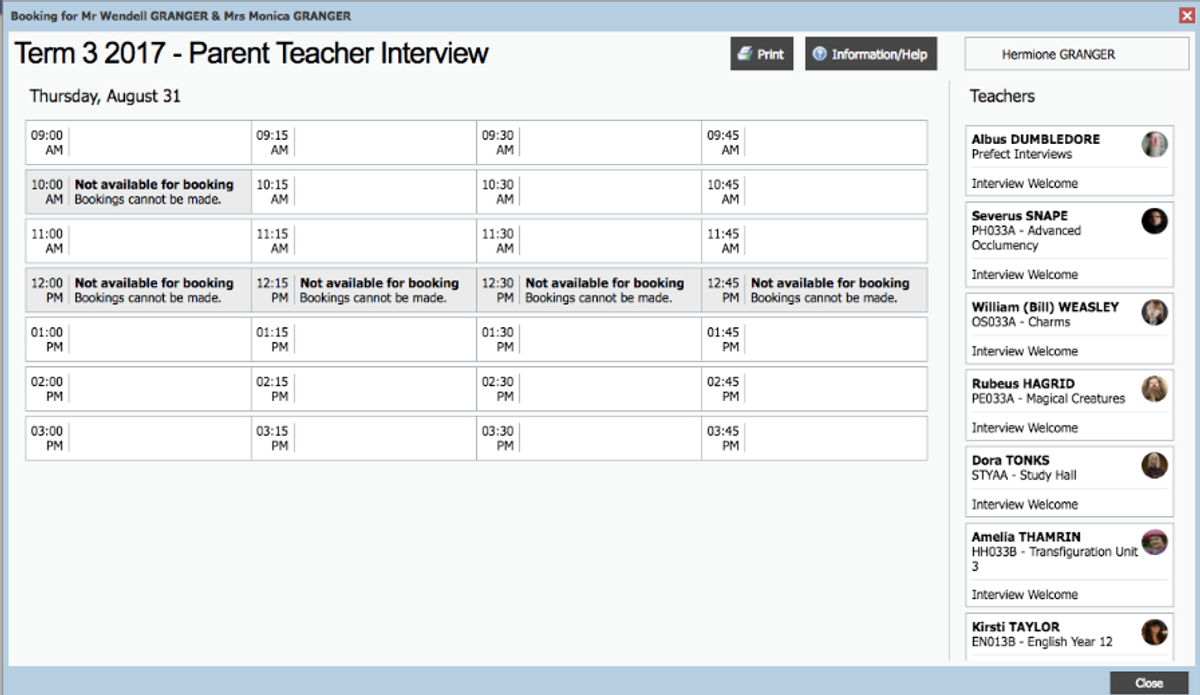
4. To book by timeslot, click the timeslot and then select the teacher from the right who you would like to book with for this specific time. The teachers who are available during this timeslot will be shown in white.
5. To book by teacher, click the teacher's name in the list at the far right. The schedule to the left will display only the timeslots that the teacher is still available to be booked with. All timeslots that the teacher is already booked out for will be greyed out. Just click an available timeslot on the left to make a booking.
6. You will receive a confirmation popup to confirm the details
of the booking. Click the OK button. If you don’t click the confirmation button it won’t save your bookings).
Tips
- It’s a good idea to print or copy down your bookings! We do not keep a copy for you at school.
Who to see
Student-Parent-Teacher Conversations are always well supported at Northcote High School. However, if you are new to the process, here is some advice:
- Appointments book out quickly for some staff. Please don’t delay to make your appointments.
- Select teachers to see on the basis of need. For example if you are concerned about how your child is going in a particular subject, contact with that staff-member should be a priority. If you miss out on seeing a teacher but need to see them, please contact them for another appointment via Compass.
- Some other teachers work part time and may have limited availability on both days. Look for availability when you log on to Compass. If the teacher’s name does not come up as an option when you look on Compass, it means they don’t work that day. Please contact these teachers by Compass if required. There may be other reasons that teachers are not available for one or both of the Student-Parent-Teacher Conversation dates. They will be blocked out on their schedules.
- Please check Compass on the day for any unexpected absence announcements.