Page 0 Banner Photo
Cover Page
For your diary  Banner Photo
For your diary Key Dates
From the Principal  Banner Photo
From the Principal
Top Screen Success Banner Photo
Top Screen Success VCE Season of Excellence continues
International Students Banner Photo
International Students Introducing our International Student Leadership, Seeking Homestay families
FemCo International Women's Day Excursion Banner Photo
FemCo International Women's Day Excursion Feminist Collective at the Parliament of Victoria
Parent Teacher Student Conversations - Bookings now open Banner Photo
Parent Teacher Student Conversations - Bookings now open Parent Teacher Student Conferences (PTSC), Who to see
Athletics Carnival: Information for Students and Families Banner Photo
Athletics Carnival: Information for Students and Families Everything you need to know for Athletics Carnival
VCE Vocational Major Banner Photo
VCE Vocational Major Know your rights as an Apprentice
Student Services : Careers  Banner Photo
Student Services : Careers Two weeks until our Careers Expo!
Art Making & Exhibiting : NGV Excursion Banner Photo
Art Making & Exhibiting : NGV Excursion Enjoying the NGV Triennial and Wurrdha Marra collection
Welcome new staff  Banner Photo
Welcome new staff Joining our community : Part 3
Italian Cultural Exchange  Banner Photo
Italian Cultural Exchange  The adventure begins for our Year 10 Students
Year 9 Health and PE Banner Photo
Year 9 Health and PE Self Defence Workshops at Aerostrike
Library STEM building update Banner Photo
Library STEM building update Library STEM building update
The Spiel : callout for contributors Banner Photo
The Spiel : callout for contributors Come and join us on Friday lunchtimes in B5
Supporting our students' learning Banner Photo
Supporting our students' learning Join the gang at Maths Help, English Help for Senior Students
Sports Report Banner Photo
Sports Report Baseball and Softball, Intermediate Volleyball, Junior and Intermediate Cricket, Division Swimming , Coming Up:
Friends of Northcote Banner Photo
Friends of Northcote Call out for event organising support
Year 10 Digital Photography Banner Photo
Year 10 Digital Photography Cindy Sherman Non-Self Portraits
Student Services : Wellbeing  Banner Photo
Student Services : Wellbeing Clubs Fair Fun, Community resources
2024 Innovate Grants Banner Photo
2024 Innovate Grants Encouraging innovative thinking at NHS
From the Library  Banner Photo
From the Library Farewell to Flavio, Introducing our Online Resources , Clubs in the library, The Readings Teen Advisory Board 
C Block Exhibition Banner Photo
C Block Exhibition New work on display in the C Block exhibition space
Partner in learning: 

Family events Banner Photo
Partner in learning: Family events
Financial Assistance  Banner Photo
Financial Assistance NHS Empower Fund:  Helping Students in need
Top tips : Resetting your Compass password Banner Photo
Top tips : Resetting your Compass password A guide for parents and carers, Resetting your Compass Password
Community Notices  Banner Photo
Community Notices Girls and Women play soccer for free at Keon Park in 2024, Darebin’s Meet the Makers Competition returns in March 2024, Victorian Aboriginal Child Care Agency seeking foster Carers, Northcote Primary School Fete : Saturday 16 March, Come and try Calisthenics in Coburg, Laser Tag night in the school holiday , New Dance School in Coburg, Northcote Carers Support Group at Jika Jika, Hook in2 LaTrobe Hockey
View archive
Published by
Northcote High School
St. Georges Rd, Northcote, Victoria, 3070, AUhttp://www.nhs.vic.edu.au9488 2300
Banner Photo

Top tips : Resetting your Compass password


A guide for parents and carers


We have consolidated a range of compass help guides on a page on the Northcote High School website. Check out the Compass help page for information on:

  • Adding an attendance note
  • SMS attendance alerts
  • How to email staff
  • Confirming your Compass details


Resetting your Compass Password


A quick refresher for all families, this information is also on the Compass Help page of our website. 


Follow these easy steps if you need to reset your Compass password at any time.

 

You can reset your password on the front page of the Compass login:  under “can’t access your account details” (see sample below)
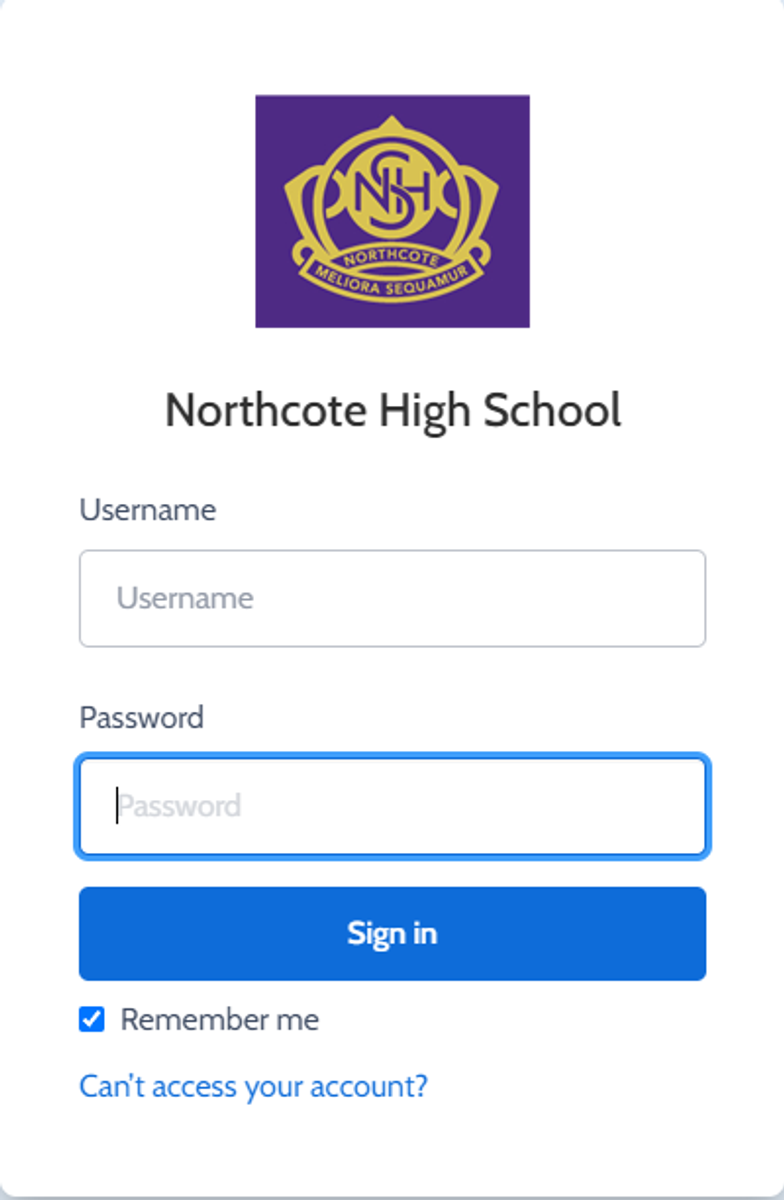


Gallery Image


Enter your Compass username. (see example below)
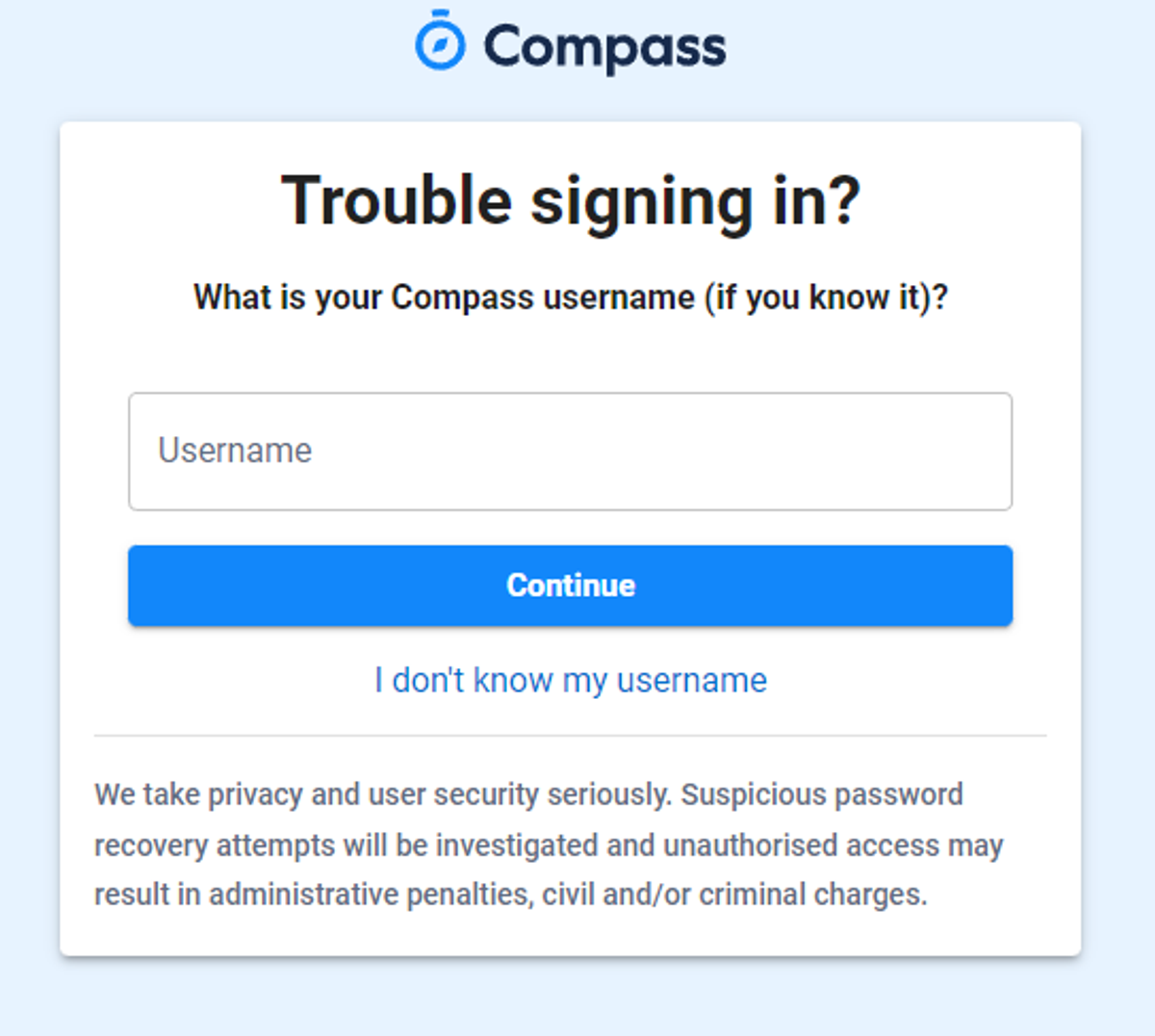
 

Gallery Image


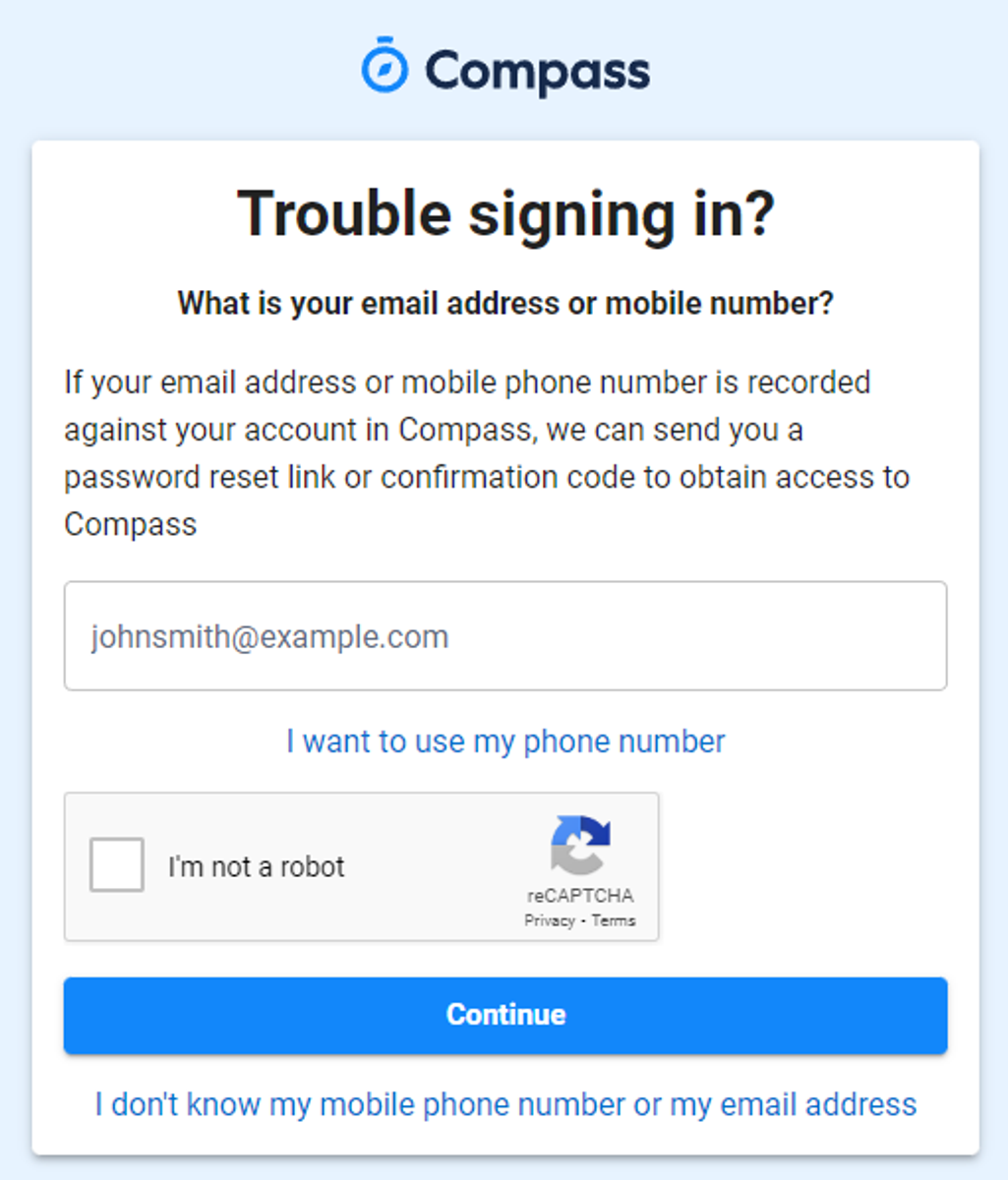
The next page will ask for your email ensure all relevant areas are completed. 


DO NOT USE MOBILE OPTION

(Families that live at the same address only: Password reset can only be sent to parent #1 recorded details and will need to match the details that are currently recorded against your Compass account) 


(see example below)


Gallery Image


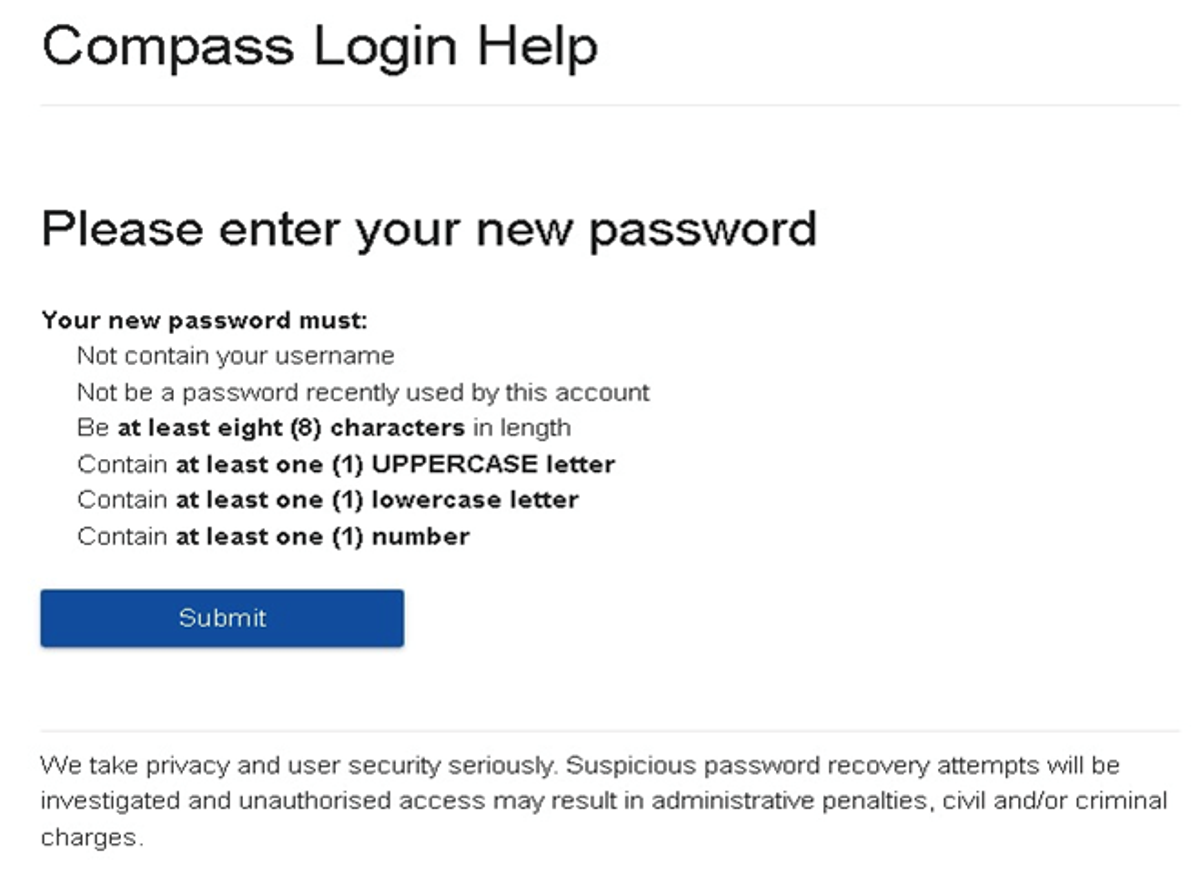
An email will be sent to you with a link to change your password.


(DO NOT uses a previously entered password) See information below on how to choose a password.
 

Gallery Image


. 


Top tips

  • Compass username will be the first three letter of your surname (in capital letters) followed by 4 issued numbers
  • Email/phone number used must match parent captured details currently held in Compass.
    • Families that live together share parent # 1 user name and password (reset to parent #1 recorded details held in Compass)
    • Families who live separately will each have their own username and password
  • You must use a new password each time you reset; Compass will reject any previously used password. (if it rejects, it will ask you to contact the school, if you refresh the page it will let you try again).
  • It is best to reset your password on a Computer rather than a phone.


This information can also be accessed on our website under Communicating with Families: How to reset Compass Password