Naplan 2026

NAPLAN is fast approaching for Year 7 and 9 students. NAPLAN is an opportunity for students to demonstrate their strengths in reading, writing, language conventions and numeracy and to provide feedback on their next steps in learning.
The tests will be administered from:
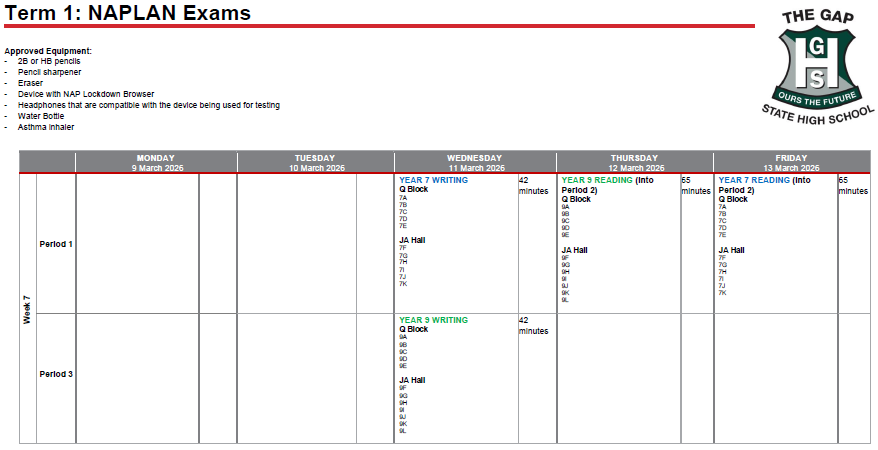
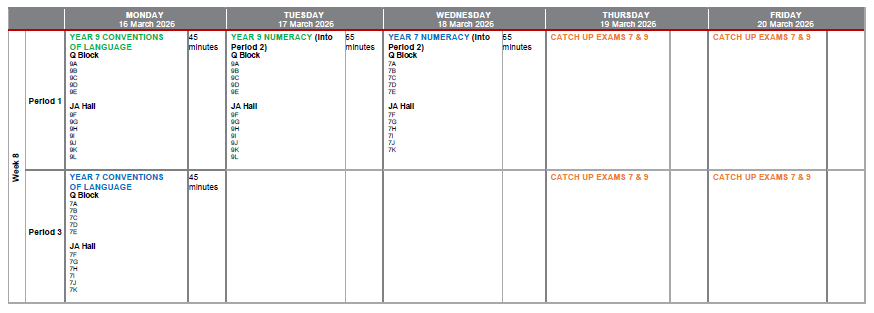
Wednesday 11 March (Week 7) to Friday 20 March (Week 8).
Participation vs Engagement
TGSHS has excellent participation rates in NAPLAN. That is, students attend and engage with the test. However – there is a discrepancy between student participation and student engagement in these tests. Student engagement refers to students actively attempting all questions to the best of their ability; using their time and resources to ensure that their responses are reflective of their best efforts.
Longitudinal data shows a direct correlation between a student’s NAPLAN results and their future ATAR. We encourage students to engage and do their best – use available time, check responses and attempt all questions.
Being prepared - students should:
- Check the NAP Locked Down Browser is installed
- Ensure their device is fully charged
- Pack their ‘wired headphones’ to access all features of the browser
- Check their timetable carefully to ensure that they are in the correct venue at the right time.
Any questions, please email the Pathways and Performance Team pathways&performance@thegapshs.eq.edu.au
There is also a practice NAPLAN test on Wednesday 25 February Period 1 to provide students with a chance to familiarise themselves with the test environment.
If you think your student might benefit from extra support at home, parents can access the Public Demonstration site here to see the look and features of the test environment.
Technical Information
To complete NAPLAN on a BYO device, students must have the NAP Locked Down Browser (LDB) installed.
- For Windows laptops: Download and install LDB version 5.11 from link provided below. The installed LDB icon will appear purple with the writing “NAP 2026”.
- For Mac and iPads: Download and install LDB version 5.10.5 from the link provided below. The installed LDB icon will appear green with the writing “NAP 2026”.
Download the latest LDB here.
Thank you for your support in preparing your child for NAPLAN 2026.
Naplan Schedule: