Naplan - Year 7 & Year 9

NAPLAN - Yr 7 & Yr 9
All students will require a laptop with NAP Locked Down Browser installed, headphones, and a pencil for the testing. Practice NAPLAN is on Wednesday 25 February Period 1 to provide students with a chance to familiarise themselves with the test environment. If you think your student might benefit from extra support at home, parents can access the Public Demonstration site here to see the look and features of the test environment.
To complete NAPLAN on a BYO device, students must have the NAP Locked Down Browser (LDB) installed.
- For Windows laptops: Download and install LDB version 5.11 from link provided below. The installed LDB icon will appear purple with the writing “NAP 2026”.
- For Mac and iPads: Download and install LDB version 5.10.5 from the link provided below. The installed LDB icon will appear green with the writing “NAP 2026”.
Download the latest LDB here.
Thank you for your support in preparing your child for NAPLAN 2026.
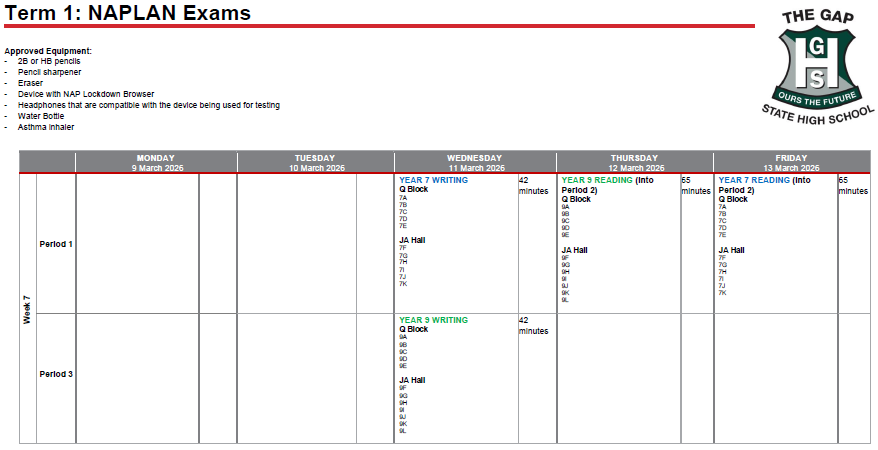
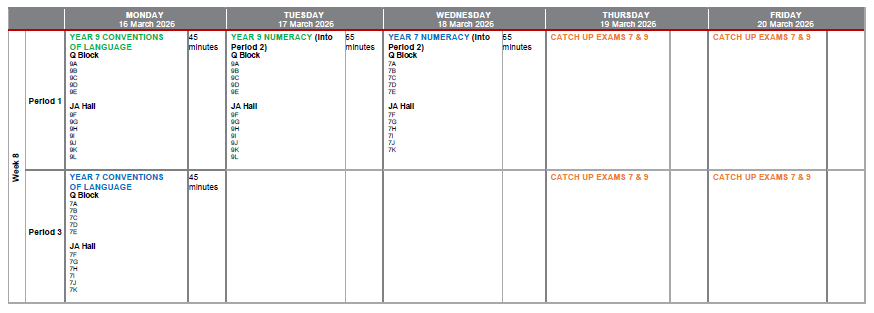
NAPLAN testing window is from 11 March to 20 March, schedule below.