Attendance - 'How To' On Compass

Attendance Reminder
A gentle reminder that all full-day absences and holidays must be recorded on Compass.
If your child is only going to be late to school, there is no need to log this on Compass beforehand. Simply sign them in using the Compass Kiosk at the school office upon arrival.
If your child will be absent for the entire day, please enter a full-day absence on Compass and provide a reason. If you require assistance, please contact the school office.
'How to Add an Attendance Note in the Compass App
- Open the Compass app and select your child's profile photo.
- Tap the Attendance tab.
- Enter the details of the upcoming absence.
- Tap Save to submit the attendance note.
How to Add an Attendance Note using Compass Desktop
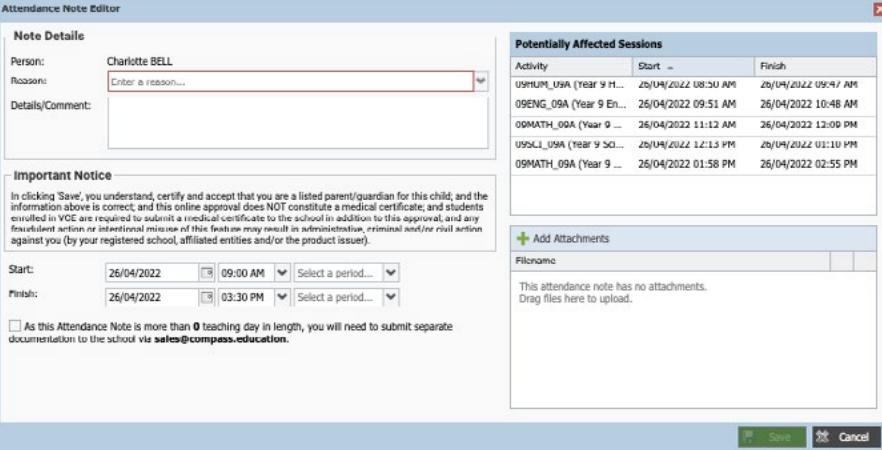
If your child is going to be away, you can add in an Attendance note to advise the school. To do so, click ‘Add Attendance Note (Approved Absence/Late)’.
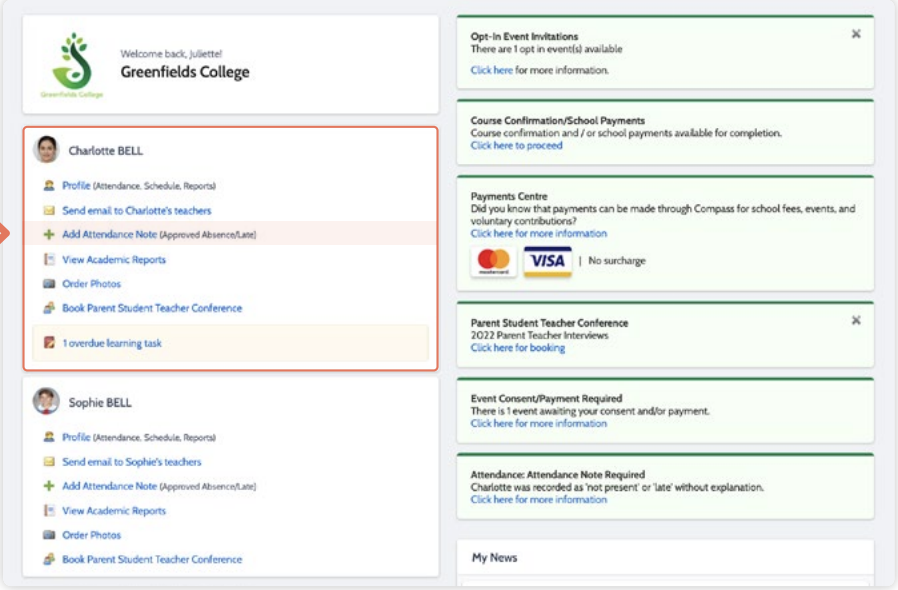
A Note screen will open. Select the applicable reason from the drop down list; add in any additional information if applicable in the Details/Comment box. Select the start and finish date/time of the absence and click ‘Save’