
Compass Information


On this page we will continue to build up a list of instructions on how to use Compass. You can also access the parent guide from the following link:
Giving Consent for Excursions and Activities
There have been a number of excursions and activities requiring consent through Compass already this year. If you receive a notification on your app or an email alerting you to a new activity, please provide consent as soon as possible.
If the event is an opt-in activity, you will need to accept the invitation in the first step and then provide consent by completing your name and submitting the consent.
Check my Details
In the app or portal there is opportunity to check your personal details and let us know of any changes or updates.
List of Upcoming Important Dates
If you would like a list of upcoming important dates in our school calendar, you can go to the 'Calendar' in the Compass Portal.
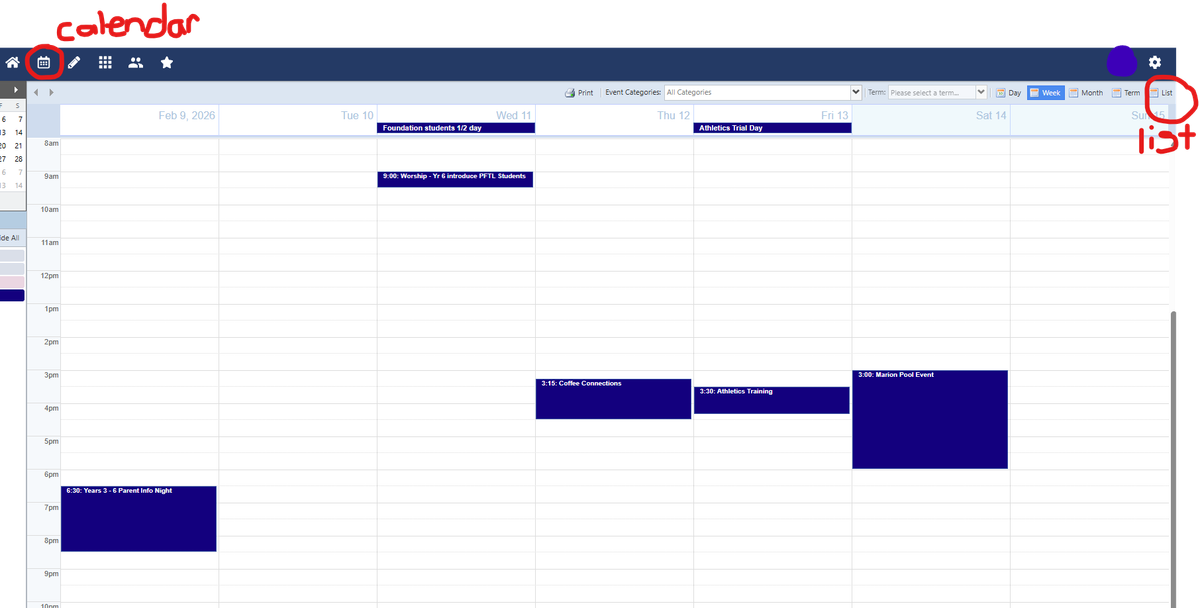
Once there, select the 'List' option in the top right and then choose 'Print' if you would like to print off the list.
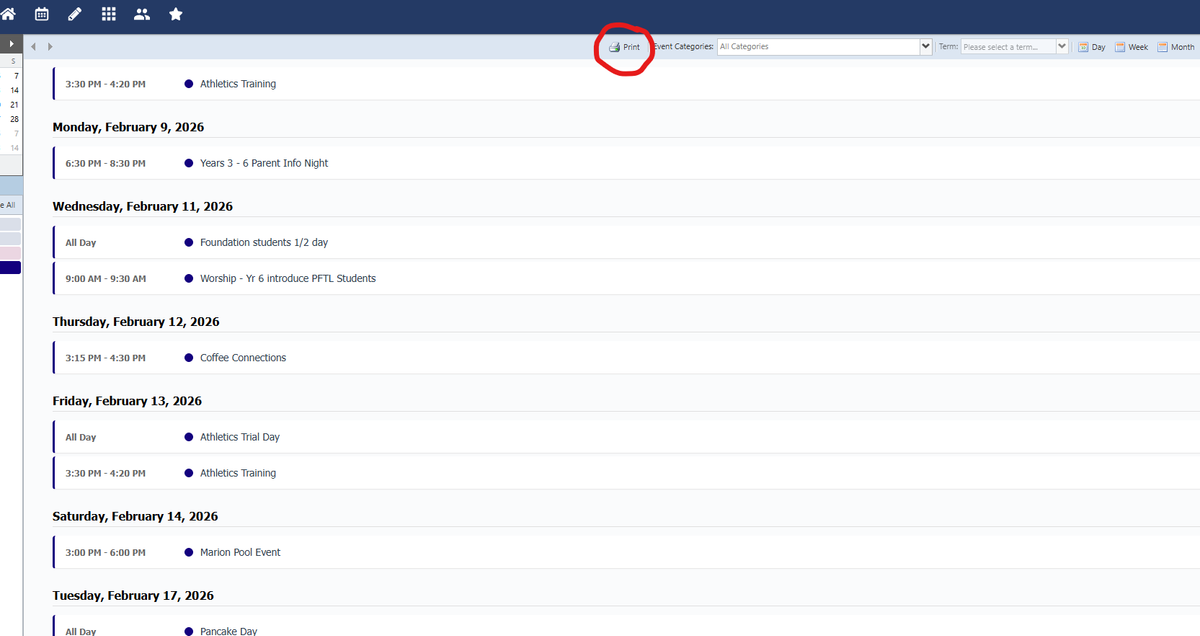
Please note this feature is only available in the portal and not in the phone app version.
Compass Information for New Families
Downloading and Using the Compass School Management App
It is helpful for all parents to have access to the Compass School Management App. We use the app/portal for many communications, including notifications about First Aid attendance, permissions for events, purchase of school photos, notifications of attendance and absences, and sharing of academic reports.
Instructions to Install and Login to the App
You can find the app from the Google Play or Apple App Store
It may be useful to read the Compass User Guide through the button below to discover how to use the different areas of the app.
You will need to use the login details emailed to you to access your account. If you have difficulty with this please speak to staff at our Front Office.
By enabling notifications you will receive up-to-date information about attendance or First Aid etc through the app.
Attendance/Absences
You can add an Attendance Note from the app or portal to notify of today's or a future absence.
Please select an attendance code and enter a brief description to let us know what is happening for your child. Compass has a required minimum of 10 characters in this field.
Please inform the Front Office of an absence through the app or by phone as soon as possible. If you are dropping your child at school after the 8.45am start of school bell, they will need to sign in as 'Late' at the Front Office. We have an automatic SMS system of asking parents to explain an absence if their child has not been marked 'Present' on their class roll by their teacher and you will reminded to provide an explanation. It is a government requirement for each absence to be explained.
Connect and Chat Session Bookings
Parents of our new Foundation students can book for their Connect and Chat session with their child's teacher through the Compass App by clicking on the green notification on your home page or clicking on the 'Conferences' button. This same system will be used for Parent Teacher Conferences across the school later this term.
Ordering School Photos
School photos can be ordered on the Compass App. You should see a link in a green box above the 'My News' section which will take you to the order page.
Emails
Emails sent through Compass go to all parents/guardians of a student. Please let the Front Office know if you think you are not receiving emails or if you do not wish to receive emails from the school and we will make necessary adjustments.