













Page 0 Banner Photo
Cover Page
Important Dates to Remember Banner Photo
Important Dates to Remember October, November, December
Farewell to the Class of 2025 Banner Photo
Farewell to the Class of 2025 Year 12’s Graduate, Year 12 Celebration Day
Book Week 2025 Banner Photo
Book Week 2025
Melton Secondary College celebrates 50 years of teaching by throwing a school fete! Banner Photo
Melton Secondary College celebrates 50 years of teaching by throwing a school fete!
R U Ok? Banner Photo
R U Ok?
 Allied Health (Wellbeing)  Banner Photo
 Allied Health (Wellbeing)  The Power of Yet: Encouraging a Growth Mindset at School and Home, What is a Growth Mindset?, Why Does Growth Mindset Matter?, How We Promote Growth Mindset at School, How Families Can Support Growth Mindset at Home
Enrichment Program Banner Photo
Enrichment Program
Community Liaison Team Banner Photo
Community Liaison Team Cultural Diversity Week 2025, From Then to Now: 50 Years of Change, Connection & Community
The Sport Report Banner Photo
The Sport Report Student successes, General Sport Excursion Reminders, Melton SC Sport Facebook page, Sport Dates
Rugby Banner Photo
Rugby
Before and after school supervision  Banner Photo
Before and after school supervision  Melton Secondary College , Before and after school supervision 
Canteen Banner Photo
Canteen 1. Download the app, 2. Register, 3. Log in to your Flexischools account and enter your child’s details
General Information  Banner Photo
General Information  General Office, Camps, Sports and Excursion Fund (CSEF)/State School Relief and Parent Payment, School Canteen, Uniform Shop, Lost Property, Student accident insurance, ambulance cover and private property brought to school, Access to School Grounds, School Access Times - Students, Collecting students from school early, Mobile Phones, Recording a Student Absence, Privacy Information for Parents and Carers
Community noticeboard Banner Photo
Community noticeboard
View archive
Published by
Melton Secondary College
Coburns Road, Melton, Victoria, 3337, AUhttp://www.meltonsc.vic.edu.au/03 9743 3322
Banner Photo

Canteen

Our school is pleased to announce that we are now using an online lunch ordering system called Flexischools. Australia's #1 school ordering solution, Flexischools, operates in more than 1650 schools across Australia, enabling cashless ordering and payments for schools. 

Gallery Image

How to set up your Flexischools account

Simply download the Flexischools App from the Apple or Google stores and follow the prompts to create an account. 

You can also signup through the Flexischools website flexischools.com.au

If you already have a Flexischools account you can simply add a new student to your existing account.


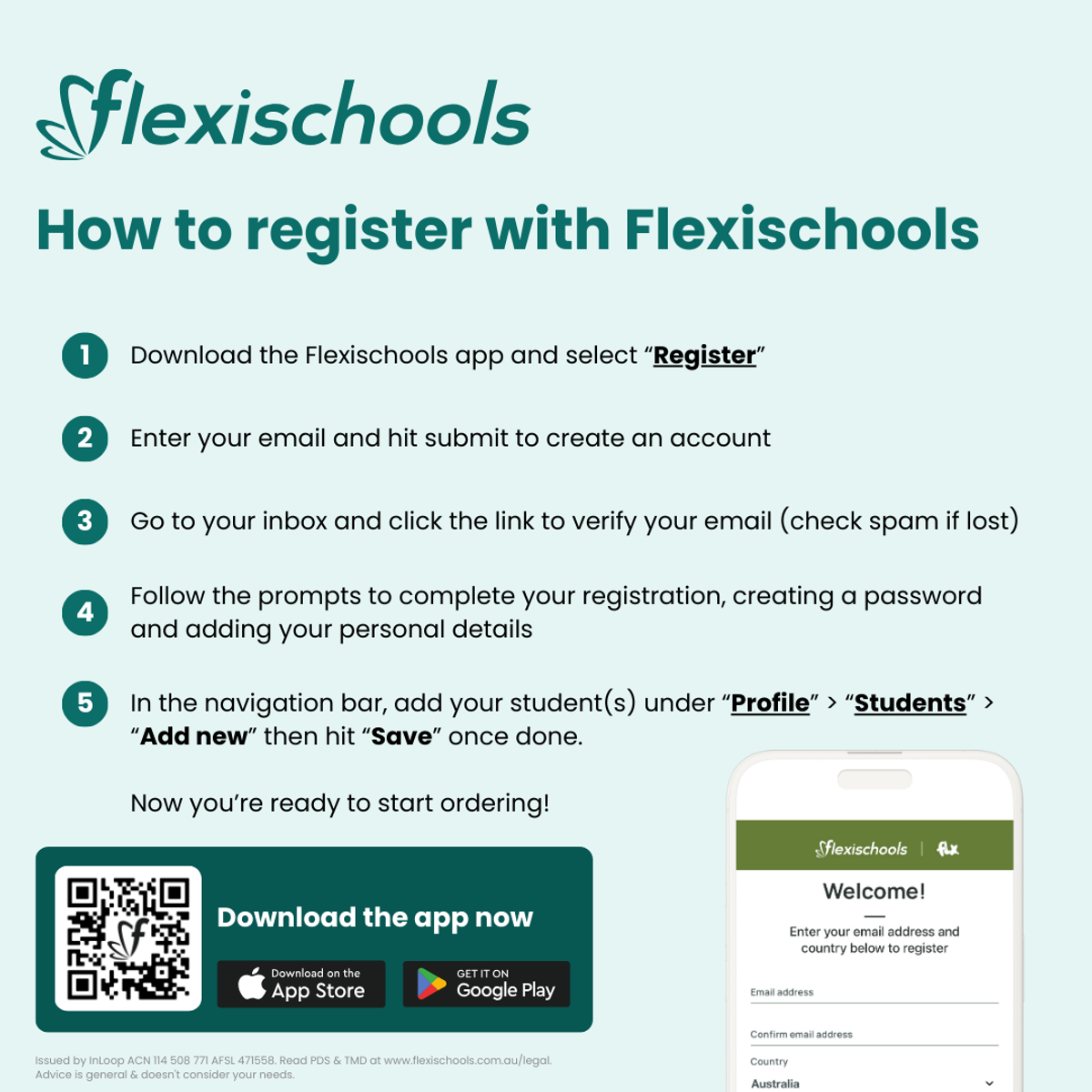
1. Download the app


The Flexischools app is the easiest way to place online lunch orders, buy school uniforms, and receive instant notifications from your school.


2. Register

  • Open the Flexischools App and click ‘Register'.
  • Submit your email address to create an account.
  • Go to your inbox and open the registration email from Flexischools.
  • Click on the link and follow the registration process.

3. Log in to your Flexischools account and enter your child’s details

  • Select the ‘Profile’ icon on the navigation bar.
  • Under ‘Students’, click ‘Add new’. 
  • Enter your child’s name, school, year level, and class. 
  • Click ‘submit’.


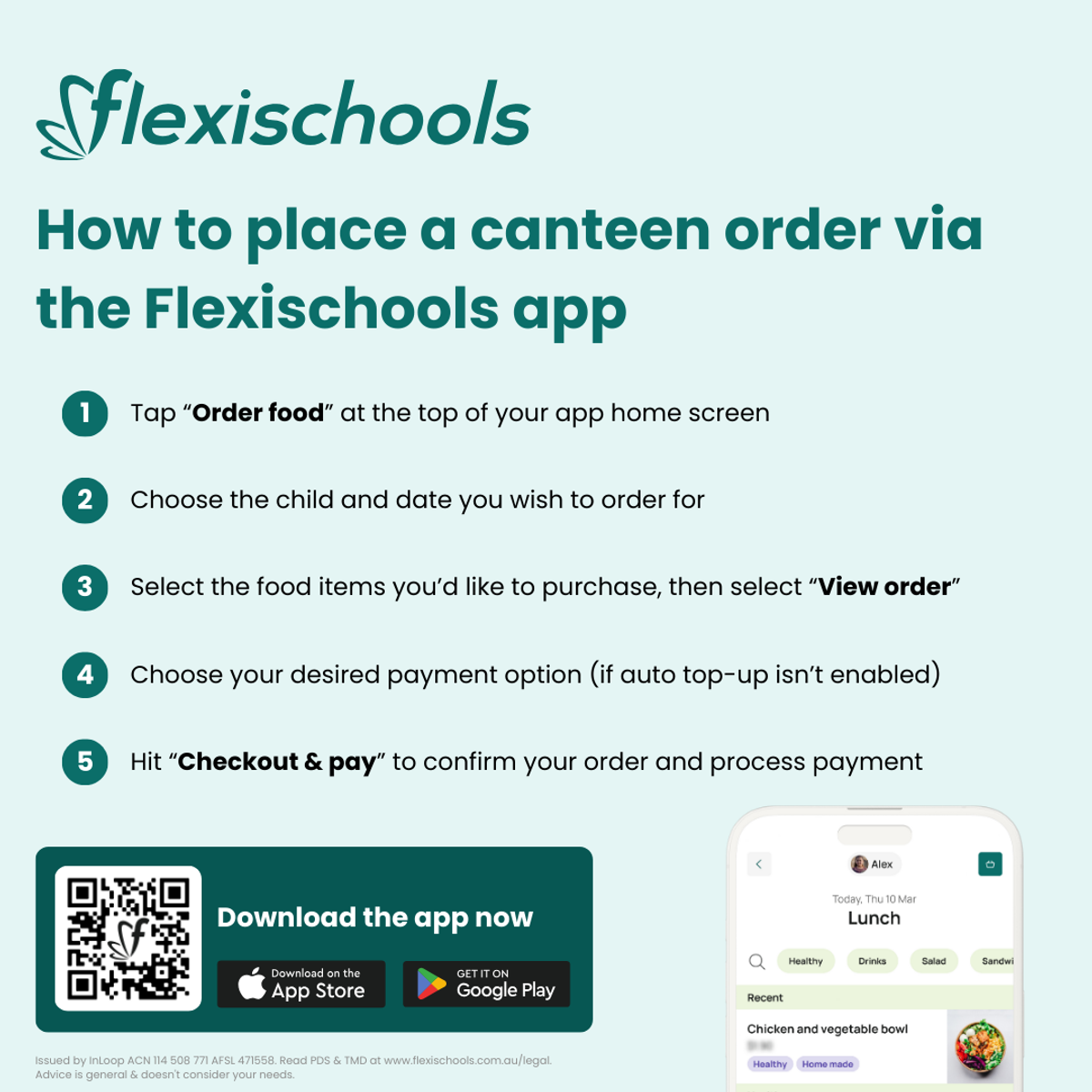
How to order

  • Click the 'Order Food' button at the top of the home page.
  • Select which student you would like to place the order for.
  • Choose which service, and date you would like to place the order for.
  • Make your selections by adding items
  • Click "View Order", then "Checkout & Pay"

Tip: Pay-as-you-go for each order, or top-up your Flexischools Wallet.


Cancelling your order

Orders can be cancelled through the Flexischools app prior to being sent to the canteen supplier each morning. 

To cancel your order click on “Orders” in the Flexischools app and then click on the order you wish to cancel. If the order is still available to cancel, simply click on the cancel button. The full amount of your order will be refunded to your Flexischools Wallet.

If the order is not available to cancel, please contact your canteen supplier directly.


Fee & Charges 

A 29c order fee is charged on every canteen order placed through the Flexischools App. This fee is in addition to the cost of the canteen items and is charged at the time of purchase.

There is an additional surcharge for purchases or account top ups made by credit card, debit card or PayPal which is clearly detailed when you check out or add funds into your wallet. However, parents can top up their Flexischools wallet by Bank Transfer which incurs no surcharge. Click here to view instructions.

Please visit our Help & Support section for additional information and tips.

Our Terms & Conditions can be found here: Legal & Privacy
 

Gallery Image
Gallery Image