Office news




















 Karoo Primary School
Soiree tickets - coming home today
All pre-ordered tickets for the Karoo Performing Arts Soiree (featuring Noisecraft) have been sent home with students today.
We still have tickets left, only available for purchase through the school office.
Unexplained absence letters
If you have received an absence letter from us this week it means that there are some unexplained absences recorded for your child. Could you please check the dates listed and provide an explanation for each absence?
You can do this easily by logging in to Compass (using the instructions provided below) to enter the reason for each absence. If you prefer, you can also complete the letter provided, write an explanation for each date, sign the letter, and return it to the school office.
We understand that children may occasionally be absent from school for a variety of reasons. Providing an explanation helps us keep our attendance records accurate and up to date.
Thank you for taking the time to check the dates and provide the required information.
How to record an explanation for an 'Unexplained Absence'
If your child has been marked Not Present without an explanation, you will be required to add an Attendance Note. You will see an alert on your homescreen when the absence occurs. Click the alert and it will take you to your child’s ‘Unexplained’ attendance tab where you will see any sessions listed for which they were marked as Not Present or Late.
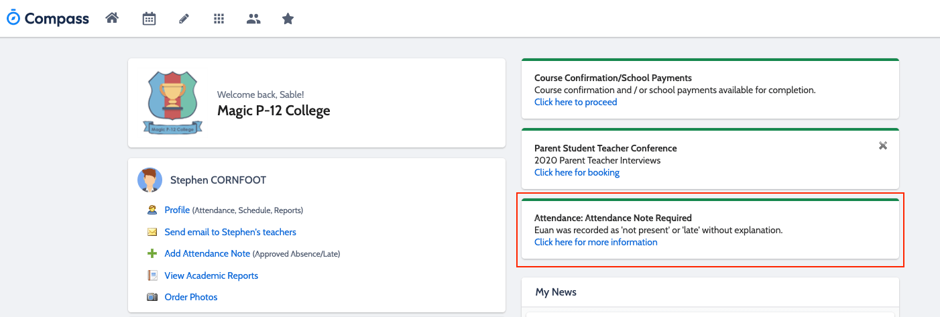
Clicking on this notification will allow you to add a Note or Approval for one or more absences.
To approve an unexplained absence using your mobile phone, select the main menu, select the attendance tile and down the bottom of the screen should be an 'Unexplained' tab. Select this and follow the prompts to complete the note.
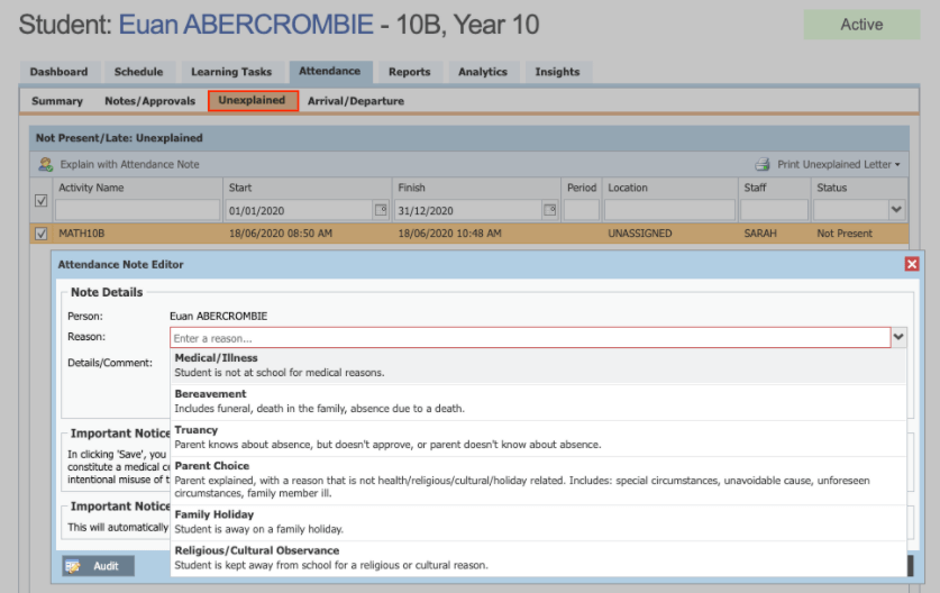
To approve an unexplained absence using a laptop, select the 'Unexplained' tab (as shown below), select one or more of the absences listed, add in further details and then select the "Explain with Note/Approval" button.
(Please do not use the code 'Sorry Business' as this is a special code for indigenous students who are absent due to a family loss)
Helpful Attendance Reminders for Families
• Please enter your child's full day absence on Compass on or prior to the day.
• Where possible, schedule appointments outside school hours.
• Arriving on time helps students begin the day calmly and successfully.
• If your family is experiencing challenges with attendance, please reach out as we are here to support you.