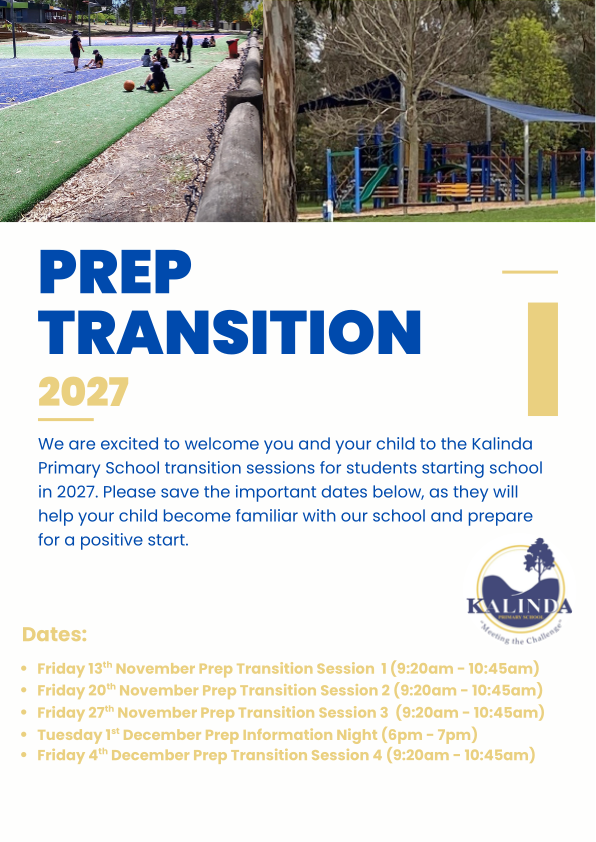
2027 Prep Information for families
We are so close!
Offers of enrolment to be sent out to families on Monday, 3rd August.
It is up to the parents to log back into the VicStudent portal and accept the offer.
This step must happen for the application to proceed to enrolment.
At this stage, the site will ask for more details, such as an emergency contact and further medical information. Emergency contacts are people we can call after we have attempted to contact Parent A and Parent B. They are only contacted when the student is ill or an accident has occurred. Please nominate someone who has a mobile phone.
Medical information - what we need and why.
Conditions are diagnosed by a teacher or specialist, such as Asthma, Anaphylaxis, allergy ( and or hayfever ) or ADHD, and will have a treatment plan. This information is a parents reponsiblilty to share with the school to ensure we can properly execute our duty of care.
The treatment plan will sometimes have medication that needs to be delivered at school. Other conditions, such as visual ( glasses ), hearing loss ( even partial ), and travel sickness ( excursion travel ), can affect how your child learns at school. This information should also be shared with the relevant staff.
It is a parents responsiblity to be honest and upfront regarding conditions that may affect the student, and assist with their learning.
All information is confidential and private. If you would like to discuss or have any concerns or questions, please contact the office or Wendy, our first aid officer.
Enrolment process
All Prep applications are through the VicStudent portal - https://students.educationapps.vic.gov.au/s/
1 - Parents/ carers log in and create a profile. (Please note that Parent A will be the first point of contact from here on in. If you wish your partner to be contacted first, enter their details in Parent A )
2 - Parents upload supporting documents to the child's profile (immigration certificate, birth certificate, and proof of address ). This will support the application.
3 - Apply for primary school.
4 - Schools send out offers via email. This will depend on zoning, etc
5 - Parents log back in and accept one offer from a school. They will then complete the enrolment details, listing medical conditions, emergency contacts, etc. This is where you share information that will assist schools in supporting your child - diagnois, medicial etc
6 - School imports enrolment information, and the child can then be added to Compass, etc. You will then begin to receive information regarding transition sessions etc.
What you can do now to help your child.
- Let them put their shoes on and take them off. Give them time to learn buckles and straps. Do this when you are not busy, so both are you are not rushed.
- Practise doing zips up and down. Practise taking jackets off and on, and then putting them away.
- Put socks on, and pants off and on. Staff will not be able to assist with this.
- Let them carry their own bag into day care, or kinder and hang it up.
Can your child find the letters of their name?
Why is this important?
They need to put their bag away, find their drink bottle, and find their own satchel.
Start with the first letter and sound. Where can you find letters? On the back of the car in front of you, on the side of the truck, on the advertising board, in the weekend paper. Letters are everywhere.

Dates for families
| Friday 13th November | 2027 Prep Transition Session 1 |
| Friday 20th November | 2027 Prep Transition Session 2 |
| Friday 27th November | 2027 Prep Transition Session 3 |
| Tuesday 1st December | 2027 Prep Parent Information Session |
| Friday 4th December | 2027 Prep Transition Session 4 Meet the teacher |