St Roch's Community News

Scholastic Book Club
Scholastic Book Club is back!
Thanks to your amazing support last year, our Scholastic Book Club was a huge success! Together, we raised over $300 in Scholastic Rewards, which went straight back into our school to purchase valuable learning resources for our students.
The first 2026 Scholastic Book Club catalogue will be coming home in school bags this week, and there are some fantastic offers to kick things off:
- In this issue, families can receive:
3 FREE books when spending $75+
2 FREE books when spending $50+
1 FREE book when spending $20+
- Many families also have a $5 discount code to use now if they spent over $19.50 from Issue 8 last year.
- Don't forget, every order earns Scholastic Rewards, helping support our classroom and school library. Let's see if we can beat last year's record!

Plus! To celebrate National Family Reading Month in May, families can enter a draw to win one of 50 signed copies of Mr Luke’s Magic Library: Dinosaur Trail.Find out more here: https://scholastic.com.au/nfrm/nfrm-home/
*** Issue 1 orders are due by Monday 16th February ***
If anyone needs help setting up a LOOP account, or has any other issues with their Book Club order, please text Nadine G on 0401 571 527 or email n.guiney@hotmail.com
Parents & Friends Committee - Thank you to the Team of 2026
P&F COMMITTEE 2026
P&F President - Dave Crew
P&F Vice President - Will Cheang
Class Representatives:
Prep: Bridie Parry & Kate Bollard
Year 1: Jess White & Sarah Iwaniw
Year 2: Sandy Arthur & Mairin Chevaux
Year 3: Pat Fernando & Elissa Ivancic
Year 4: Penny Guerra & Leah Scheggia
Year 5: Jess Mount & Jess Nichols
Year 6: Tahnee Jones
Scholastic Book Orders: Nadine Guiney
2nd Hand Uniform: Jess Nichols
General Committee Members:
Stephanie Morris
Cheri Nagle
Karina Prajoga
Bree Lynch
Emily Nugent
CDFpay Parent Announcement
Good News: New CDFpay mobile app is now available to download. St Roch’s will be using the new CDFpay mobile app for online ordering, events and fundraising from the throughout 2025.
How to register for a new CDFpay account.
- Download the CDFpay mobile app on the Apple or Google store, then click ‘Sign up now’. No app? Register here
Important: You will not be able to use your existing CDFpay credentials to login to the new CDFpay mobile app. You will need to follow these steps to create a new CDFpay account (you can use the same email address if desired).
Enter and confirm your email address, then click ‘Sign up’.
- Check your email inbox and follow the prompts to complete your account registration (check junk/spam if lost). After you have registered and entered your child’s details, you can order and pay in seconds!
Have questions? View CDFpay powered by Flexischools Help & Support for detailed FAQs or chat to the Flexischools Digital Assistant. If you cannot find what you are looking for, please complete the online Contact Form and Flexischools will get back to you directly.
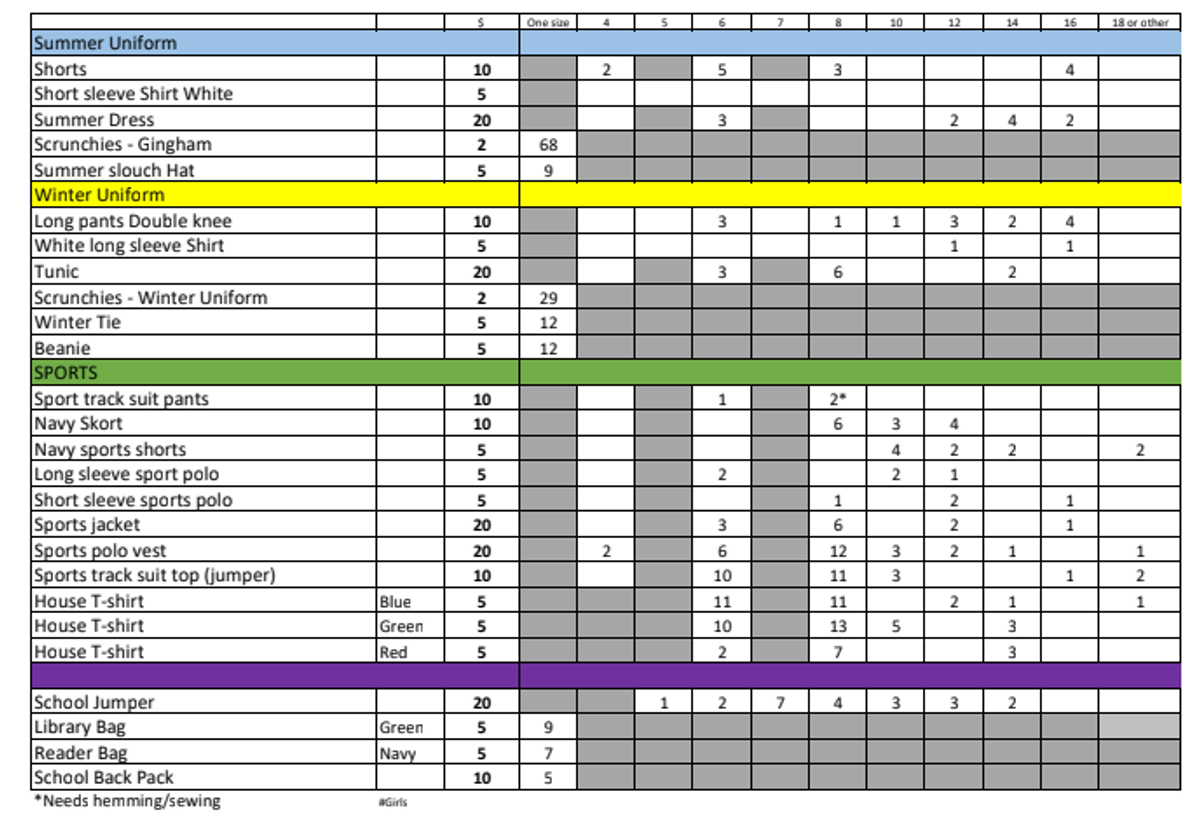
The Second hand Uniform Shop
Any enquiries please contact Jess Nichols, jess.h.nichols@gmail.com