USING COMPASS








 Surf Coast Secondary College

Compass - Student Management Solution

Compass is a school management solution that allows parents and carers to access up-to-date and meaningful information about your school and your child’s progress. Compass includes many different features, including the ability to:
- Monitor your child’s attendance, and enter an explanation for absence or lateness
- Communicate with your child’s teachers
- View your child’s timetable and the school calendar
- Monitor your child’s homework and assessment tasks
- Download and view your child’s academic reports
- Book parent-teacher conferences
- Pay and provide consent for events and school fees
For more helpful information on how to use Compass and answers to FAQs please see the following links:
A guide for parents & families | Compass Education AU
Parent FAQ | Compass Education AU
How to advise of an absence
If you would like to advise of your child's absence or would like to authorise to sign your child out for an appointment later in the day, you can utilise Compass as follows:


The most common approval types are:
- Medical / Illness
- Medical Appointment (this also includes specialists e.g. psychologist, orthodontist)
- Parent Choice
So, for example, if your child needs to leave school at lunch time for an appointment at the dentist, you would select the start time as 12:30pm and finish time as 2:55pm.
Your child at the appointment time can then sign out at the Administration Office, our staff will check Compass for your approval and can sign your child out.
Communicating with your Student's Teachers
Through the range of platforms at Surf Coast Secondary College there is also a range of communication mediums with your students teachers. This article will detail a couple of these opportunities and some supports.
The most straightforward means of communication is via a phone call to the school (03) 5261 6633, in this instance teachers may be teaching or engaged in meeting/planning time so you may need to leave a message or organise another time for contact.
To ensure communication with your students teachers the most consistent means of communication is via Compass our Student Management Platform. Compass will allow you to communicate with the teacher via email, it is also how the teacher will communicate with you and your student.
To ensure you can speak with your students teachers organising a time for a phone call or to meet onsite through Compass will ensure you and the teacher are available and prepared. Compass will also allow you to email all of your students teachers at once.
To communicate with a your students teachers via compass you can refer to the linked guide. “You will need to be in the browser version, Menu -> Open in Browser, to do this from the app.”
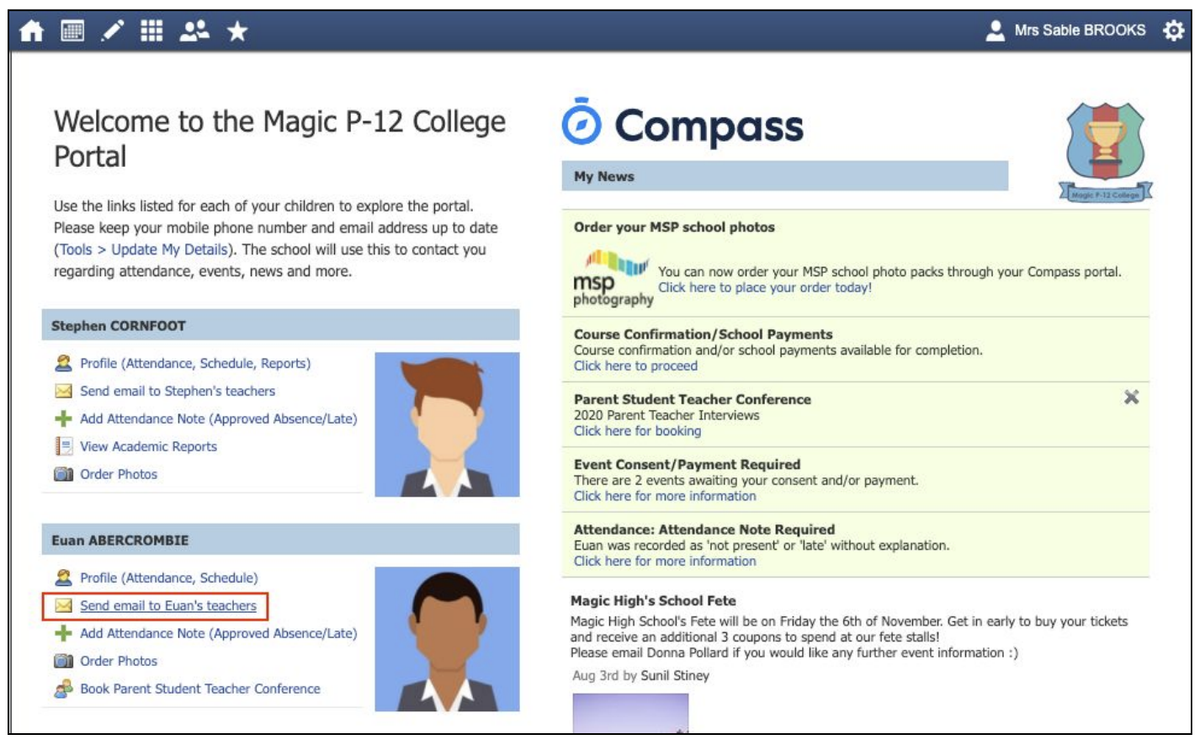
For a helpful guide on how to use Compass please use this link - A guide for parents & families | Compass Education AU
The page where all past posts are stored is - https://bit.ly/3jzBzXz
Shaun Miller,
Digital Learning Specialist.
Camps, Sports and Excursions Payments
Did you know there are a variety of ways to provide ease of payment for students extra curricular activities?
As we advise families of upcoming events e.g. camps, sports and excursions via Compass, our preferred payment method is via the Compass event, as this enables families to make a payment and provide consent for your child to attend at the same time.
Using the Compass App:
From the homepage, click on the blue shortcuts button from the bottom taskbar
Click on 'Pay for an events'
In your Action Centre, click on any events still requiring your payment and/or consent

For events with fees of over $200.00 and all camps, we are introducing the ‘recurring contribution’ feature in Compass events, where families can make instalment payments on the specified dates using a debit or credit card saved to your Compass Pay account.
If you have any queries regarding this feature, or if you would like to request a custom payment plan, please email events@scsc.vic.edu.au.

Alternatively, you may make a payment, as follows:
Direct Deposit
To make a payment by direct deposit please use the following bank details:
Account Name: Surf Coast Secondary College Council Official
BSB: 033-608
Account Number: 246907
Please be sure to put your child’s name in the reference and payment type, then notify the college of the payment by emailing us at accounts@scsc.vic.edu.au