Online Safety Hub






















 John XXIII College

Online Safety Hub
The Hub includes expert advice on the most pertinent cyber safety issues and frequently asked questions around platforms like TikTok, Fortnite, Instagram, and more. There are app reviews with age and safety recommendations, a range of guides and resources to help ensure healthy boundaries around screen time and gaming, and step-by-step instructions for using parental controls and filtering out inappropriate content.
Secret vaults explained: is your child using a fake calculator app?

Kids have always kept secrets. You might have had a journal that could be locked with a key, or perhaps you wrote your innermost thoughts in “invisible ink”. Children today have digital ways to keep their private things private – they’re called “secret vault apps” which are often disguised as unassuming calculators.
Privacy is important for kids, but it shouldn’t come at the expense of safety. As the content often stored in secret vault apps can put children – and others – in danger, it’s important that parents understand the risks and know how to spot these deceptive apps.
What are secret vault apps?
Secret vault apps are smartphone or tablet apps designed to look like regular, utility apps on the surface, most commonly a calculator. A fake calculator functions just like a regular calculator, but when the user enters the passcode they established on setup, they can access and manage their private files.
There are many versions of fake calculator and vault apps available for download, but they all share one common purpose: to hide private images, videos, and files.
In addition, some secret vault apps use the phone’s camera to take a snapshot of an “intruder” if they enter an incorrect password. This snapshot is stored in the vault to show the phone’s owner who has been trying to access their files.
Why might kids use a secret vault app?
As we live in an increasingly connected world, helping children stay safe by monitoring their online activities is something many parents now do regularly. As a consequence, some children may feel that their privacy is being invaded, and they may look to calculator vault apps as a space to hide the images and files that they don’t want people to know about – either parents, friends, or siblings.
While this might sound innocent in practice (everyone feels the need for privacy), secret vault apps could be used to store media that’s sexual in nature.
Sexting is a major concern for parents. A 2024 UK survey found that 39% of adults first shared explicit content while they were underage. It also revealed that 28% of under-18s had experienced misuse of their intimate images or had received an unwanted sexual image. Secret vault apps can offer a place for young people to hide sexual images and videos (real or “deepfakes”).
Secret vault apps can also be used to hide contacts – and even entire messaging apps – that kids don’t want their parents to know about.
Are secret vault apps safe?
Fake calculator and other vault apps may not be inherently dangerous in the same way as some social media or communication platforms. The risks lie in the type of content being stored in these apps – and why a child feels the need to go to such lengths to hide it.
Sexting and sexual content
A common use for secret vault apps is to hide inappropriate content or sexual imagery. Under 18s are not able to give consent for their naked image to be created or shared, so if they have one on their phone, stored in secret, this is against the law. Children may not understand the severity of taking and sharing nude images, or engaging in sexting.
Inappropriate relationships
A child may also use a secret vault app to conceal a relationship from their parents – with someone older for example. The app could be used to store contact details, photos, conversations, and even entire communication apps.
When messages, images, and chats are hidden, it becomes much harder for parents to know whether their child is being groomed, bullied, sextorted, or otherwise harassed – limiting their opportunity to intervene.
Privacy and security
There are many developers out there making calculator vault apps, so it’s difficult to know which ones really help keep data and information secure or not. It’s worth reminding your child that nothing uploaded to the internet is 100% safe and secure.
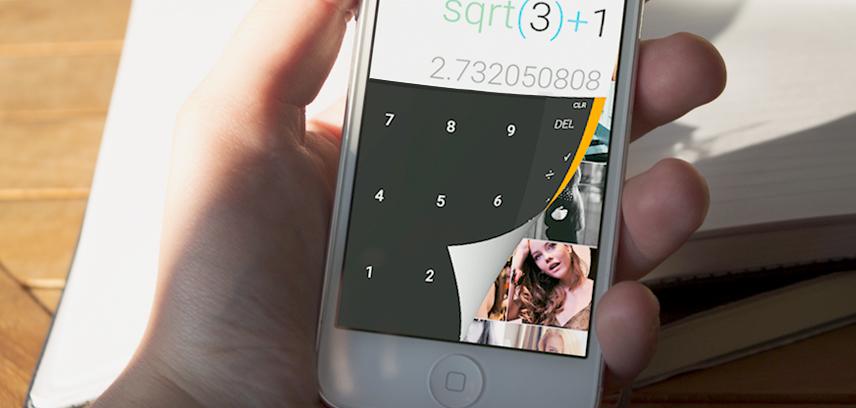
4 ways to spot a fake calculator app
There are several things that might help you to find out if your child is using a fake calculator app:
1. See how many calculator apps your child has on their phone
It might seem obvious, but if your child has more than one calculator app on their phone, one could be a private vault app. However, some children need to use scientific calculators for homework purposes, so the presence of an extra calculator doesn’t always mean there’s something to worry about.
2. Search on the app store
If you can see the name of the app on your child’s phone, look it up. The app description will show you if the calculator is real, or if it’s a way to keep private files secret.
Using your child’s device, you can try typing “vault app” on the App Store or Google Play Store to see a list of secret vault options for download. If your child has already downloaded one of these apps, then instead of “Download”, the text will read “Open” on the app itself.
3. Look for behavioral signs
If you don’t want to check your child’s phone, and you’re worried about them downloading and using vault apps without your knowledge, here are some of the signs your child could be using a secret vault app:
- They hide their phone from you when you enter the room
- They quickly close an app or tab when you enter the room
- They make regular requests for privacy, which they didn’t make before
- They are unwilling to show things on their phone or tablet to other people
They are suddenly using their device much more frequently
4. Use parental control tools
Parents can find out if their child is using a secret vault app by using a comprehensive parental control tool, such as Qustodio. With Qustodio, you’ll get daily reports of the apps your child uses and the amount of time they spend on them – giving you valuable insights into where your child spends their time online. If you see something suspicious – like an hour spent on a calculator – you can bring this up with your child.
You can also:
- Be alerted when your child uses an app for the first time
- Block apps you may be suspicious of
- Pause internet access at the push of a button.
Talking to your child about hiding apps on their phone
One of the main concerns about secret vault apps and camouflaging tools is that your child could be hiding something inappropriate behind them – the consequences of which they may not fully understand. It’s important to help your child understand the risks of sharing inappropriate content and what it means for them to engage in sexting.
To help develop your child’s trust in you, keep family communication open and honest. By creating an environment where your child feels they aren’t judged, and where it’s safe to confide in you, you can encourage them to come to you for advice or seek out your help if they feel uncomfortable online. The more your child feels they can converse with you and rely on you, the less likely they are to want to keep things private – and in turn, see less need to make use of secret vault apps.
Reference: Secret vaults explained: is your child using a fake calculator app? | Qustodio