
Featured News

School Closure Day - Monday 2nd November
Term 4 - No Hat - No Play
Sunsmart Policy

Our Sunsmart Policy requires all of our students to wear their St. Andrew's school hat in term 4. We expect all children to have and wear their school hat. Wearing the school hat is not only compulsory during recess and lunchtime, but also before/after school and during Physical Education lessons, sport and other outdoor training sessions.
As a SunSmart registered school all children will have access to Sunscreen.
Please ensure hats are well named for ease of return.
Summer School Uniform
We inform parents that children can make the transition to summer uniform now we are in warmer weather.
Zooper Dooper Friday - Is back!

With Term 4 warming up we welcome back our Friday Zooper Dooper sales!
Children are invited to bring $1.00 to school to purchase a Zooper Dooper at recess on a Friday.
We thank our Year 6 children for volunteering their time to support the sales of the Zooper Doopers.
Italian Day
One of the highlights of our school calendar is Italian Day on Wednesday 21st October.


ORDERS CLOSE TODAY AT 3.00pm. Please follow the instructions to order each child's Pizza & Gelato Bundle.
Step 1 - on nForma
Please select your child's choice of Pizza and Gelato. You need to order for each child.
Step 2 - on CDFPay App
Please use the CDFPay App to make your payment for the: Pizza & Gelato bundle food ticket: Cost is $6.50 per child.
Note: you will need to set up your CDFPAY account (instructions below) to be able to purchase the Pizza & Gelato bundle ticket.
Orders close today at 3pm on Thursday 15th October. No late orders can be accepted.
Day for Daniel – Supporting Child Safety
On October 30th our school will be participating in Day for Daniel, Australia’s largest child safety education and awareness day. Inspired by the incredible work of the Daniel Morcombe Foundation, this day focuses on teaching children important personal safety lessons, empowering them to Recognise, React, and Report in situations where they may feel unsafe.
Throughout the day, students will participate in age-appropriate safety activities and watch a dedicated educational video tailored to their year level. These lessons cover crucial safety themes, including identifying safe adults, recognizing body clues when feeling unsafe, and practicing online safety.
How Your Child Can Get Involved
- Wear a Touch of Red: Students are asked to wear their regular school uniform with a touch of red—such as red socks, a red hair ribbon, or a red T-shirt . Red is the official color of Day for Daniel and symbolizes child safety awareness.
- Gold Coin Donation: Please send a gold coin donation with your child. All funds raised will go directly to the Daniel Morcombe Foundation to support the development of free safety resources for schools and families across Australia, as well as providing support to young victims of crime.
Continuing the Conversation at Home
We encourage parents and carers to use Day for Daniel as an opportunity to talk to your children about personal safety. Free resources, safety guides, and tips for starting these conversations at home are available on the Daniel Morcombe Foundation website.
Thank you for your support in helping us keep our children safe!
CDF PAY is used for online school events
St. Andrews’s Primary School uses CDFpay mobile app for school events
How to register for a new CDFpay account
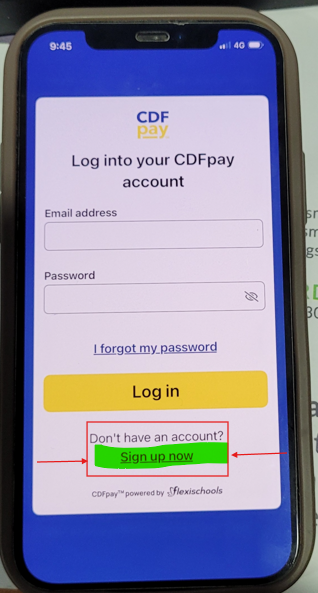
1. Download the CDFpay mobile app on the Apple or Google store, then click ‘Sign up now’.
No app? Register here
Important:
You will not be able to use your existing CDFpay credentials to log in to the new CDFpay mobile app. You will need to follow these steps to create a new CDFpay account (you can use the same email address if desired).
2. Enter and confirm your email address, then click ‘Sign up’.
3. Check your email inbox and follow the prompts to complete your account registration (check junk/spam if lost).
Need Help?
Download instruction options below:
CDFPay Parent Digital instructions
Do you have a child ready to start school?
If you have a child ready to start school in 2027 and haven't yet enrolled them, please do so now!
Please click on the buttons below to begin the journey!



Information on the nForma Parent Portal (nPortal)
https://portal.nforma.com.au/login
nPortal is our school’s official platform for:
- Student reports
- Permission forms
- Your child's Medical information
First Aid notifications
We ask all families to regularly access nPortal and ensure their information is kept up to date. Please take a moment to:
- Check for any outstanding forms or notices
- Ensure your child’s medical information is current
- Upload your child's Medical Plan and give a copy to the Office
- Check that your contact details are up to date
- Regularly check nPortal for important school communications and student reports
Late Attendance
If children arrive at school after 8:45 am they must be signed in by their parent. Failure to do this will trigger an SMS to the Parent as an unexplained absence.
Thank you for your co-operation
Lost Property
Lost Property is stored in the blue bin located near the front entrance door. It is the student’s responsibility to promptly collect any lost property.
Clearly labelled items are returned to their owners and unlabelled items are donated to the Uniform Shop at the end of each Term.
St. Andrew's Facebook Page
Please click on the link and join St. Andrew's official Facebook page. This page will be regularly updated with information and photos of events taking place at St. Andrew's.