Cyber Safety
Australia's Social Media Ban for Under-16s Begins
Australia's social media ban for people aged under 16 has officially started, marking a world-first effort to protect children from phone addiction and online harms.
From now on, a range of social media platforms will face penalties of up to $50 million if they do not take reasonable steps to prevent children and teenagers aged under 16 from holding an account.
Australia's age-restricted social media apps now include:
- Threads
- Kick
- Snapchat
- TikTok
- Twitch
- X (formerly Twitter)
- YouTube
In line with these national safety measures, all students’ school Google accounts will have access to social media, including YouTube blocked at all times. We also strongly recommend that families avoid creating social media accounts for children, as these platforms are not considered safe for users under 16.
As part of these changes and recent updates to MACS policies, there will also be changes to our Chromebook program. Starting 19 December, students will be required to use a personal Gmail account to log into their Chromebooks for all personal use. Their school Gmail account will be used exclusively for school or homework tasks.
Please note the following important points regarding school account access:
Holiday Access:
- Students’ school accounts will be blocked during holiday periods, including the upcoming break from 19/12/25 to 28/01/26.
School Account Use:
- Students should access their school Gmail only for educational purposes.
- School-based filtering rules will apply to these accounts at all times, including when used at home.
Monitoring and Safety:
- We will continue to use cloud-based filtering to monitor students’ use of their school Gmail accounts.
- St Mark’s eSafe rules apply whenever students use their school Gmail account, even outside of school.
- Breaking these rules may result in consequences.
To support families, we strongly recommend creating a monitored Gmail account using Google Family Link. This allows parents to manage screen time, approve apps, and monitor usage to keep children safe online.We do not recommend creating an unmonitored Gmail account for students.
For guidance on setting up a monitored Gmail account, please refer to the following resources and videos:
- Guide: Set up Family Link for your child
- Video: Set up Family Link for your child
- Guide: Create a Google Account for your child
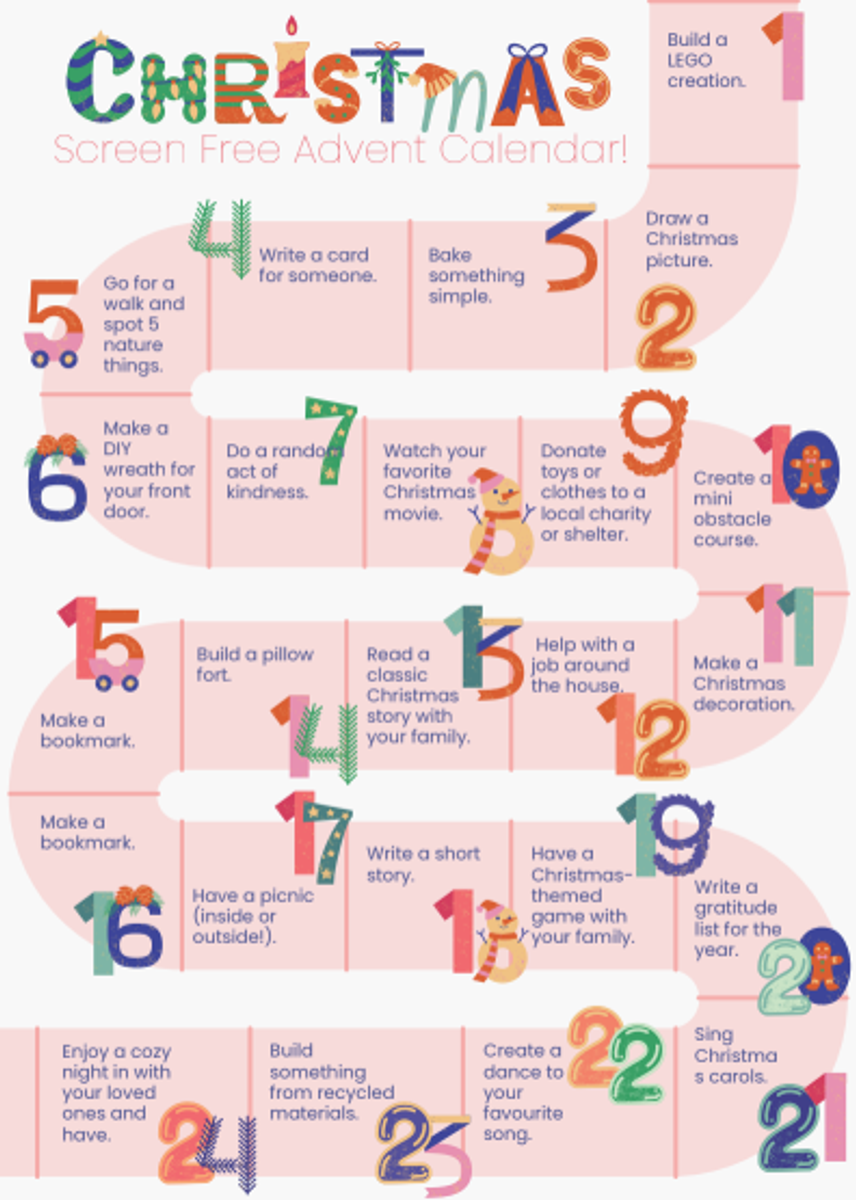
Screen Free Advent Calendar!
To help unwind, stay creative, and enjoy time away from screens this festive season, we’ve put together a fun Screen Free Advent Calendar. Each day reveals a simple activity designed to spark imagination, movement, or connection with family and friends.
The Offline Advent Calendar is attached is a great way to countdown to Christmas while staying happily unplugged. See how many activities your child can complete throughout the holidays!
Have a safe and happy holiday!