






Page 0 Banner Photo
Cover Page
School Calendar Banner Photo
School Calendar 2024 School Term Dates
Prayer Banner Photo
Prayer Prayer for Teachers ~ World Teachers’ Day 2024 (October 25th), Acknowledgment of Country, Prayer , God of new beginnings, new ideas, new creations and new hopes,, We come to you at the beginning of this year with many feelings, expectations, hopes and dreams., Help us to recognise that we are given NEW opportunities to hope, to create, to think and to begin again each and every day. , Help us to accept these opportunities as ways for us to grow as an individual, as a student and a learner, as a friend, as a community member, as a follower of Jesus., This we ask through Christ our Lord,, Amen, 2024 Diocesean and School Theme , Keep In your Prayers and Thoughts... 
Principal's News Banner Photo
Principal's News
Learning Enhancement Banner Photo
Learning Enhancement Library News
Deputy Principal / Religious Education  Banner Photo
Deputy Principal / Religious Education  World Teachers' Day, Feast Day ~ Friday 18th October, Youth Mass ~ Saturday 9th Nov 6pm,   In response to the success last term, we are celebrating another combined Youth Mass with St Brendan’s on Saturday 9th November at 6pm.     Assistance with readings, singing and other jobs will be needed.   Please let the office or myself know if you are planning to attend.   Thank you for your continued support of our parish school communities.  , St Brendan’s Church ~ Stained Glass Windows
Wellbeing  Banner Photo
Wellbeing 
Awards & Acknowledgements Banner Photo
Awards & Acknowledgements Week 1, 2 & 3 Awards , ICAS Awards 
Sport  Banner Photo
Sport  Regional Basketball:, AusBike, Hockey, Central Park / St Brendan's Cricket Club, Auskick & Superkick, Soccer , Shepparton Swans Junior Football Club
Community Group  Banner Photo
Community Group Community Group
Office Info Banner Photo
Office Info Office Hours, Change of Details, School Day, Sickness at School, Lunch Orders, Positive Partnerships - Free Workshop, Country Bus Travel , Music Recital , Emergency Services Family Day, Berry Street - Post Separation Service , Sandhurst Arts on Show, Book Inn - Book Sale , 2024 Australian Early Development , 2025 Mission , Berry Street Foster Carer, Circle of Security - Parenting Group Program , Notre Dame Music Programme , Thrive 4 Life, Attendance Matters 
Student Attendance  Banner Photo
Student Attendance 
Communication Outline  Banner Photo
Communication Outline Communication Outline , Staffing 2024, School Advisory Council 
Parent Access Module Banner Photo
Parent Access Module HOW TO - Login to PAM
View archive
Published by
St Luke's Catholic Primary School
629 Goulburn Valley Highway, Shepparton, Victoria, 3630, AUhttp://www.slshepparton.catholic.edu.au/newsletter@slshepparton.catholic.edu.au(03) 5822 1834
Banner Photo

Student Attendance 

Gallery Image

At St Luke’s, most students come to school regularly and as a result are learning new skills socially, academically and emotionally. This is an expectation and a right that we would like to see enacted for every student.


We know that coming to school on time every day is a necessary condition for learning to occur. Students who attend school every day benefit from all of the support and teacher assistance that is available, and are much more likely to go ahead in their learning.

Gallery Image

Being ready to begin the day's learning with the rest of the class is also very important and we ask for your support in ensuring that students are in their classes by 8.55am. Being prepared for the day and starting with peers encourages a great day of learning!

Gallery Image

Parents/guardians are responsible for making sure that all children attend school every day unless they are too unwell, in which case the school must be advised.


Marking your child’s attendance on PAM


1. Log into PAM as per normal

(type pam.slshepparton.catholic.edu.au in your address bar) or via the App - SimonEverywhere.


2. You can either log by clicking on the large blue calendar section that says Parent Notified Absences or you can click on the 3 menu lines at the top right-hand side of your screen.

NOTE: On your phone it will appear below your child/ren’s name. 

Gallery Image

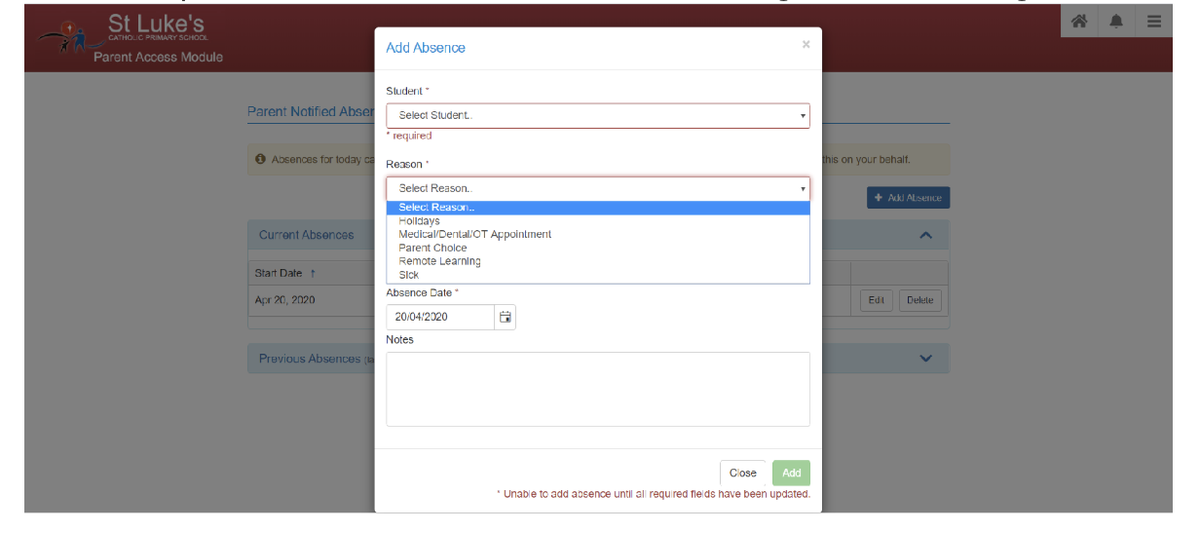
3. You will then need to click the blue + Add Absence button circled below

Gallery Image

4. Then select your child, and in reason 
Gallery Image

If your family is going on an extended family holiday. Please contact the school to inquire about an Student Absence Learning Plan.