Page 0 Banner Photo
Cover Page
Upcoming Dates  Banner Photo
Upcoming Dates 2025, May, June, July, Term Three, July, August, September, Term Four, October, November, December
Principal's Report Banner Photo
Principal's Report  Classes 2026, Parents Association Meeting, Second Hand Uniform Sale, Important Child Safety Reminder – School Drop-Off and Pick-Up Zones
Communications Update Remind Banner Photo
Communications Update Remind nForma Parent Portal Latest Updates
Education in Faith Banner Photo
Education in Faith Praying for our First Reconciliation Candidates
Victorian Premiers’ Reading Challenge 2025 Banner Photo
Victorian Premiers’ Reading Challenge 2025
Mathematics Banner Photo
Mathematics Australian Mathematics Trust Competitions, Bebras Computational Thinking Challenge
Wellbeing Banner Photo
Wellbeing I Answered an Unknown Number During Filming, The Parenting Breakthrough that Happened Between Takes, When Emotions Run High, Intelligence Runs Low, Emotion Coaching: The Science Behind the Approach, The Five Steps of Effective Emotion Coaching
Digital Technology News - Kids Screen Time and Device us  Banner Photo
Digital Technology News - Kids Screen Time and Device us  1. Establish Tech-Free Zones in the Home, 2. Use Screen Time (iOS/iPadOS) or Digital Wellbeing (Android) for Monitoring and Limits, For iOS/iPadOS Devices (Screen Time):, For Android Devices (Digital Wellbeing):, 3. Use Family Sharing Features to Manage and Monitor Screen Time, For iOS/iPadOS (Family Sharing):, For Android (Google Family Link):, 4. Paid Services for Comprehensive Screen Time Management, Bark: Comprehensive Monitoring for Safety and Well-Being, Qustodio: Robust Parental Control Features, Norton Family: Online Safety and Web Monitoring, 5. Create a Screen Time Schedule Together, 6. Model Healthy Tech Habits, 7. Have Conversations About Screen Time, Conclusion
Physical Education and Sport News Banner Photo
Physical Education and Sport News Cross Country Team Outstanding at District Day
Gardening News Banner Photo
Gardening News Term 2 Gardening
What's Been Happening?  Banner Photo
What's Been Happening?  kYear 3 Mathematics, Year 4 Camp - Sovereign Hill & Log Cabin Camp Creswick, Year 5/6 Camp - Camp Wyuna Queenscliff, A Musical Prodigy in Our Midst - Go Gabriel!
Student of the Week Banner Photo
Student of the Week Week 4
PARENTS ASSOCIATION Banner Photo
PARENTS ASSOCIATION Parents Association Term 2 Meeting - Tuesday June 3rd, The Term 2 Second-hand Uniform sale will be held on:
Parish, Community & Extra Curricula Banner Photo
Parish, Community & Extra Curricula Stage Left News, 🎾 A Thank you from Gerry Mustey
 Meet the Team Banner Photo
Meet the Team Principal and Deputy, Leadership Team, Religious Education Leader, Literacy Leaders, Numeracy Leader, Foundation Team, Year 1 Team, Year 2 Team, Year 3 Team, Year 4 Team, Year 5/6 Team, Learning Support Officers (LSO's), Learning Support and Junior Technologies Teacher, Gifted and Talented Leader, Art Teacher, Music Teacher, PE Teacher, Language (French)Teacher, Library Leader, Student Wellbeing Leader, Child Safety Team, Office Team, Digital Technology Leader, Parents Association Coordinators, Canteen Coordinators, Uniform Shop Coordinators, OSHC Leader - MACSEYE, School Advisory Council
Contact Us Banner Photo
Contact Us School Details , PARISH PRIEST, Email Contacts
View archive
Published by
St Cecilia's Primary School
4 Van Ness Avenue, Glen Iris, Victoria, 3146, AUhttp://www.scgleniris.catholic.edu.au/(03) 9809 2142
Banner Photo

Communications Update Remind
nForma Parent Portal Latest Updates

Gallery Image


After moving to nForma for our first aid notifications and medical information data, we are ready to introduce two new features:


Absence Notification

Parents can now use the nForma Parent Portal to notify the school of student absences. This is now our preferred method, as the notification is automatically transferred over to the our electronic school roll system, which is also part of the nForma program.


To log an absence via the portal:

  1. Login via the App or Website.
  2. Click the 'View Details' button under your child's profile picture.
  3. Click in the 'Mark Attendance button in the top right corner of the screen.
  4. Fill out and submit the absence form.

Parents can alternatively still call or email the classroom teacher or front office to report absences.


Notices and Excursion Forms

Before the end of the term, we will officially be switching over from Audiri to Nforma for all our online notices and forms. To prepare for this it is vital that all parents go on to the portal and update their child's medical information, as when new forms are published, they will refer to the student's medical profile on nForma and require it to be up to date.


Medical Information - ACTION REQUIRED

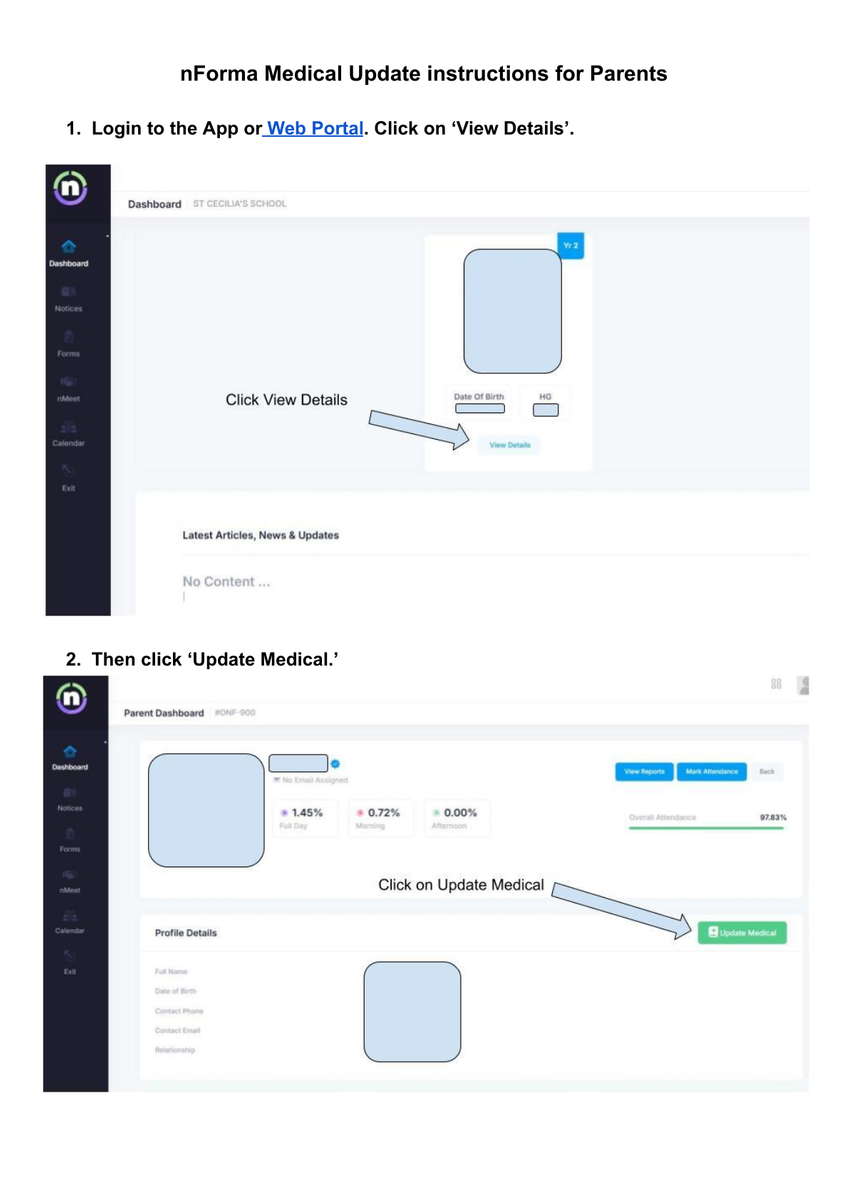
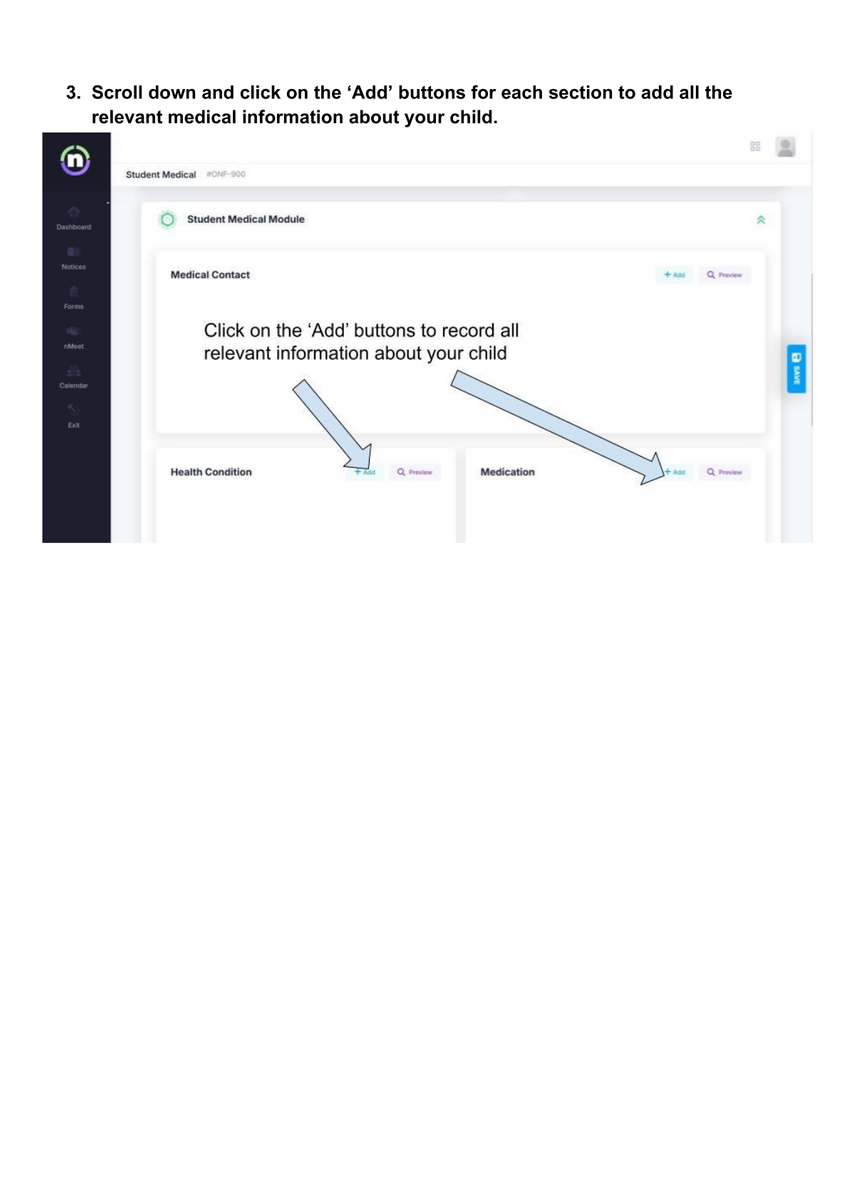
Any families yet to do so are requested to go into the nForma Parent Portal and update their child/ren's medical profile. Please see the pdf below for step by step instructions on how to do so.
 

Gallery Image
Gallery Image

By having all families complete this information in this centralised location, it will ensure we have all vital details we need to help ensure student safety, and it will reduce duplication of information for future excursions and special events.


Stay tuned for further updates in the near future about more new nForma Parent Portal features.


For details on how to setup and access the nForma Parent Portal, see the information below.


The nForma Parent Portal can now be accessed in two ways:

  1. Via the new Nforma App (see linked Portal Guide For Reports Via the App)
  2. Via the web using the new portal URL:  https://portal.nforma.com.au/login (see linked nPortal Parent Guide using URL)

Thank you for your continued support in transitioning over to a more comprehensive and streamlined communications system.