Communications
How to keep in touch and up to date...




Communications
How to keep in touch and up to date...

Principal: Mr Chad Smit principal@dcs.tas.edu.au
Head of Primary: Mr Tom Evans tom.evans@dcs.tas.edu.au
Head of Secondary: Mrs Alison Moore alison.moore@dcs.tas.edu.au
Phone: 03 6423 1373
Address: 3 - 11 Jiloa Way (PO Box 44D)
Don, Tasmania 7310
E-mail:
Staff email addresses:
Communication by email is often the best way to be in contact with teachers and other staff. Please contact the school office on 6423 1373 or admin@dcs.tas.edu.au if you would like a staff member's email address.
Website: www.dcs.tas.edu.au
Primary School Times:
8:30am start | 3:00pm finish for Primary
(Please do not enter driveway or park in Kiss n Drop until after 3pm to keep the car park flowing)
Recess: 10:55am – 11.25am
Lunch: 12:45pm (eating), 12:55pm – 1.35pm (playing)
Secondary School Times:
8:30am start | 3:10pm finish for Secondary
Recess: 10:35am – 11.00am
Lunch: 12:45pm (eating), 12:55pm – 1.35pm (playing)
Office Hours: 8:00am - 4:00pm
Our main platform for sharing important information is Schoolbox. To make sure you receive all updates relevant to your children and family, we encourage you to download the DCS Schoolbox app. Once installed, you’ll receive notifications whenever new information is available, helping you stay up to date with school news.
You will require your parent ‘Schoolbox’ username (this is usually the letter P or S followed by numbers) and then your Schoolbox password. For new families you will have received this information via email by our IT department.
Every parent and user will be required to download the new Schoolbox App on their device as we have rolled them together into one 'Application' commencing 2025.
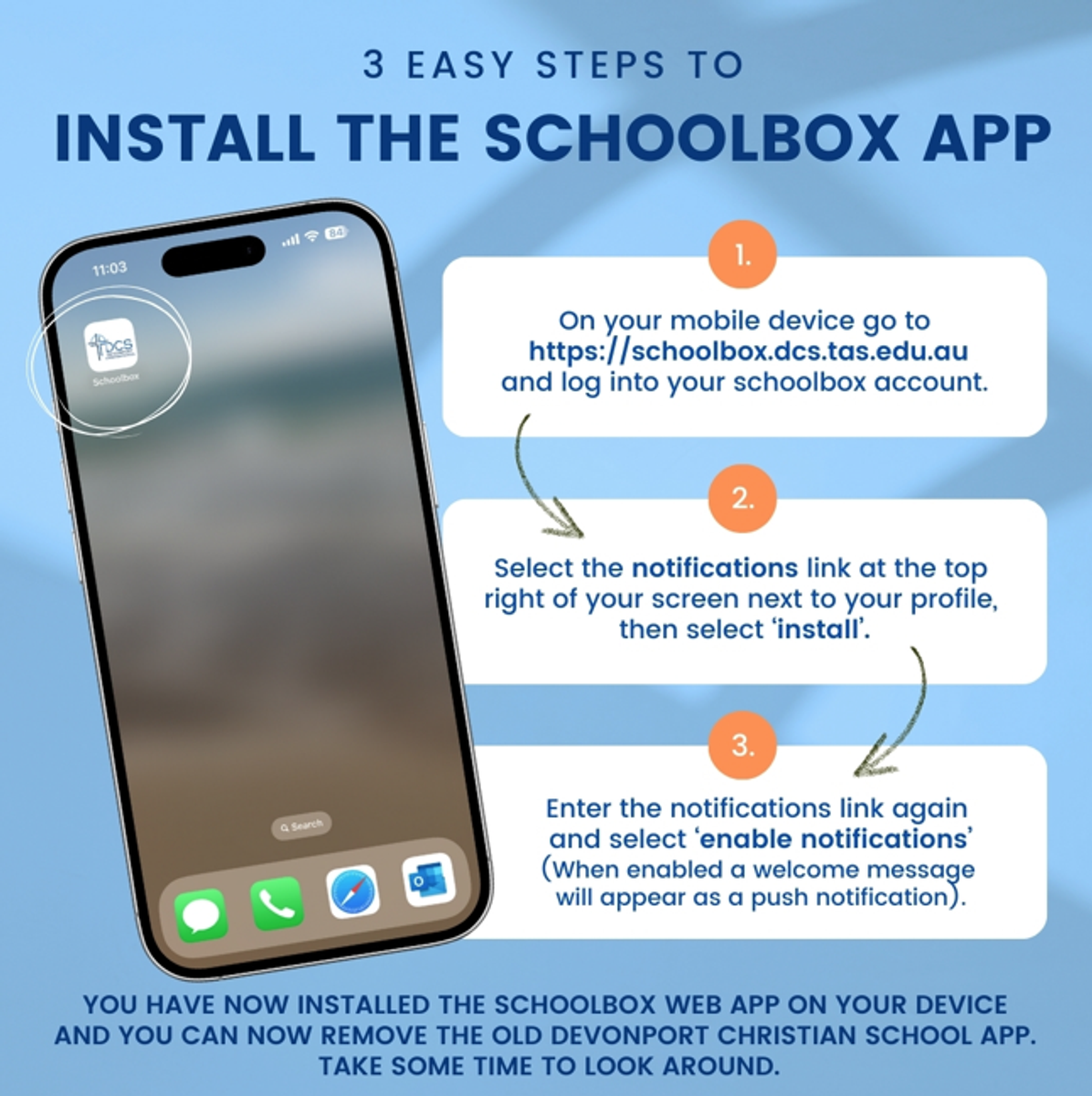
Once you have logged into Schoolbox, follow the steps below to install the new Schoolbox app on your phone, or device, giving you easy access to news (including from teachers), learning moments, timetables, communication forms and school events.
Instructions to install the new app are included below. Please call by the main office if you require any assistance.
Parent Lounge is an online portal where you can view and update student and family details, record absences, update medical information and book parent teacher interviews. From 2025 copies of student reports are also now available in Parent Lounge. Additional features will be introduced in the future.
Please use this link to log in to Parent Lounge.
When logging in for the first time, please use the 'Forgot Password' option to set your own unique password. If you then save this in your browser you will be able to simply log in again in the future.
Once you have logged in, please take the time to click around to explore what is available in Parent Lounge. We also ask that you check that all of the information listed under Parent Details and Student Details is correct. This includes address, MCEECDYA Details, student emergency contact details, student medical information and church attending.
If you have any queries or need assistance to login, please contact the school on 6423 1373 or email reception@dcs.tas.edu.au
