Page 0 Banner Photo
Cover Page
Important Dates Banner Photo
Important Dates
Principal Report Banner Photo
Principal Report A New Agreement for Our School Staff, Norwood Scores HIGH, Spring Show, Farewell to the Class of 2026, World Teachers' Day: Friday 30 October
Junior School Principal Banner Photo
Junior School Principal Road Safety, Screen Time, Term 4 Key dates for Junior School
Senior School Principal Banner Photo
Senior School Principal Year 12 Celebration Day, Year 12 Valedictory Dinner, And to our Year 12 students... your final exams are almost here!
Teaching and Learning Principal Banner Photo
Teaching and Learning Principal Celebrating Learning – What’s Happening in Classrooms, Ms Pearsell: Understanding the Economics of Mining, Ms Day's Year 12 Biology (Final Lesson), Year 12 Physics Exam Preparation with Mr Bonhi, Victorian Teaching and Learning Model 2.0, Homework Club
Captains' Corner Banner Photo
Captains' Corner Year 12 Valedictory Dinner Address
Department Updates Banner Photo
Department Updates Thunderstorm asthma – be prepared this pollen season 
 Donations for 2027 Banner Photo
 Donations for 2027
Toilet works starting!  Banner Photo
Toilet works starting!  Toilet Upgrade – An Exciting Update
Wellbeing  Banner Photo
Wellbeing  Welcome to Term 4 – The Final Stretch Finish strong, not perfect!, The Final Stretch Mindset, Five Ways to Make the Most of Term 4, Community Connections – Support Beyond the Classroom, Your Space – A Place to Connect, Create and Hang Out!, EACH Youth & Family Counselling – Free Support for Young People and Families, Maroondah Community Assist
Year 12 VCE VM  Banner Photo
Year 12 VCE VM  Year 12 VCE VM – 2026 Year in Review 🎓
Uniform Shop Banner Photo
Uniform Shop
Library Banner Photo
Library Requests for Purchase for Library Resources
Student Safety - Pick Up and Drop Off Banner Photo
Student Safety - Pick Up and Drop Off
Policies Banner Photo
Policies
Attendance Banner Photo
Attendance Process for Absences, Process for Late Arrival and Early Departure
Community News Banner Photo
Community News Poppy Appeal – 11 November 2026
View archive
Banner Photo

Library

Linda Mill - Librarian/Resource Centre Manager
Gallery Image

Requests for Purchase for Library Resources

I’m always keen to receive suggestions from students for books, magazines or games that can be added to the library collection. In the past we have had a ‘Suggestion Book’ where students could add their suggestions, but we have moved up a step and created an online suggestion book.

Here’s how students can make requests:
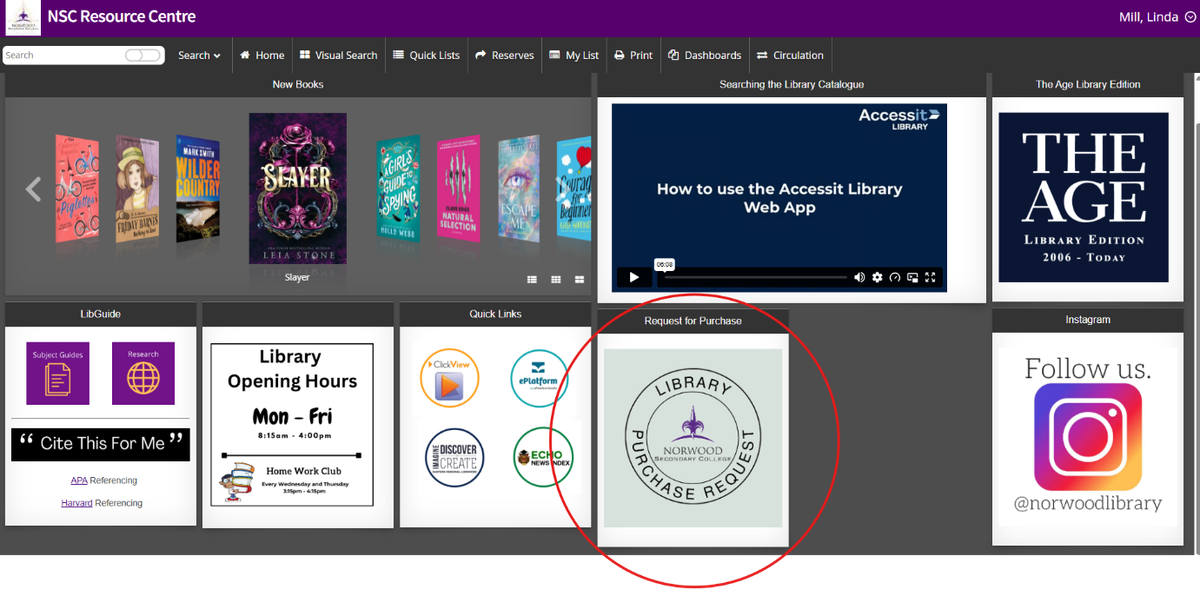
  1. Log in to the Library Catalogue using your Compass login details: 
Gallery Image
  1. From the Home page, click on the Library Purchase Request icon (please note: you must be logged in to the catalogue for this icon to be active).

  2. Fill in the Google form with your name and as much detail as you can about the resource. E.g. title, author.

  3. This form will be emailed to the Librarian who will consider the resource and check it aligns with the Library’s Collection Development policy. If successful, the resource will be added to the library’s purchase list and the next time an order is placed, it will be purchased. 

  4. Once the resource has been processed, an email will be sent to the student to let them know the resource is ready to be borrowed.

NOTE: As we are drawing close to the end of the year, any purchase requests made now will be carried over until 2027. I would love to have a list of student suggested resources to purchase at the beginning of next year, so start suggesting.