From the Office










 Pakenham Secondary College
General Office
The General Office/Reception is open from 8:15am to 4:15pm Monday to Friday throughout the school term.
The office phone number is (03) 5945 1433 and the email address is: pakenham.sc@education.vic.gov.au
Student Absences
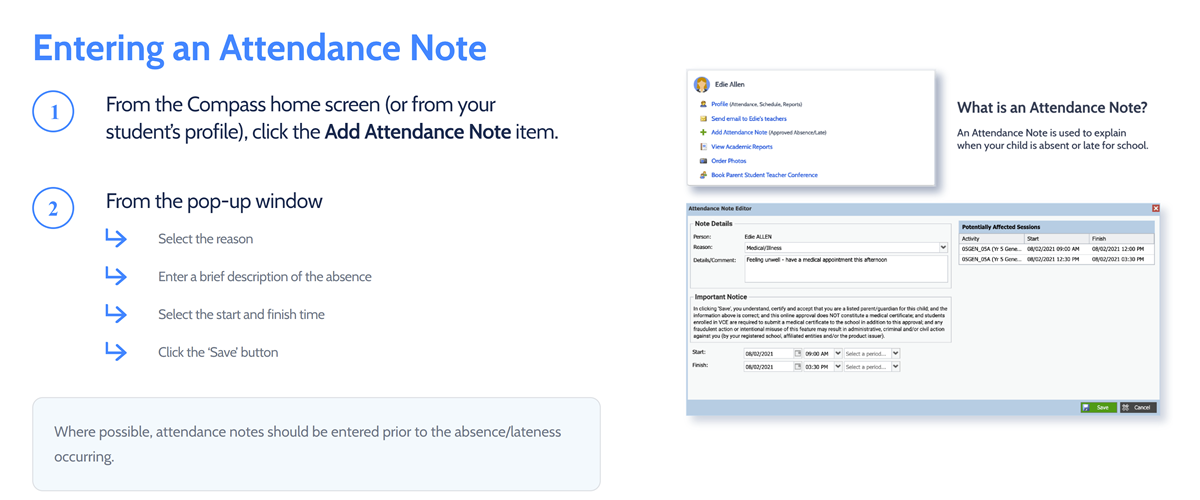

If a student is unable to attend school, is going to be late or needs to leave early, the school must be informed of all absences, whether it be illness, appointments, holidays or any other reason.
The easiest way is to Login to Compass with your Parent Login and “Add an Attendance Note” (click on the image for details).
Click here for the Compass Login or you can call the school office on 5945 1433 on the morning of the absence.
Early Departures
Please send a note with your child for early departures. The student should give this to their team leader/coordinator who will provide an Early Leavers Pass for the student to leave class.
If this is not possible, please call the office on the morning of departure so that an Early Leavers Pass can be given to your child at recess/lunchtime.
Teachers will not allow students out of class without a note.
Bell Times
| Locker Bell | 8:45 am - 8:55 am |
| Period 1 | 8:55 am - 9:55 am |
| Change Over | 9:55 am - 9:57 am |
| Period 2 | 9:57 am - 10:57 am |
| Recess | 10:57 am - 11:19 am |
| Locker Bell | 11:19 am - 11:24 am |
| Period 3 | 11:24 am - 12:24 pm |
| Change Over | 12:24 pm - 12:26 pm |
| Period 4 | 12:26 pm - 1:26 pm |
| Lunch | 1:26 pm - 2:10 pm |
| Locker Bell | 2:10 pm - 2:15 pm |
| Period 5 | 2:15 pm - 3:15 pm |
Parent Details

If you have moved house or changed phone numbers, please remember to fill in a ‘Change of Details’ form. The form can be collected from the General Office. Please return this form as soon as possible. It is important that we have your most current details for general purposes and in case of an emergency.

It is also important that you keep your mobile phone and email address details up to date on Compass. This is to ensure you do not miss out on vital information including student attendance alerts. To do this:
- Login to your Compass account, and select the Cog Icon in the top right-hand corner of the page.
- Select Update My Details from the drop-down menu provided.
- Fill in your new details as desired, then select the Update My Details button to save.
Unwell Student Reminder

Please remind your child to ask their teacher if they can visit Sick Bay if they are feeling unwell during school time. Students are not to contact parents directly. Our First Aid Officer will contact parents and ensure that correct protocols are followed.
Compass
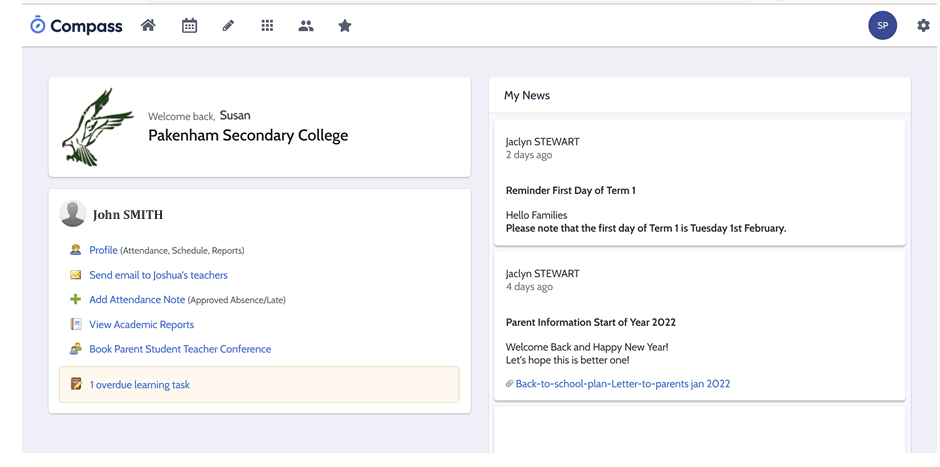
Compass is our portal where we post important information and where you can update your child/s absence, check the work that they need to complete, contact teachers, download reports when available, book parent/student/teacher interviews and more.
Please feel free to call the College with any questions you may have on 5945 1433. Our General Office will be more than willing to help you as best they can.
Click here for the Compass Login.