Child Safety and Wellbeing
























 Elisabeth Murdoch College

Child Safety and Wellbeing at Elisabeth Murdoch College:
Information for families and the school community
Elisabeth Murdoch College is committed to providing an environment where students are safe and feel safe.
Our child safety framework includes policies, codes and procedures that explain how we support and maintain the safety and wellbeing of our students and protect them from harm. These documents are available on our website: College Policies – Elisabeth Murdoch College
The college is also committed to continuous improvement of our child safety framework. We are currently reviewing our child safety policies and practices to ensure they are up to date and effective.
Our students and families are important partners in this process. We welcome your feedback or ideas on ways we can improve our approach to child safety and wellbeing.
You can read the Child Safety Code of Conduct here:
Policy Updates
The following policies were updated and ratified at School Council at the end of term 3. You can find these policies on the College website here - College Policies – Elisabeth Murdoch College
- Camps & Excursions
- Curriculum Framework
- Homework
- Yard Duty & Supervision
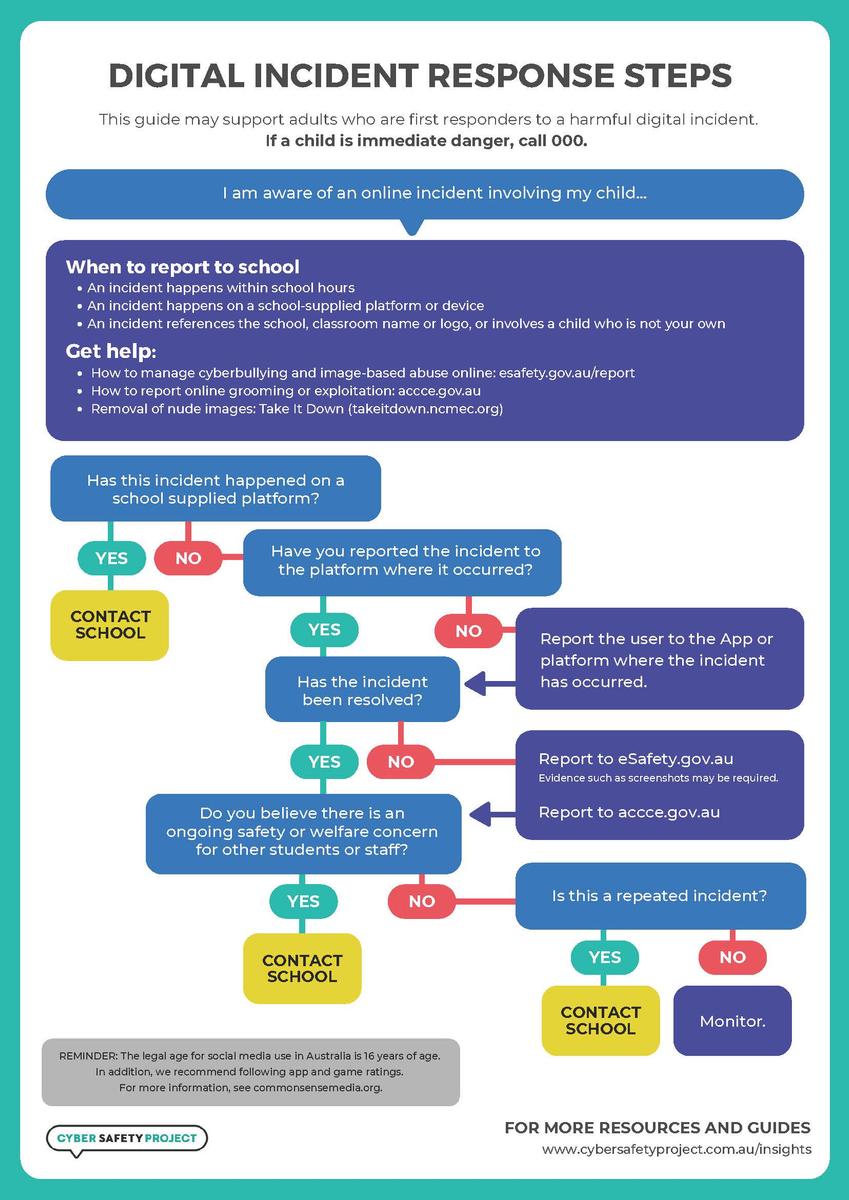
Digital Incident Response Steps:
Digital Technology at EMC
Technology helps us learn, connect, and create, but it's important to use it safely and responsibly.
At Elisabeth Murdoch College (EMC) we are committed to building a culture of respect and responsibility. We show this in the way we use technology and interact online. We teach our students about responsible digital behaviours, including how to recognise and respond to online dangers and threats. We support students to develop the digital skills they need to make a positive impact in the world. We are intentional and discerning about our integration of digital tools into the curriculum, providing rich, interactive and personalised experiences, while ensuring a balance with offline learning opportunities.
How parents and carers can help
Learning about technology and its impacts doesn’t stop at the school gate. In the document attached we share our suggestions for ways you can support your children to responsibly use digital technology.
Staying Safe Online
Protect Your Privacy
- Never share personal information online, including your full name, address, phone number, passwords, or school details.
- Do not upload photos of yourself, your family, friends, or anyone else to AI tools or websites.
- Never enter personal or confidential information into AI chatbots or AI image generators.
Use Strong Passwords
- Create unique passwords using a mix of letters, numbers, and symbols.
- Keep your passwords private and never share them with friends.
Think Before You Post
- Remember that what you share online can stay there forever.
- Be respectful and considerate in messages, comments, and social media posts.
Be Aware of Scams
- Don't click suspicious links or open unexpected attachments.
- Be cautious of messages offering prizes, rewards, or asking for personal details.
Be Kind Online
- Treat others with respect.
- Report cyberbullying or inappropriate behaviour to a trusted adult or teacher.
Using AI Responsibly
AI can be a useful learning tool, but remember:
- Never share personal information, passwords, school records, or private conversations with AI tools.
- Never upload photos of yourself or others.
- Always check AI-generated information, as it can sometimes be inaccurate.
- Use AI to support your learning, not to complete work dishonestly.
If Something Doesn't Feel Right
If you see something online that concerns you, stop engaging, take a screenshot if needed, and speak to a teacher, parent, or trusted adult.
Think. Protect. Respect. Report.
Smart choices online help keep everyone safe.
If you have any suggestions or comments, please contact us via the college email – elisabeth.murdoch.co@education.vic.gov.au