School Apps















 St. Andrew's Primary School Clayton South


Staying Connected!
Dear Parents,
To help us keep you updated with everything happening at school, we use two main apps for our communication.
We would greatly appreciate it if you could download these to your mobile device:
- Audiri: This is our go-to for daily notices, and general school reminders. It’s the best way to make sure you never miss an important update!
- nForma: We use this portal for more formal items, such as accessing your child’s student reports, medical and health information and granting permissions
Both apps are available for free on the Apple App Store and Google Play Store.
Thank you for helping us stay connected and well-informed!
We no longer use Operoo
We need you to be using nForma
Operoo has been phased out and is no longer be supported. Due to this change, our school has transitioned to nForma, which is our new platform for digital forms, permissions, and school communication.
nForma will provide a streamlined and user-friendly experience for families, making it easier to complete and submit school forms, manage student information, and stay up to date with school notices.
Please log into the nForma portal and check their child's information and medical history.
How to Access the nForma Parent Portal:
1. Using the nForma App:
Download the nForma Parent Portal app from the Apple App Store or Google Play Store.
The app is available for both iPhone and Android devices. Simply search for "nForma for Parents" in the Apple App Store or Google Play Store to download it for free.
How to Get Started:
- Instructions for downloading and setting up the app can be found here.
- Log in to the app and experiment with the attendance, calendar and report features.
- Please contact the office at office@saclaytonsth.catholic.edu.au if you have any questions.
Important Notes:
- To set up your nForma App account, you must use the email address you’ve provided to the school.
- If you haven’t yet provided an email address, or if you need to confirm or update your details, please contact the school office as soon as possible.
We hope you find the new system more convenient and user-friendly.
Viewing Your Child's Information:
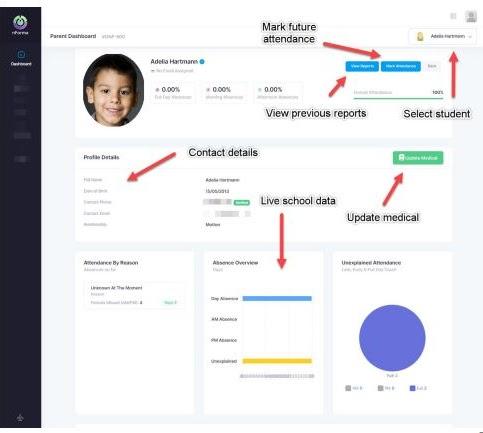
After logging in, select your child from the list.
Please check your child/ren's information and medical information.
Getting started
Logging in
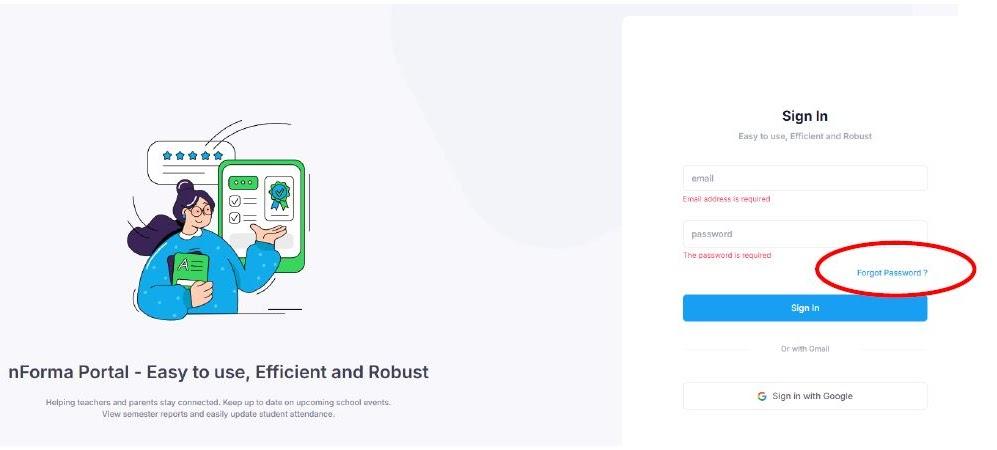
When logging in, you will see multiple options on how to login. You can login either with a google account or another preferred email address. The most important thing to note is that it must be the email registered with the school.
For example, if you have two emails, one Google and one Hotmail, and the Hotmail is linked to the school, logging in through the google option with your Gmail account, will not work.
To log into the nPortal use this link: https://portal.nforma.com.au/login
To setup your password for the first time, you will need to click on the “Forgot Password” link. From there, enter the email address registered to the school. Once done, you should receive an email with a password reset. Once you have updated your password, you can then login.
Need Assistance?
If you encounter any issues or have questions about accessing the portal, please contact office@saclaytonsth.catholic.edu.au
Audiri School App

Please ensure you download the Audiri App to get alerts for weekly newsletters, important announcements and reminders.
Please continue using Audiri for your child's absence.