Arrival and Departure to and from School.

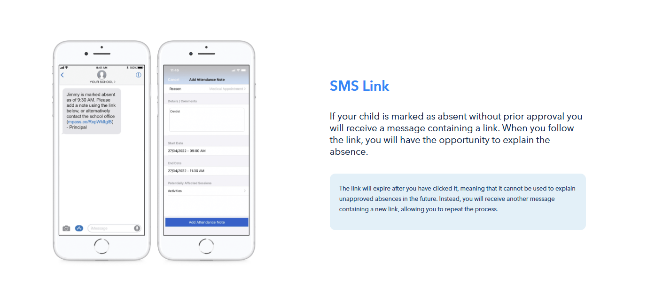
A friendly reminder that if your child needs to leave school during the day for an appointment, will be arriving late due to an appointment, or will be absent for the entire day, please submit an attendance note through Compass.
Providing attendance notes promptly helps us maintain accurate attendance records and ensures that all absences are recorded correctly.
Please note that students are still required to physically sign out and sign back in at the appropriate Year Level office:
- Years 10–12: Senior School Office (Kiera)
- Years 7–9: Middle School Office (Narelle)
Thank you for your support in helping us keep our attendance records accurate and up to date.
Entering an Attendance Note
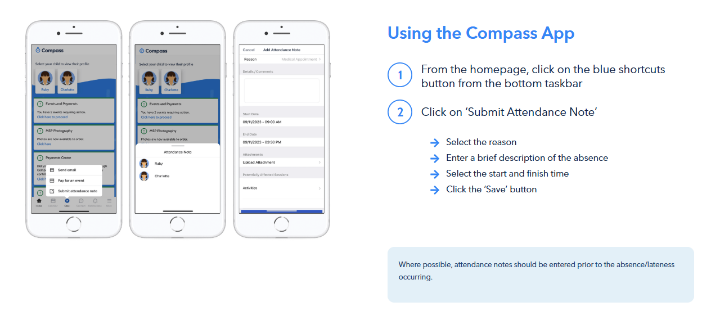
1. Using the Compass Mobile App
- Open the Compass School Manager app on your smartphone.
- From your home screen, tap the "+" icon (Shortcuts) in the bottom taskbar.
- Tap "Submit Attendance Note" (or "Add Attendance Note").
- Select the child you are writing the note for.
- Choose the Reason (e.g., Illness, Medical Appointment, Family/Social).
- Enter a brief description in the details/comment box so the school understands the nature of the absence.
- Adjust the Start and Finish Dates/Times to ensure they cover the exact period your child will be away.
- Tap "Save" or "Add Attendance Note"
2. Using a Web Browser (Computer or Laptop)
- Go to the Compass School Portal.
- Log in using your parent username and password.
- Click on your child's profile picture or name on the home screen.
- Navigate to the Attendance tab.
- Click "Add Attendance Note/Approval".
- A pop-up window will appear. Select the applicable reason, add a description, and select the start and finish times/dates.
- Click "Save"
Attached is a link that will take you the Compass Guide for Parents please have a read
A guide for parents & families | Compass Education AU