Compass - Events & Tips

Compass Events
Compass is the main communication tool between home and school, with notifications from classrooms, whole school messages, event information (excursions/incursions), reminders, student led conference bookings, newsletter etc. We strongly encourage all parents to regularly check in to avoid missing deadlines and important information - late payments will not be accepted.
Events currently requiring parent consent/payment:
- Year 1 'Mad about Science' Workshop - payment and consent due 15/6/26
- Year 3 Camp - Balance due 3/8/26
- Year 4 Camp Deposit - payment and consent due 19/7/26
- Foundation - Year 6 Cyber Safety Program - payment and consent due 15/7/26
- Somers School Camp (select students) - payment and consent due 23/6/26
Trying to keep track of due dates for events?
Here is what Karoo is doing to support you:
Compass posts
Notifications are automatically sent when an event is posted on Compass - we recommend you check when the event is on, and due dates for payment/consent, and mark it in your personal diary/calendar.
Compass reminders
Reminder notifications are sent via Compass with due date for payment/consent a week or so prior to the event.
Compass School Calendar
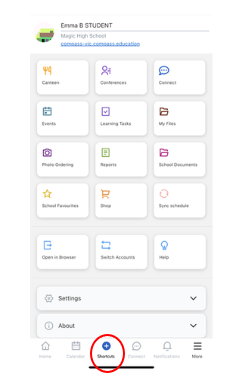
All events and other activities are listed in the school calendar on the Compass app (click on calendar icon or select 'Calendar' tile to view).
Newsletter
All events and other activities (such as second hand uniform sales, canteen special lunches, etc) are noted in the newsletter (See Calendar page and/or Compass - Events page)
Year Level/Class newsletters
Year level or Class newsletters (sent out each Friday) include reminders for upcoming events.
Phone Calls
Follow up phone calls will be made from the teacher to the parent a few days prior to event if still outstanding.
We urge all parents to please keep on top of event due dates as unfortunately late payments will no longer be accepted after the final cut off date/time for any event or activity.
If families are experiencing financial difficulties, please come and have a confidential conversation with leadership or office staff.
Shortcut and Calendar
- Use the shortcut button (located at the bottom of the screen) to take you directly to any outstanding events/notifications.
- Click on the Calendar button (located next to the shortcut button) to discover what is upcoming for your child. Choose the 'by week' option for easier viewing.