Term 1 Reports

Accessing Reports - The Learning Dashboard
This term, St Mary’s Catholic College is transitioning to our new academic reporting application, The Learning Dashboard (TLD). On Saturday, 5 April, you will use the new app to access your child’s Term 1 report and all future reports.
You will notice some differences with TLD compared to our previous system. Rather than opening a PDF report, TLD will take you to your child’s report via a modern web interface, providing an improved user experience on your mobile phone, tablet, or computer.
The new report will also include student cohort data about their achievement judgments. This cohort graph provides a visual indicator of your child’s grade and their peers'.
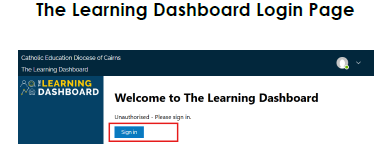
Once having navigated to TLD, users will need to log in again using their Parent Portal credentials.
How do I access the new system?
You can access TLD via the Parent Portal or the MyCE app.
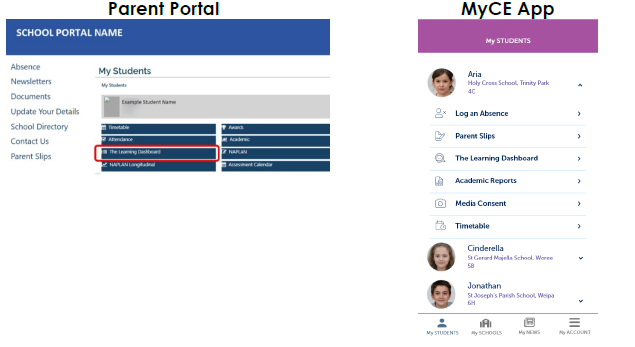
Once having navigated to TLD, users will need to log in again using their Parent Portal credentials.
Can I still have a PDF version of my report?
Yes. There is a print PDF functionality available within TLD. On clicking the blue 'Print PDF’ button on the top right-hand corner of the dashboard, a PDF of the report will be downloaded. Further guidance on these steps is provided in the training materials.
How do I access previous reports created in the old system?
You will continue to access your previous reports via the School Portal as you have in the past. All future reports will be accessible via The Learning Dashboard.
If you have any questions or need help navigating the new system, please contact the College.
In faith, hope and love
Janet Ross
Assistant Principal - Learning