This Week in IT















 Trinity College
Creating a Safe and Consistent Digital Learning Environment
As part of Trinity College's College Provided Laptop Program (CPLP), students are provided with a managed device that has been configured to support learning, collaboration, creativity, and responsible use of technology.
To help provide a consistent and secure experience for all students, the College standardises on approved software and services, including the use of Microsoft Edge as the default browser and approved educational applications and AI tools.
While students may notice that some browsers, extensions, applications, and AI services are unavailable on their device, these decisions are made to support student safety, privacy, cybersecurity, and effective learning.
Why We Standardise on Microsoft Edge
The College has adopted Microsoft Edge as the standard browser across CPLP devices because it integrates closely with our learning platforms, Microsoft 365 services, identity management systems, and cybersecurity controls.
This provides several benefits:
- Consistent access to College learning resources.
- Improved security and protection from malicious websites.
- Better protection of student accounts and passwords.
- Support for accessibility features and learning tools.
- Seamless integration with Microsoft 365 applications.
A consistent experience for students and teachers across the College.
By maintaining a standard browser, the College can provide better support, resolve issues more quickly, and ensure students have reliable access to the resources they need for learning.
Supporting Safe Technology Use
Technology evolves rapidly, and thousands of new applications, browser extensions, and online services become available every year. While many of these tools are legitimate, others may collect excessive personal information, contain hidden advertising, expose users to inappropriate content, or present cybersecurity risks.
In recent years, schools and organisations worldwide have seen an increase in applications, browser extensions, and online tools that appear legitimate but are later found to:
Collect personal information beyond what is necessary.
Access account credentials and online activity.
Store or transmit user data without adequate safeguards.
Circumvent security and content-filtering protections.
Introduce malware or other cybersecurity threats.
For this reason, the College carefully reviews and approves software before it can be used on CPLP devices. This also gives us the opportunity talk to boys and see what they require and more importantly is it safe and functional within this framework.
Age Appropriate Artificial Intelligence
Artificial Intelligence (AI) is becoming an important part of education and the future workplace. Trinity is committed to helping students develop the skills needed to use AI responsibly and effectively. However, not all AI platforms are suitable for school-aged students.
Many publicly available AI tools have been designed for a general audience and may not provide the safeguards expected in an educational environment. Some may retain user conversations, collect personal information, or generate content that is not appropriate for younger users.
To support student wellbeing and online safety, the College provides access to approved AI tools that have been reviewed for:
Age appropriateness.
Educational value.
Privacy and data protection.
Security controls.
Content moderation and safety guardrails.
Alignment with the College's teaching and learning objectives.
This allows students to benefit from emerging technologies while ensuring appropriate protections are in place.
Balancing Innovation and Safety
The College is not seeking to limit students' access to technology. In fact, CPLP devices provide access to a wide range of modern learning tools, creative applications, collaboration platforms, accessibility features, and approved AI services. Our goal is to strike the right balance between innovation and responsibility.
Just as we supervise physical learning environments to ensure student wellbeing, we also have a responsibility to provide appropriate safeguards within digital environments.
Preparing Students for the Future
Technology will continue to evolve, and so will the tools available to students. The College regularly reviews browsers, applications, extensions, and AI platforms to ensure students have access to technologies that support learning while maintaining high standards of safety, privacy, and security.
By providing a managed and secure device environment, we are helping students develop the digital literacy, critical thinking, and responsible technology habits they will need for success beyond school.
The CPLP is designed to give students access to modern technology in a safe, supported, and age-appropriate environment. Standardising on trusted platforms such as Microsoft Edge, approved applications, and carefully selected AI tools helps ensure students can learn confidently while protecting their privacy, wellbeing, and online safety.
Helping Students Build Healthy Digital Habits
Technology plays an important role in learning at Trinity College, but the habits students develop around technology are just as important as the device itself.
Small, consistent routines at home can help students stay organised, protect their wellbeing and use technology more responsibly. Parents and guardians do not need to be technology experts. Simple conversations and clear expectations can make a meaningful difference.
Families may find it helpful to encourage students to:
- Charge their device each evening and bring it to school ready for learning
- Keep food and drinks away from laptops and other technology
- Store chargers, pens and accessories safely
- Use devices in shared areas of the home where practical
- Take regular breaks from screens
- Avoid recreational device use close to bedtime
- Keep passwords and sign-in details private
- Think carefully before posting, sharing or responding online
- Report concerning messages, content or online behaviour to a trusted adult
Let the College know promptly if a device is damaged, missing or not working correctly
It is also helpful for families to regularly discuss what students are doing online. Rather than focusing only on screen time, parents might ask:
- What did you use your device for today?
- Did you see anything online that concerned or confused you?
- How do you decide whether information online is trustworthy?
- What would you do if someone contacted you unexpectedly?
Can you show me how you organise your schoolwork?
These conversations help students develop confidence, judgement and accountability as they become more independent online.
Technology works best when students, families and the College share responsibility for creating safe, respectful and productive digital environments. By establishing healthy routines and maintaining open conversations, families can help students use technology as a positive tool for learning.
Introducing the Trinity College Student Safety Portal
Trinity College is pleased to introduce the Student Safety Portal, a new service designed to give parents and guardians greater visibility and control over their child’s internet use on college-managed devices outside of school hours.
The Student Safety Portal is powered by Saasyan Assure and is available for supported Junior School College-managed devices and College Provided Laptop Program (CPLP) devices.
The portal is part of the College’s ongoing commitment to student wellbeing, online safety and digital citizenship, while strengthening the partnership between families and the College in supporting safe and responsible technology use.
What does the Student Safety Portal provide?
The portal is designed to complement the conversations and boundaries families already have around technology use at home. It provides parents with additional information and practical tools to help establish healthy and age-appropriate digital habits.
Through the portal, parents and guardians can:
View internet activity and online safety alerts (outside of school hours)
See reporting on web searches, video activity and blocked websites
View insights into different categories of web usage
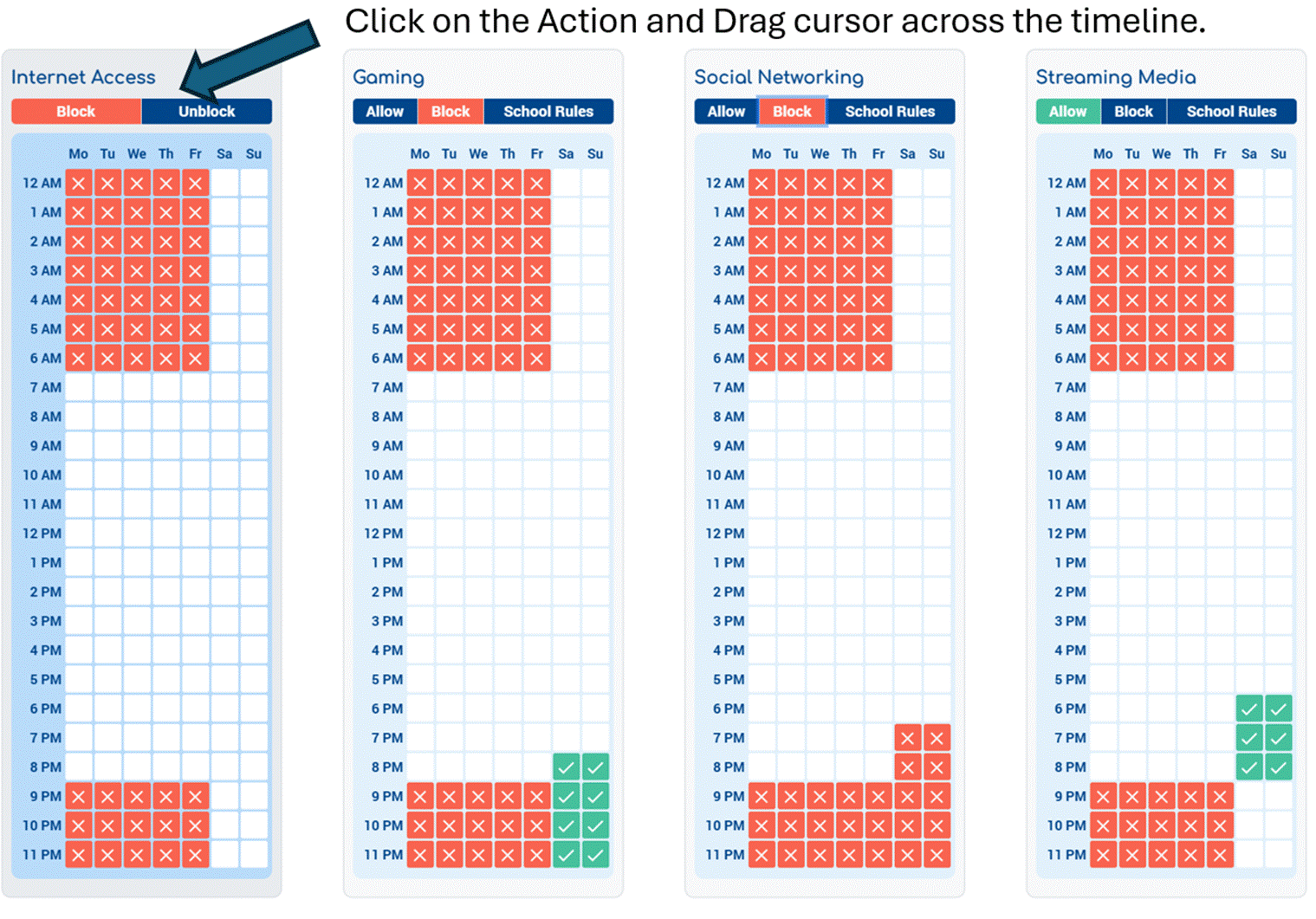
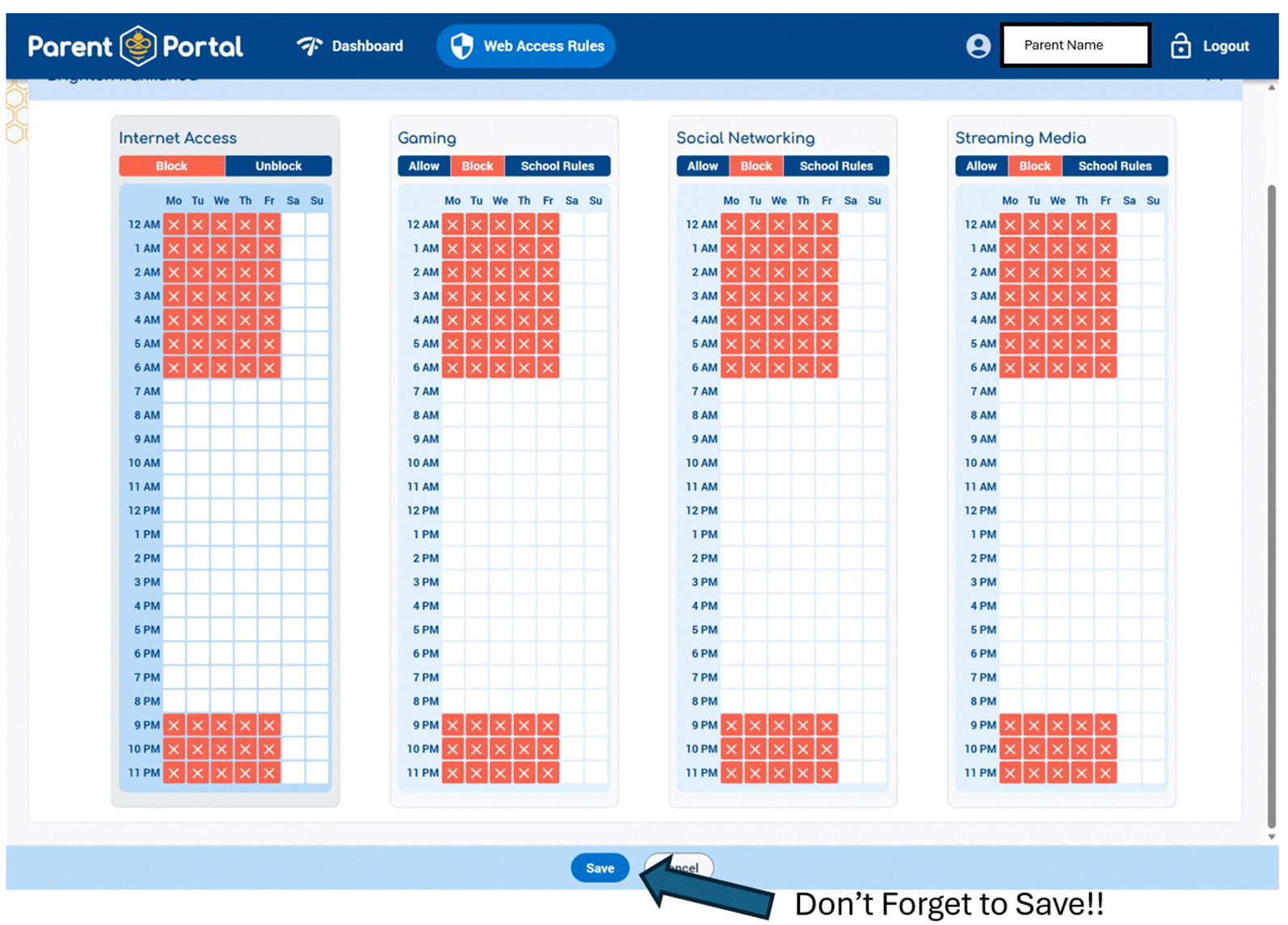
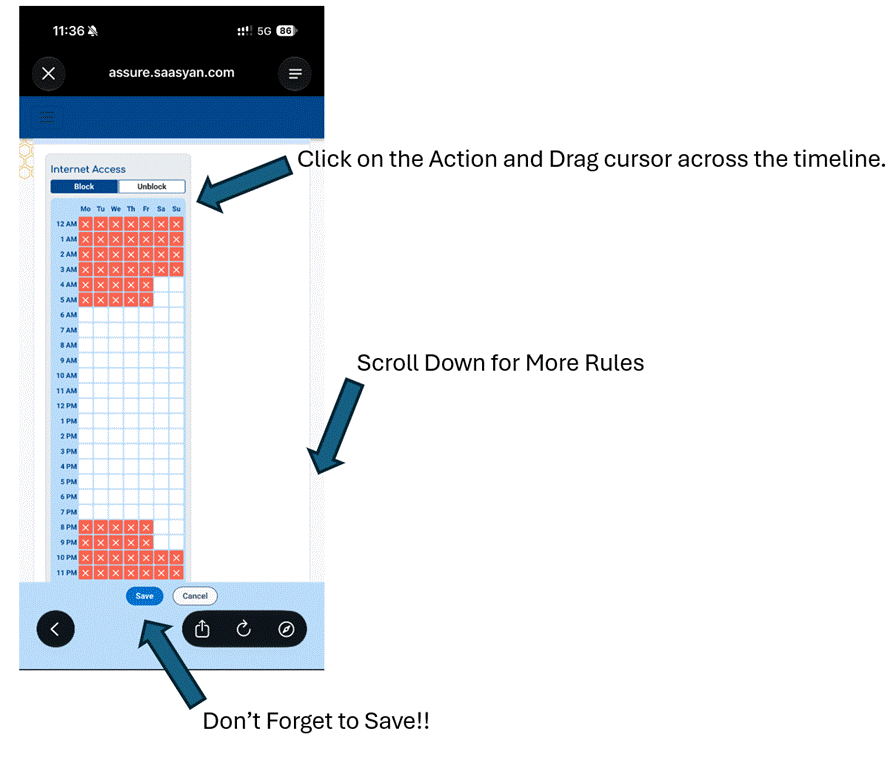
Manage selected internet access rules and schedules outside of school hours
Gain greater awareness of online behaviours when College-managed devices are being used away from the College
How do you access Student Safety Portal:
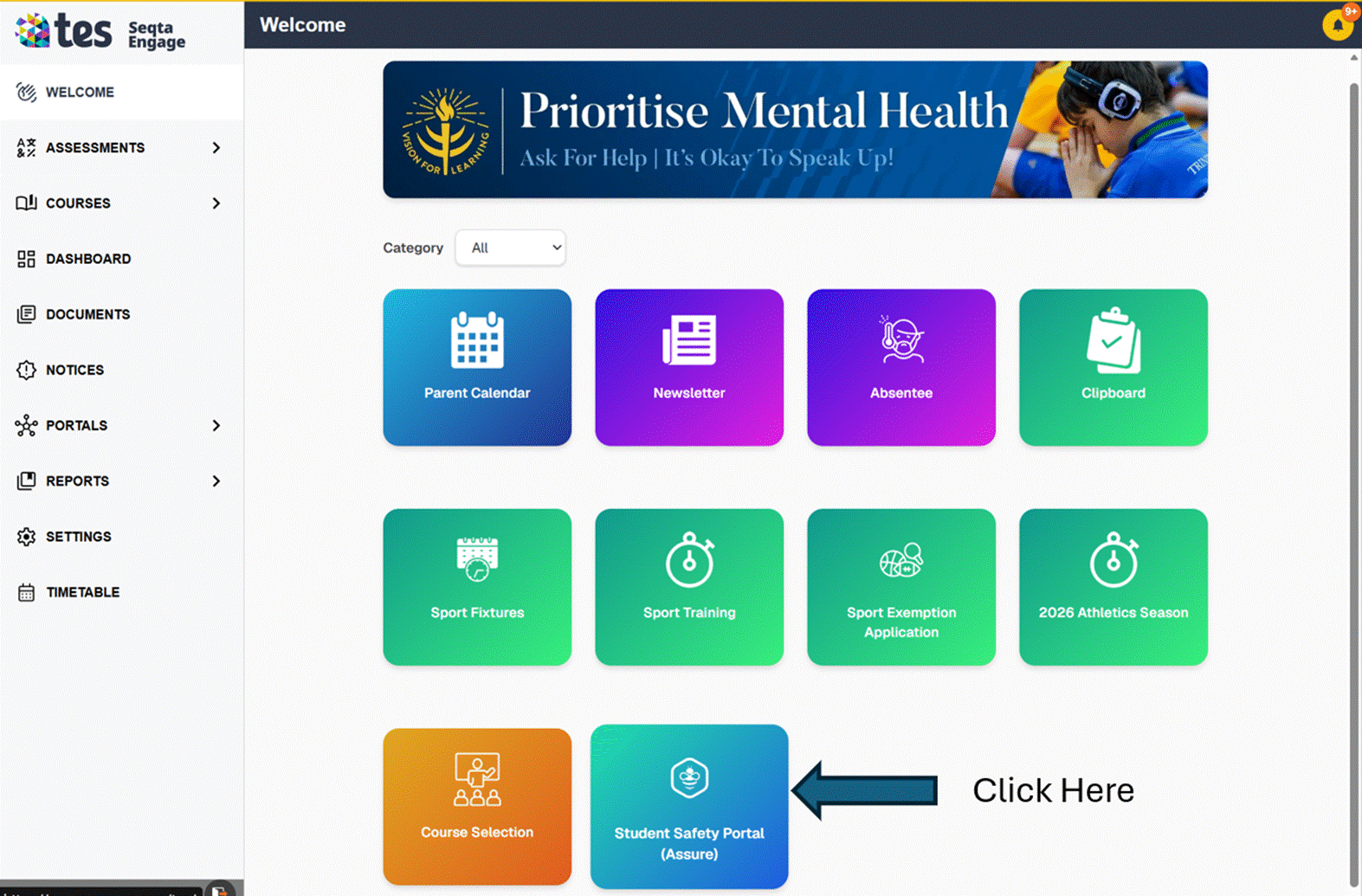
Student Safety portal can be access via the Seqta Engage Portal (Welcome — SEQTA Engage) or via the Trinity College Perth App in your Favorite mobile store whether that will be Apple App Store or Android Google Play store.
TC Mobile App | Trinity College
Seqta Safety portal Login :
Step 1: Seqta Engage portal has a new tile called Student Safety Portal.
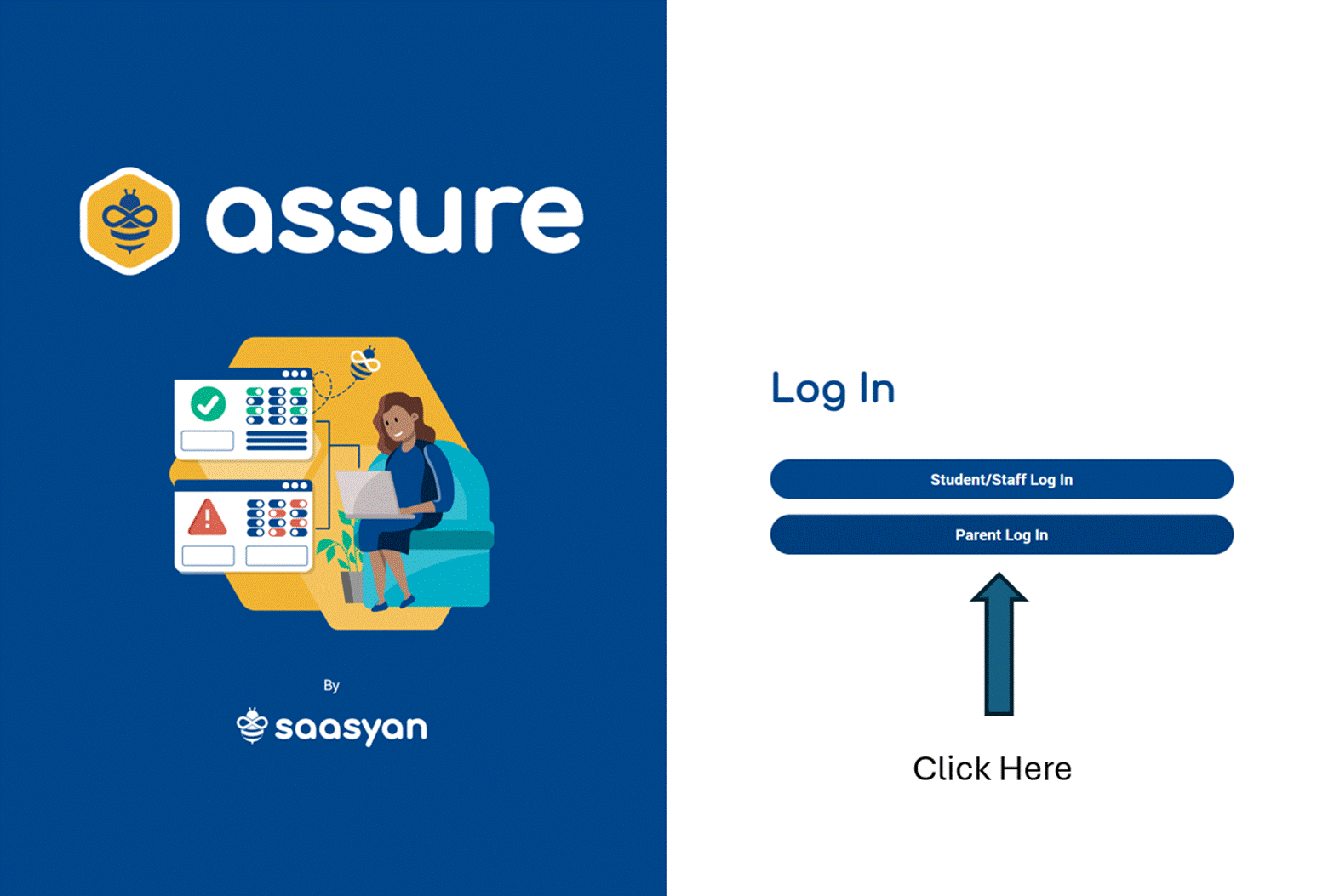
Step 2: Please ensure you pick the write login tile.
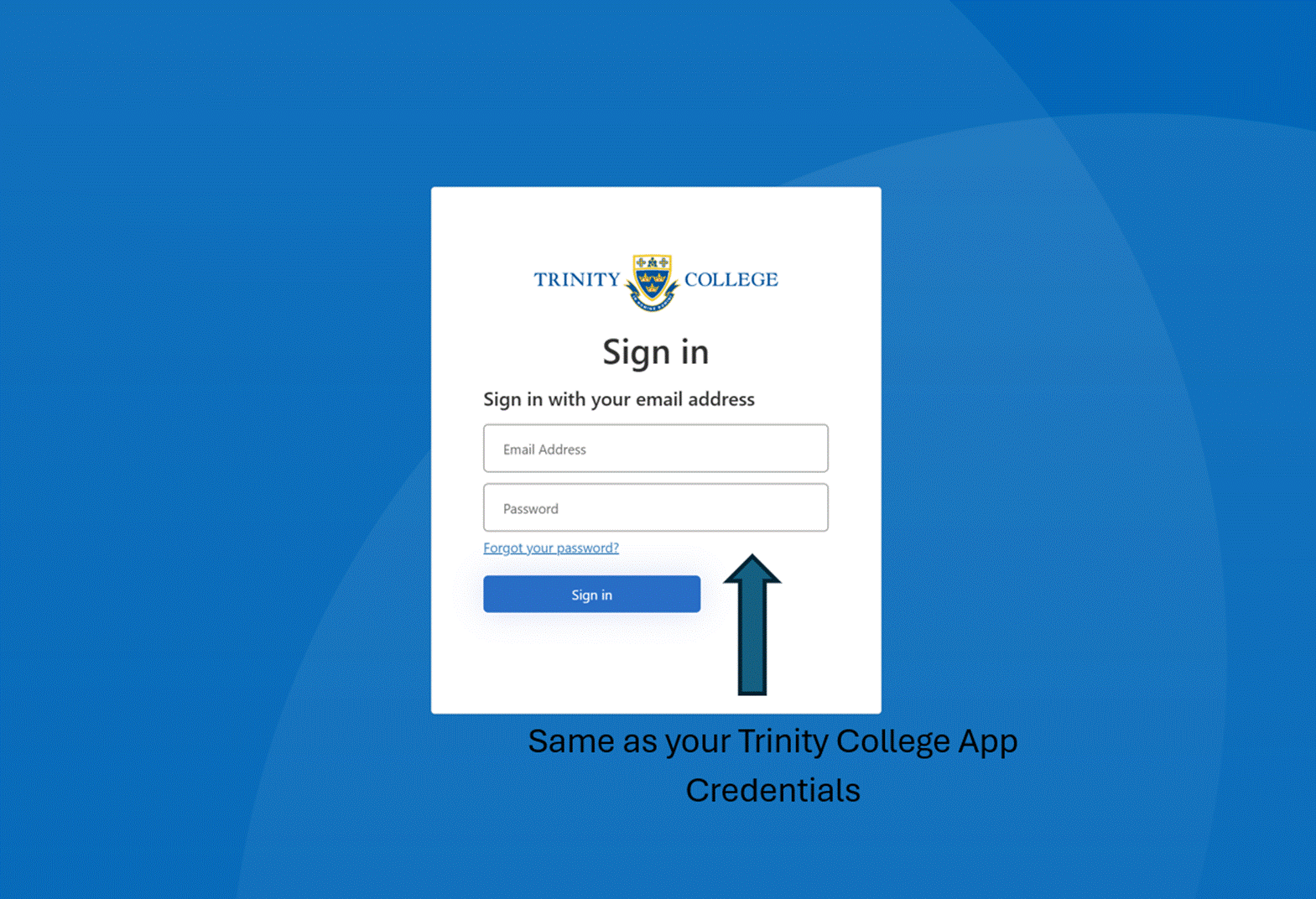
Step 3: If you get this prompt please use your sign in information to Trinity College App
Step 4: Main Dashboard with drill down information on internet history on the device.
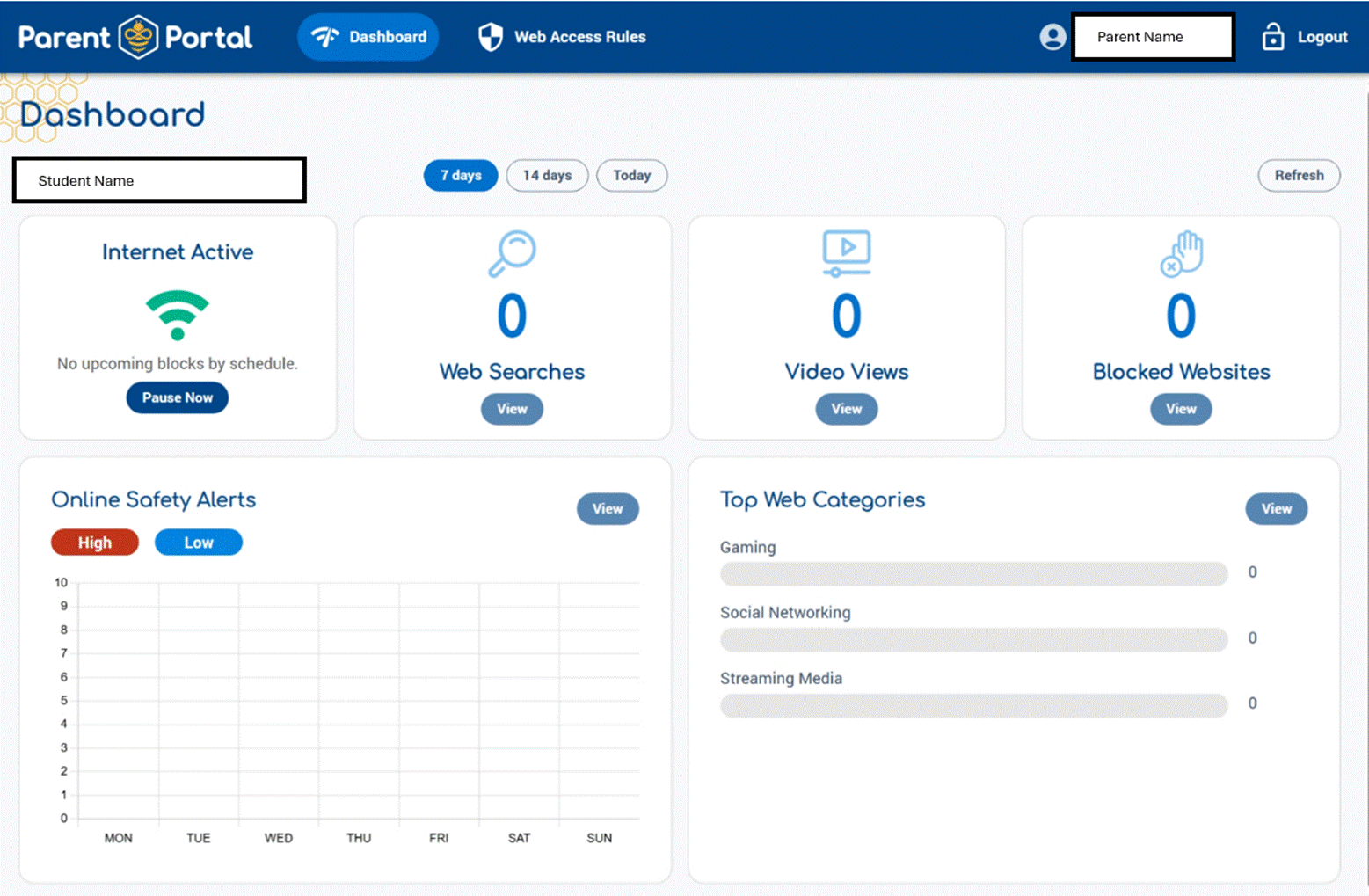
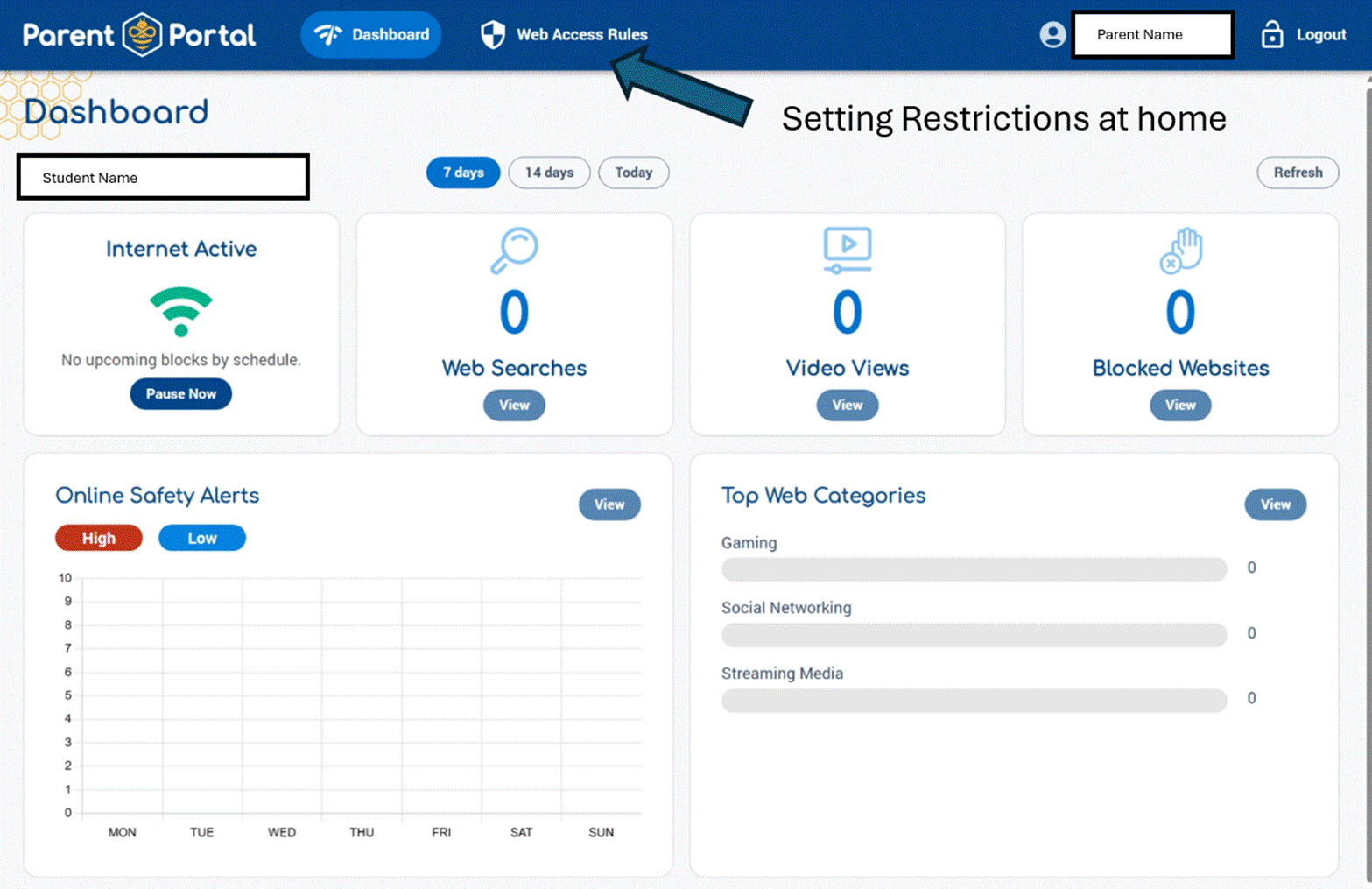
Step 5: Setting Restrictions in Web Access Rules:
Trintiy College Perth App access to Safety portal Login :
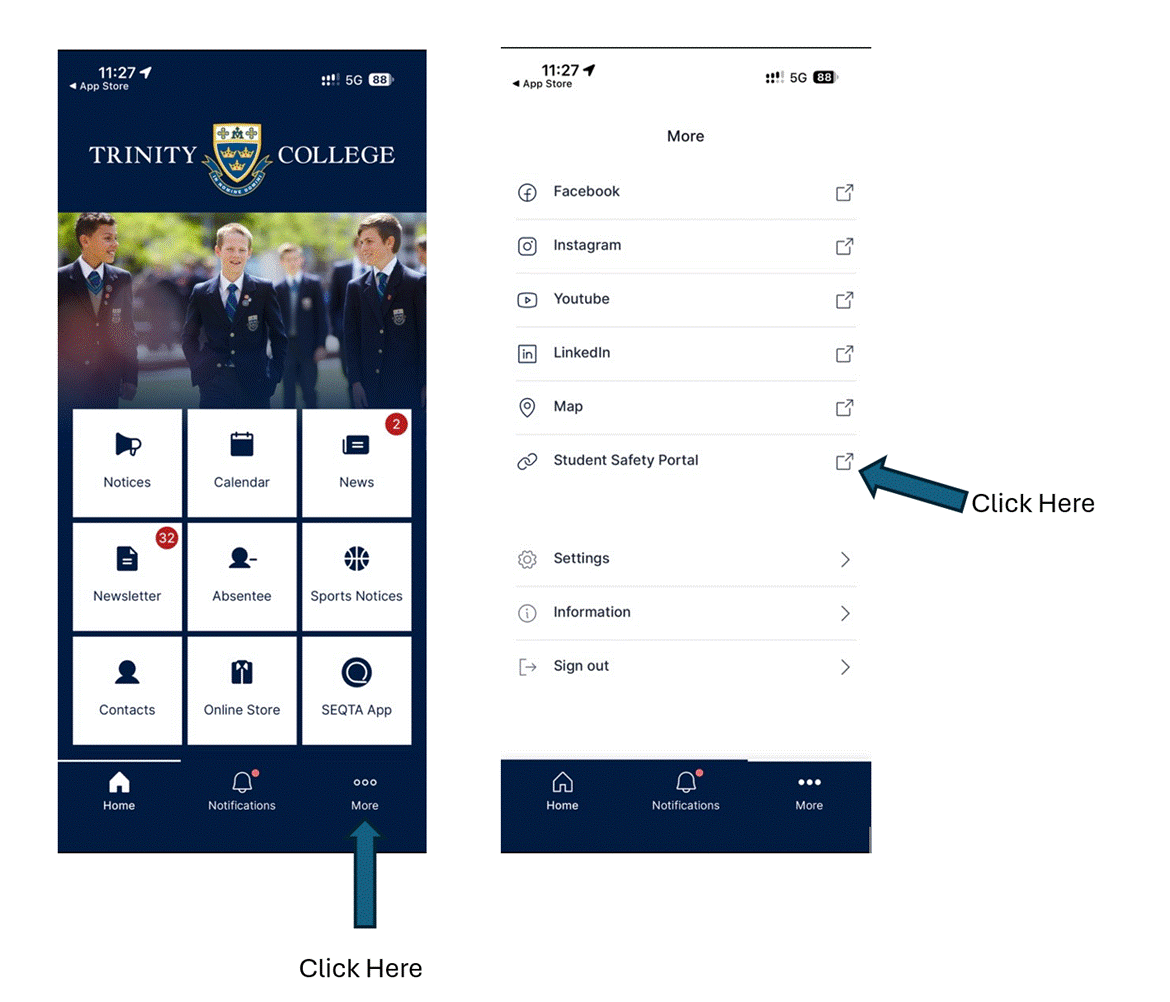
Step 1: Login via the steps below by Clicking More and Student Safety Portal (Use the same credential as the app)
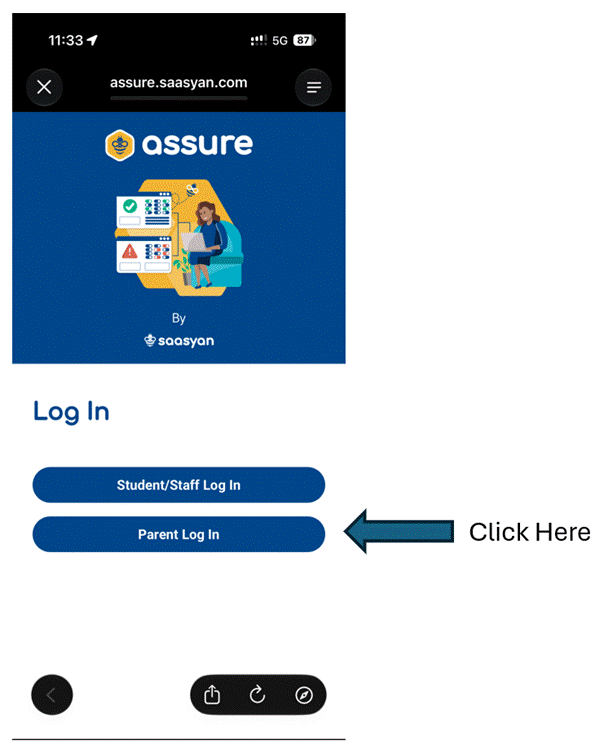
Step 2: Ensure you click on Parent Login
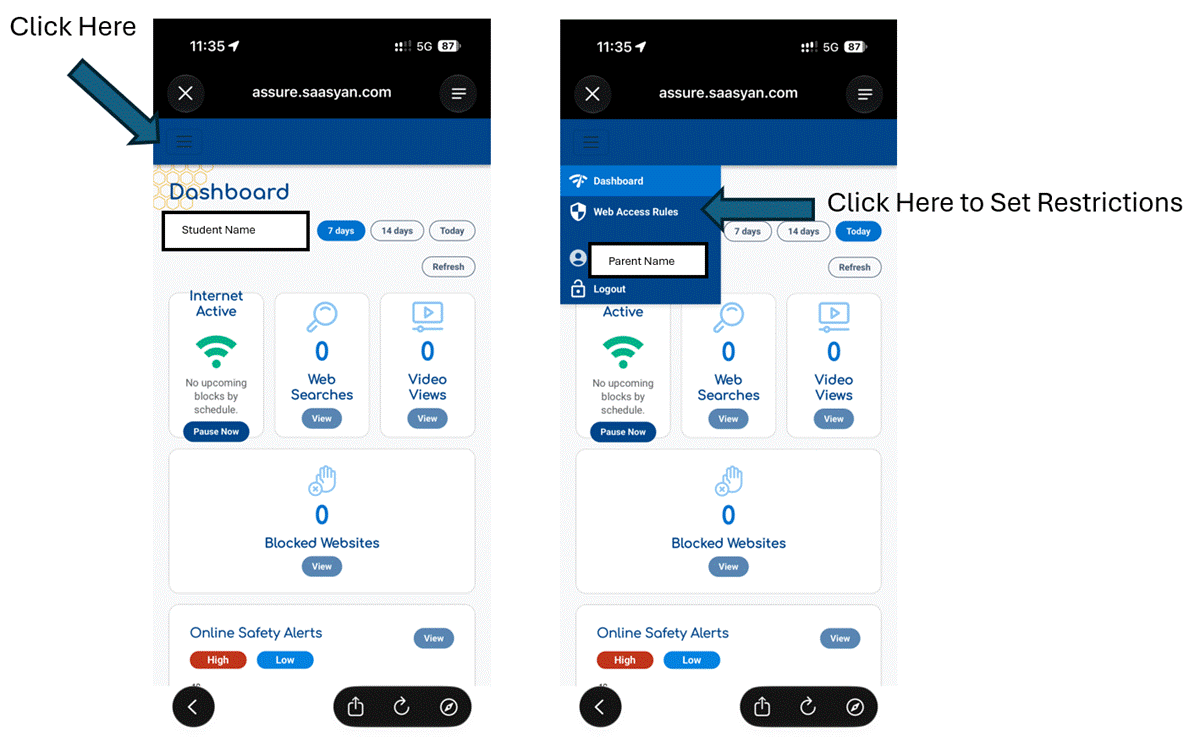
Step 3: Main Dashboard with drill down information on internet history on the device. If you click on the Left hand corner

you will get access to setting restrictions.
Mr Shaq Herath
Director of ICT