Compass Information
Voluntary Contributions & Consenting/Paying for Events

























Compass Information
Voluntary Contributions & Consenting/Paying for Events
Voluntary Contributions can be found under the Action Centre tab. This is located by choosing the 'Events' button, under 'More' on the bottom right-hand side of the home screen.
You can then select the Action Centre tab along the top, which will allow you to see all voluntary contribution amounts for payment.
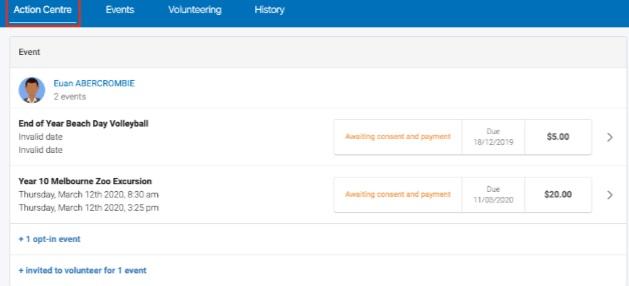
If you are unsure if you have made a payment, you are able to select the 'Payments' tab along the top, which will provide a summary of all payments made to the school.
Parents will receive a notification on their home screen when there is an event that requires their approval or payment.
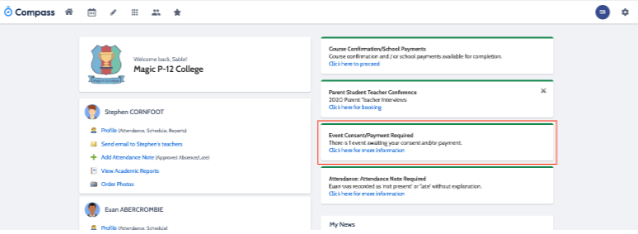
To provide the consent/payment required, parents can click the notification. This will take them to the Events page, where they can see all events that require their consent/payment, and those that they have already consented to/paid for.
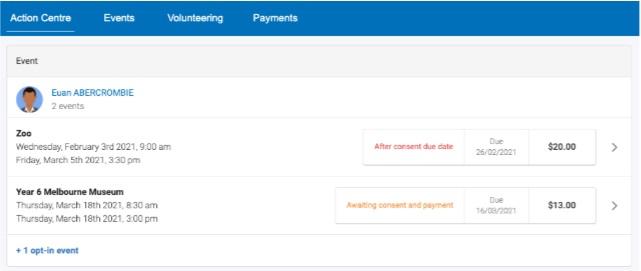
Parents have the option of completing the consent/payment online, or by printing the consent form and handing it in to the office.
If by any chance you miss the payment date, you are still able to view the amounts due by choosing the 'Events' button, under 'More' on the bottom right-hand side of the home screen. You can then select the Action Centre tab along the top, which will allow you to see all outstanding events.