CDFPay









 St. Andrew's Primary School Clayton South

CDF PAY is used for...

Online School events and fundraising at our school
St. Andrews’s Primary School is now using the new CDFpay mobile app for school events at our school.
How to register for a new CDFpay account
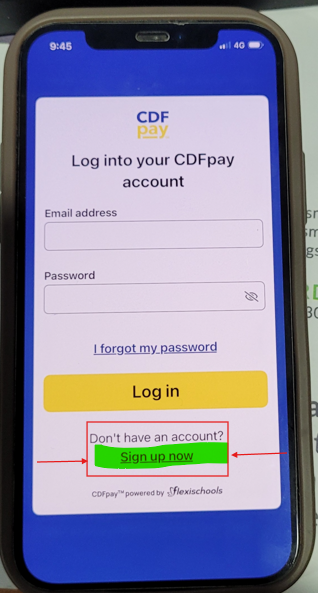
1. Download the CDFpay mobile app on the Apple or Google store, then click ‘Sign up now’.
No app? Register here
Important:
You will not be able to use your existing CDFpay credentials to log in to the new CDFpay mobile app. You will need to follow these steps to create a new CDFpay account (you can use the same email address if desired).
2. Enter and confirm your email address, then click ‘Sign up’.
3. Check your email inbox and follow the prompts to complete your account registration (check junk/spam if lost).
Need Help?
Download instruction options below:
CDFPay Parent Digital instructions
Simplification is Here: The Future of Our School Payments
Dear Families,
As we settle into the new school year, we are excited to introduce CDFpay, our new all-in-one payment and school management portal. While any new system comes with a learning curve, we are confident this modern, more efficient platform will greatly streamline how you connect with the school.
Important: Check Your Email (Sent 2 Feb)
Every family should have received a setup email directly from CDFpay on 2 February.
Action Required: This email is legitimate and is your unique key to accessing the system. If you haven't seen it, please check your Junk or Spam folders. You will need to click the link in that email to activate your account and set up your password. You will also need to download the app - instructions are in the newsletter
What Can You Do Right Now?
While the platform is new, we are already moving ahead with key services to help you manage the school year:
- School Fees: View your balance and manage tuition payments in real-time, once you have linked your family account code (see school fees statement).
- Flexible Payment Plans: We know family budgets vary. You can now set up automated weekly, fortnightly, or monthly payment plans that work for your household, all within the app.
Now Open: Family Fun Night!
One of the highlights of our school calendar is fast approaching, our Family Fun Night on 27 March, and we are making it easier than ever to enjoy the evening. We are transitioning to make the Family Fun Night as cashless as possible via CDFpay. You can now use the portal to:
- Purchase Entry Tickets: No more paperwork or cash envelopes.
- Pre-Order Food: Order elements of the food in advance so you can skip the queues and get straight to the fun!
Note: you will need to set up your CDFPAY account to be able to purchase tickets.
The Big Picture: Reducing the "App Fatigue"
We understand that managing multiple school apps can be overwhelming. Our long-term goal is to make your life simpler. Once we have successfully embedded CDFpay into our daily routine, we will begin looking at removing other communication apps. By centralizing our payments, event bookings, and updates into one place, we hope to reduce the digital "clutter" and ensure you never miss an important update again.
Thank you for embarking on this journey with us. We look forward to seeing you all—with digital tickets in hand—at the Family Fun Night! Of course if you need any assistance, please feel free to contact our friendly office staff for assistance