
Page 0 Banner Photo
Cover Page
Principal's Report Banner Photo
Principal's Report 10 Years of Learning
Year Prep Banner Photo
Year Prep Term one, Term Two, Term Three, Term Four
Year One Banner Photo
Year One Term One, Term Two, Semester One, Term Three, Term Four
Year Two Banner Photo
Year Two Term One, Term Two, Term Three, Term Four
Year Three  Banner Photo
Year Three  Term One, Term Two, Term Three, Term Four
Year Four Banner Photo
Year Four Term One, Term Two, Semester Two
Year Five Banner Photo
Year Five Term One, Term Two, Term Three, Term Four
Year Six Banner Photo
Year Six Term One, Term Two, Term Three, Term Four
Year Seven Banner Photo
Year Seven Term One, Term Two, Term Three, Term Four
Fast Track - Sports Academy Banner Photo
Fast Track - Sports Academy Term One, Term Two, Semester Two
HPE Year Prep - 9 Banner Photo
HPE Year Prep - 9 Term One, Term Two, Term Three, Semester Two
Years 7-9 Science Banner Photo
Years 7-9 Science Semester 1 & 2
Humanities Year 7-9 Banner Photo
Humanities Year 7-9 Term One, Term Two, Semester Two
Year 7-9 English Banner Photo
Year 7-9 English Term One, Term Two, Term Three, Term Four
Year Nine Banner Photo
Year Nine Farewell!, Outdoor Education Elective
Amazing Authors Banner Photo
Amazing Authors Term One, Term Two, Term Three, Term Four
Hands on Learning Banner Photo
Hands on Learning Term One
MAD Dance Banner Photo
MAD Dance Semester One, Semester Two
Inclusion at The Lakes Banner Photo
Inclusion at The Lakes Film Project with Merriang SDS, Auslan
Media  Banner Photo
Media  Semester One
Production Banner Photo
Production 'From Little Things Bigger Things Grow', Student Reflection
Digital Learning Banner Photo
Digital Learning iPad Program, Digital Technologies, Blogging, Global LYNCs, Film Project with Merriang SDS, Disability Awareness Week Film Competition, Vimeo
Breakfast Club Banner Photo
Breakfast Club Student Reflections
Cultural Diversity Week Banner Photo
Cultural Diversity Week Student Reflections
Early Years Choir Banner Photo
Early Years Choir Semester One
Young Einsteins Banner Photo
Young Einsteins Semester One, Semester Two
SANE (Science) Banner Photo
SANE (Science) Semester One, Semester Two
Early Years Student Leadership Banner Photo
Early Years Student Leadership Semester One, Semester Two
Early Years Art Banner Photo
Early Years Art Art Program, Making Pottery
Yarn Bombing Project Banner Photo
Yarn Bombing Project Semester One
Early Years Music Banner Photo
Early Years Music Term One
EY Dance Club Banner Photo
EY Dance Club Dance Club
Middle YearsStudent Leadership Banner Photo
Middle YearsStudent Leadership Yearly Report
Food Technology Banner Photo
Food Technology Yearly Reflection
Middle Years Premiers' Reading Challenge Banner Photo
Middle Years Premiers' Reading Challenge The Premiers’ Reading Challenge 2016 on Middle Years
View archive
Published by
The Lakes South Morang College
80 Jardier Terrace, South Morang, Victoria, 3752, AUhttp://www.thelakes.edu.auMiddle Years: (03) 9401 3919 Early Years: (03) 9404 9000
Banner Photo

Digital Learning

iPad Program

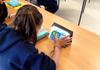
It has been an exciting year for Digital Learning at The Lakes, with the launch of our one to one iPad program.  Students from Prep to Year 9 have been excited to use their iPads to complete learning tasks that would not previously have been possible.  Students have been using the Book Creator app to create interactive digital books, containing text, photographs, videos and drawings, to demonstrate their learning across a range of curricular areas.  They have also enjoyed using apps such as iMovie and Stop Motion Studio to bring their learning to life.  Students use the Showbie app to receive tasks from, and submit completed work to, their teachers. This app has also been great for recording feedback and reflections.

Gallery Image
Gallery Image
Gallery Image
Gallery Image
Gallery Image
Gallery Image
Gallery Image
Gallery Image
Gallery Image
Gallery Image

Digital Technologies

This year, we also introduced the new Victorian Digital Technologies Curriculum, with specialist classes running across Years 5-7 and electives in Years 8 and 9.  Students have been using computational thinking to design and create their own apps, websites, animations, games and real-life digital solutions.

Blogging

Students in the Amazing Authors program have created a wonderful blog to share their writing with a wider audience, using their iPads to publish their work.  Check out their work and leave students a comment here: https://amazingauthorsblog.wordpress.com/.

Global LYNCs

This year, students in Year 5 have worked with students from a school in South Korea, sharing information and learning more about each other’s countries and cultures.  Students have used their iPads and netbooks to create content to share and have participated in ‘face-to-face’ sessions using Polycom technology.  We have learned lots about school life in South Korea and their traditional songs, dances, sports and foods.

Gallery Image
Gallery Image
Gallery Image
Gallery Image
Gallery Image

Film Project with Merriang SDS

In Term 3, students in the Year 5/6 Media Arts elective worked with students from Merriang SDS to help them create a music video for their Annual Concert.  The students used their iPads and green screen technology to create the video, which was shown on the massive screen at the Plenty Ranges theatre.  We were so proud of our students who actively demonstrated The Lakes Values during this project.

Gallery Image
Gallery Image
Gallery Image
Gallery Image

Disability Awareness Week Film Competition

As part of our Disability Awareness Week at The Lakes, students were challenged to create a short film describing what ‘inclusion’ means to them, or sharing details of their own ‘super-ability’.  Students from Prep to Year 6 used a range of different iPad apps, including Book Creator, iMovie, Stop Motion Studio and Adobe Spark Video, to create their amazing films.

Vimeo

Some great examples of digital learning at The Lakes have been shared on our school Vimeo page.  Please check it out: https://vimeo.com/thelakessouthmorang!