
Digital Technology News
Hi All,
Online security is highly important in today's world. Even at a school level, students can access each other's accounts if they aren't keeping their passwords secret and secure.
I get notifications from the Cyber Safety Project website as a subscriber. I found this great article about passphrases. Have a little read as there are some really handy tips about ways you can keep your privacy as secure as it can be.
To remember complex passwords today you basically need a masters degree! For a password to be truly strong and secure it must include a range of letters, numbers, symbols as well as upper and lower case letters. Let's be honest a random complex password is basically impossible to remember without writing it down. According to a Telesign consumer report, data breaches and account hacks are becoming a regular occurrence for digital citizens, with 2 in 5 people have had an account hacked or password stolen. Whilst there are many new security tools to make accessing our devices and accounts easier and secure, such as facial recognition and fingerprint technologies, ‘password’ and pin number security is still the most common way for digital users to access their online accounts and profiles.
The Passphrase
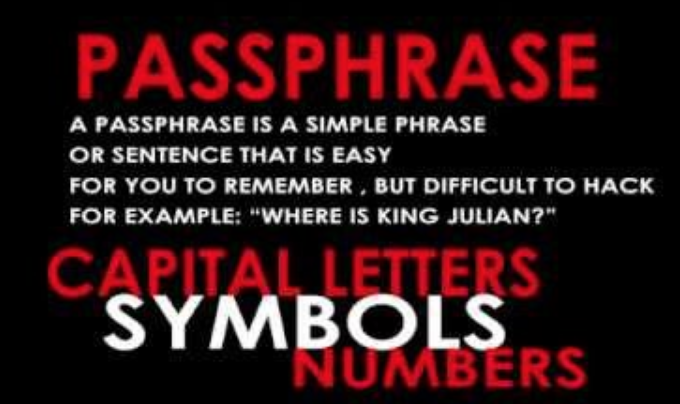
Here’s an idea… Rather than using a word or a set of completely random letters, numbers AND symbols that are seemingly impossible to remember, try using a passphrase. A passphrase is a clever trick to create a set of what may appear to be random letters. To design a passphrase, think of a phrase or sentence that you will be able to remember. Next use the first letters of each word from your memorable sentence or phrase to create a unique passphrase. Let's try this out…
"Nobody will ever be able to hack into my Xbox with this passphrase” = nwebathimxwtp
Whilst this may look complicated, lowercase letters on their own are still susceptible to hacking, particularly software programs design to process 1000s of password combinations per second. So next, we need to add some extra complexity. Review your sentence and see if you can manipulate or transform some of the letters into numbers or symbols. It’s also a good idea to make some of the letters into capital letters too. By doing this you will accelerate your password design skills tenfold.
Passphrase Sentence: "Nobody will ever be able to hack into my Xbox with this passphrase”
Letters, Numbers and Symbols Passphrase: Nw3b4th!mXwtp
If you look at the example Nw3b4th!mXwtp you will notice the symbols align with the letters used to create the passphrase. In this example, you can see that we substituted some of the letters with 'like shaped' numbers.
- Substituting the ‘E’ for a ‘3’
- Substituting the ‘A’ for a ‘4’
- Substituting the ‘i’ for a ‘!’
This password now contains 13 characters (2 capitals letters, 8 lower case letters, 2 numbers and 1 symbol) and still aligns with the memorable sentence that I'll be using to remember the password. The added benefit of a Passphrase is that you can customise the sentence any way you like to make sure it is in line with any website or online profile specifications.
Have a go at creating a sample passphrase and test out its strength by visiting the “How Secure is my Password” website. https://howsecureismypassword.net/ *note never ever use your real password in this tool – just to be safe!
Dos and Don’ts when creating Password
When creating a password there are some things that you should and shouldn’t do to protect your personal devices and online profiles/accounts:
- DO: Have a 12 character minimum – at the very minimum 12 characters is acceptable, ideally even longer is better.
- DO: Includes numbers, symbols, lower case and uppercase letters – the greater the mix the harder it is to crack.
- DON’T: Make sure it is NOT a word that can be found in the dictionary – never use common words or combinations of words. Words are patterns in language and patterns reduce the strength of your passwords.
- DON’T: Never rely on one basic and predictable substitution. Using symbols is very important, but don’t just use the symbol @ as a replacement for the letter a or number 5 to replace the letter within a ‘word’. It’s too obvious.
Got multiple accounts?
Have multiple passphrases
When logging into any online account, it is extremely important to be so cautious of the domino effect that may occur if using one single password/passphrase across all of your accounts. If one of your accounts is compromised, this will put your other online accounts at risk. Having the same password/passphrase across all of your accounts provides an open door for hackers who will browse your history and view other platforms or sites you have been using to obtain a range of our personal information.
New-season is a great time to design a new set of passphrases
Developing long and strong access codes is now just an important part of online life, but we must not set and forget! Regularly updating our passwords/passphrase minimises the chances of our online accounts being compromised. Use the seasons of the year or set a reminder in your phone every few months alerting you to visit your frequented online accounts and update/change your passwords.
A proactive password strategy is a key to preventing cybercrime. The “it won’t happen to me’ does not cut it!
Thanks,
Simon Taylor
Digital Technologies Leader