Safety /
Parking around our School / School Safety







 St Mary's Catholic Primary School
Safety /
Parking around our School / School Safety
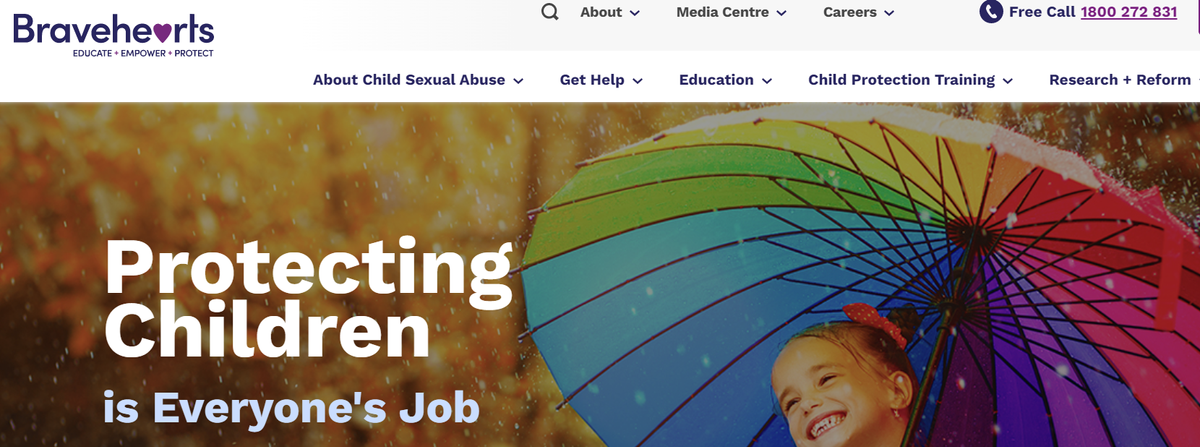
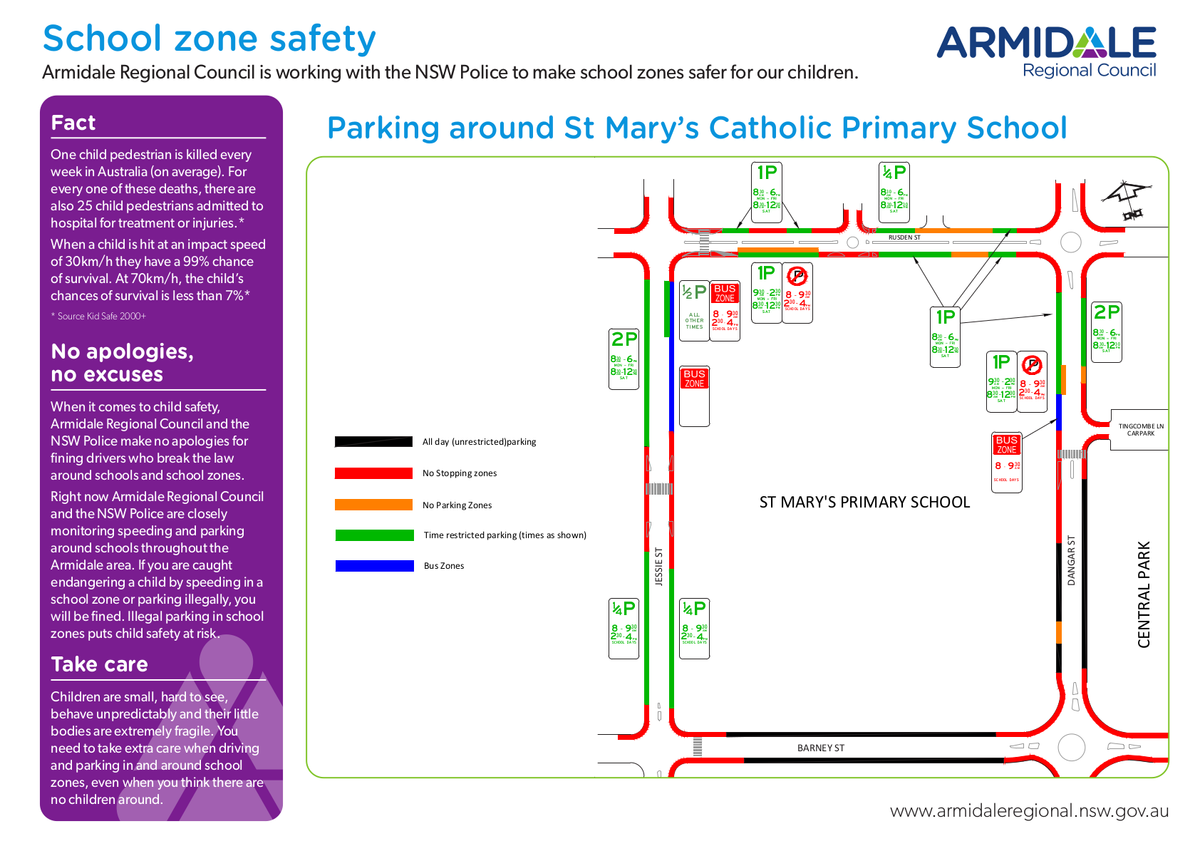
Parking zones around our school. Rusden Street (Front Entrance) and Jessie Street (Bus Zone) are all restricted parking spaces and are monitored very regularly by Armidale Regional Council. There are hefty fines and loss of demerit points for parking in particular spaces.
Attached is a brochure that the Armidale Regional Council has submitted to us in regards to this.
We ask that ALL families and children use the Pedestrian Crossing provided which is located in Rusden Street and we ask that you do not cross between parked cars and over the medium strip directly in front of our school. Rusden Street is an extremely busy street and in particular at drop off and pick up times. Thank you for your assistance.
Also we remind families to present their name signs when collecting children at pick up time so staff are aware of who you are collecting. Please contact the office if you require a new name sign.
Working With Children Check is part of the Government's keeping schools safe. The check is free if you are a volunteer. It only costs if you need it for work commitments.
https://www.service.nsw.gov.au/transaction/apply-working-children-check
Please send your WWCC number, as well as your date of birth, if the school doesn't already have it, so your information can be verified before you volunteer to assist at school or school events. smaadmin@arm.catholic.edu.au
If your child needs to take medication during school hours eg. antibiotics or antihistamines a Medical Permission Form is required to be completed and handed into the school office along with the medication.
No mobile phones for students at school. If for some reason your child needs to have a phone before or after school, they must hand their phone in at the front office before they go to class and pick it up again before they leave in the afternoon. During the school day students can always be contacted by a phone call to the front office. If students are found with a phone during the school day, the phone will be confiscated and parents will be notified.
A reminder also that all phone capabilities of smart watches need to be disabled or sim cards taken out while students are at school. If students are found to be using their smart watch in this way they will also be confiscated and parents notified.
These procedures are in place for the safety and well-being of all our students and we thank you for your ongoing support.
Kids Helpline. 1800 55 1800. Phone support is there all day, every day. Online support is open from 8am-midnight every day (AEST).
Suicide Callback Service. 1300 659 467. Phone support all day, every day, and follow-up calls.
eHeadspace. 1800 650 890. Open 9am-1am daily (AEST).
Lifeline. 13 11 14. Phone support all day, every day. Online support 7pm-4am daily (AEST).
Beyondblue. 1300 22 4636. Phone support all day, every day. Online support 3pm-midnight every day.
If a life is in danger call Triple Zero (000) right now.
Ways to limit certain content viewing. Please see the following links for these resources:
Why Screen Time For Kids Needs To Be Controlled - YouTube
How To Set Up YouTube Parental Controls - YouTube
How to Set up Parental Controls on iOS (lifewire.com)
How to Set Up Parental Controls on Google - Bing video
eSafety is the first government agency in the world dedicated exclusively to online safety. As the national online safely regulator, we are committed to helping all Australians have safer experiences by removing harmful content from the internet, as well as through a range of prevention, education and early intervention measures.
We help Australians deal with a range of online harms through our reporting services, for cyberbullying that targets a young person under 18, image-based abuse, and illegal online content, including child sexual abuse material.
We also provide online safety training, advice and resources to parents, educators, young people and other at-risk communities.
Our eSafety Guide also provides the latest advice on games, apps and social media sites young people are using, helping parents, carers and educators understand the age recommendations, benefits and risks.
eSafety’s website – www.esafety.gov.au – is a place where parents / educators can go to find useful and evidence-based advice about online safety.
Webinar May 25th 7pm - 8pm
Lenny Dowling, 19yrs former Safe on Social Youth Advisory Member and Kirra Pendergast CEO delve into the intersection of vaping and social media and what you need to know now. Lenny's firsthand experience of vaping's growing popularity among his peers in school gives him a unique perspective to offer invaluable insights into identifying and responding to this dangerous trend.
Click the image below to register for this webinar

Artificial light from electronic and other devices generally emits a blue light (it may not look blue, but that is the underlying light). Blue light is a type of non-visible light at a very short wavelength.
What does blue light do to the human body?
Non-visible light has a lot of energy, and studies show that a lot of exposure to this type of light can impair your sleep cycle. During sleep, lots of essential physical processes take place, and it is also when learning from the day is consolidated in memory. This means that having enough sleep is vital for students.
Blue light is naturally generated only during the day, from sunlight. When it gets dark, naturally occurring blue light ceases, signalling the body to produce melatonin, the hormone associated with sleep. Using artificial lighting and devices which emit a blue light at night confuses the body clock (the body’s natural sleep-wake cycle) by stopping the body from producing melatonin. This can result in disrupted sleep patterns, including difficulty in falling asleep, and staying asleep and shortened sleep duration.
Those at greatest risk from night-time exposure to blue light are those with existing sleep disorders and adolescents who often experience delayed sleep patterns as a result of biological changes.
What can we do to limit exposure to blue light at night?
Some suggestions include:
All children enrolled at a Catholic School in the Armidale Diocese are covered for accidents 24hrs day / 365 days a year. It covers students if they are at school, sport, or on holidays.
There are exclusions and conditions that apply to what is covered, for example exclusions apply if the student has been consuming alcohol, drugs, riding motorcycles, on joy flights, suicide, or terrorism related accidents. CCI can not pay medical expenses where a medicare benefit is payable.
For information about Student Care Insurance please visit www.ccinusarence.org.au/studentcare