Page 0 Banner Photo
Cover Page
Network News Banner Photo
Network News The Kiwis take on Kuala Lumpar, A feature that could save your life, iPhone , Samsung , Medical conditions, Save the Date
Agent News Banner Photo
Agent News James Mackay takes on the Sky Tower Challenge , Congratulations Stevie, Pink Shirt Day, Congratulations!, Home and Leisure Show, Dedication from Team YIP
Marketing & Media Banner Photo
Marketing & Media Join us for an extensive online training session with Designly!, $5000 Holiday Giveaway, The Heat FM, Did you miss Rob Horstman on fostering psychological safety, Brush up your marketing with new templates, Be Like Campaign, Podcast: Navigating Heritage Properties , Events Calendar
Community Banner Photo
Community Pink Ribbon Brunch, FN Progressive Hosts 8th Annual Easter Colouring Competition , Major Sponsors of Fiji's Premier Car Show, Sales Duo Tee Off for Roderique Hope, Cooking up a Storm for Bellyful Charity, Proud Sponsor
The Mix Banner Photo
The Mix The Block NZ cancelled, houses to be completed and sold, Vendors selling before banks sell house from under them, Developers sweating as flood of new homes hit the market in South Auckland, Buyers call mortgage brokers in shock after Government scraps first home grant, Countdown to bright-line: Stressed landlords urged to ‘beat the rush’ and list now, ‘It’s way more than a tent’: Off-grid dome home in private sanctuary for sale, Interest rate decision: Reserve Bank keeps OCR on hold, warns policy could stay “restrictive for longer”, The most common grammar errors and how to fix them, Make my email sound more professional
Performance Partners Banner Photo
Performance Partners Spark
Projects and Referrals Banner Photo
Projects and Referrals For your project or referral listing to appear here, complete this form. , 71 Talbot Street, Gore, 6 Crombie Street, Gore, 1 Kereru Lane, Gore, 19 Seddon Road, Hamilton, 241 Boylan Road, Te Roti, 5 Kingsford-Smith Drive, Hawera
Published by
First National Real Estate New Zealand
6-20 Lambie Drive, Manukau, 2104, NZhttp://www.firstnational.co.nzmail@firstnational.co.nz0800 22 55 87 Facebook Instagram
Banner Photo

Network News

The latest from First National and across the industry

The Kiwis take on Kuala Lumpar

Gallery Image
Gallery Image
Gallery Image
Gallery Image
Gallery Image
Gallery Image
Gallery Image
Gallery Image


Twenty of our members jetted off to Conference in Kuala Lumpur. They kicked things off with a 1920s themed National Awards dinner, decked out and ready to celebrate. A highlight was the iconic Batu Caves, soaking in the sights and sounds of Malaysia's cultural wonders. And to wrap up their epic journey, they time traveled to a futuristic themed finale night, where the costumes were out of this world! 


Gallery Image


Next year's Australian National Conference will be held in Port Douglas with an early bird offer expiring at 5 pm Friday 31 May.  


A feature that could save your life

Phil Thompson spoke at our National Conference on self defense awareness and avoidance strategies.  The goal was to have strategies in place to help avoid potential danger at its earliest point.


Some of his main takeaway points were.
  • Listen to your intuition 
  • Make sure you check your surroundings
  • Watch the body language of those around you
  • When meeting a client or viewing a property does someone know where you are?
  • When possible reverse into a car space or driveway for a quick exit if needed
  • To set up your phone with Emergency SOS (these instructions may vary depending on the model of your phone)

iPhone 

Gallery Image
Gallery Image


Do you and your team use iPhones? 


If the answer is yes, then please make sure everybody has configured the emergency call feature and knows how to use it if they find themselves in an unsafe situation.


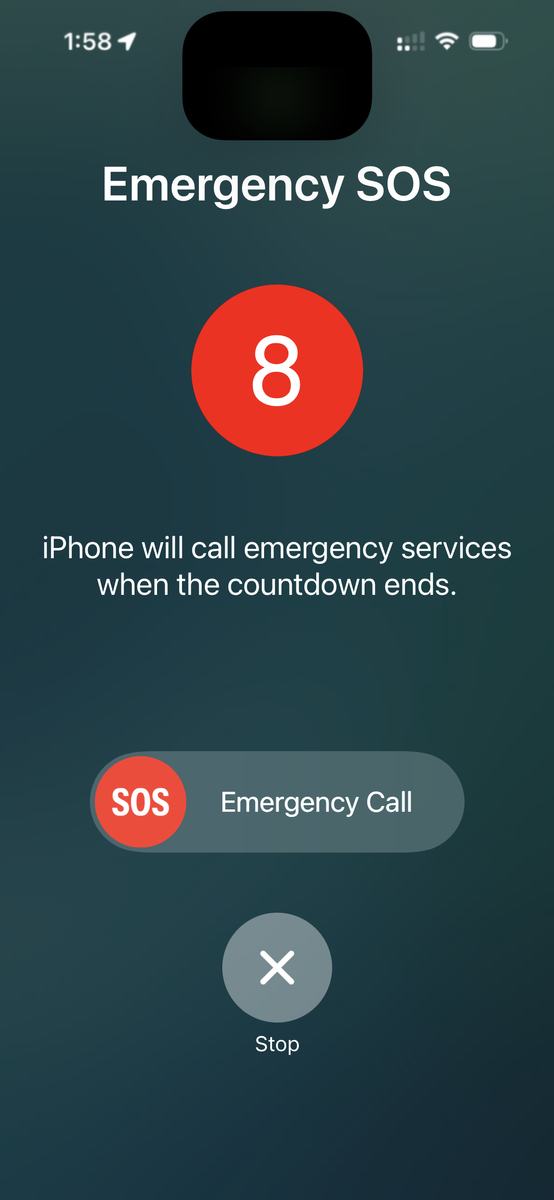
In an emergency, you can secretly trigger a call to emergency services by reaching into your pocket and pressing the power button 5 times quickly. 


Doing so starts a 10 second countdown before your phone silently alerts emergency services to your GPS location and sends a text message to up to 5 emergency contacts listed in your phone contacts directory.


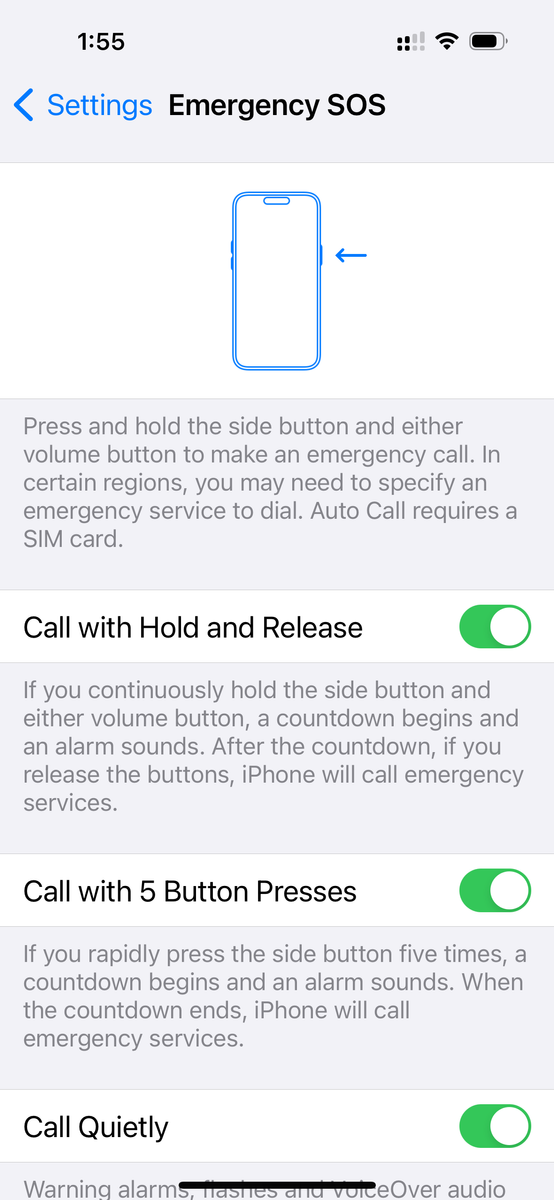
To configure your phone correctly:
  1. Go to settings and select 'Emergency SOS'
  2. Turn on 'Call with Hold and Release'
  3. Turn on 'Call with 5 Button Presses'
  4. Turn on 'Call Quietly'
  5. Select 'Edit Emergency Contacts in Health'
  6. Choose who of your friends should be contacted

Samsung 

Gallery Image


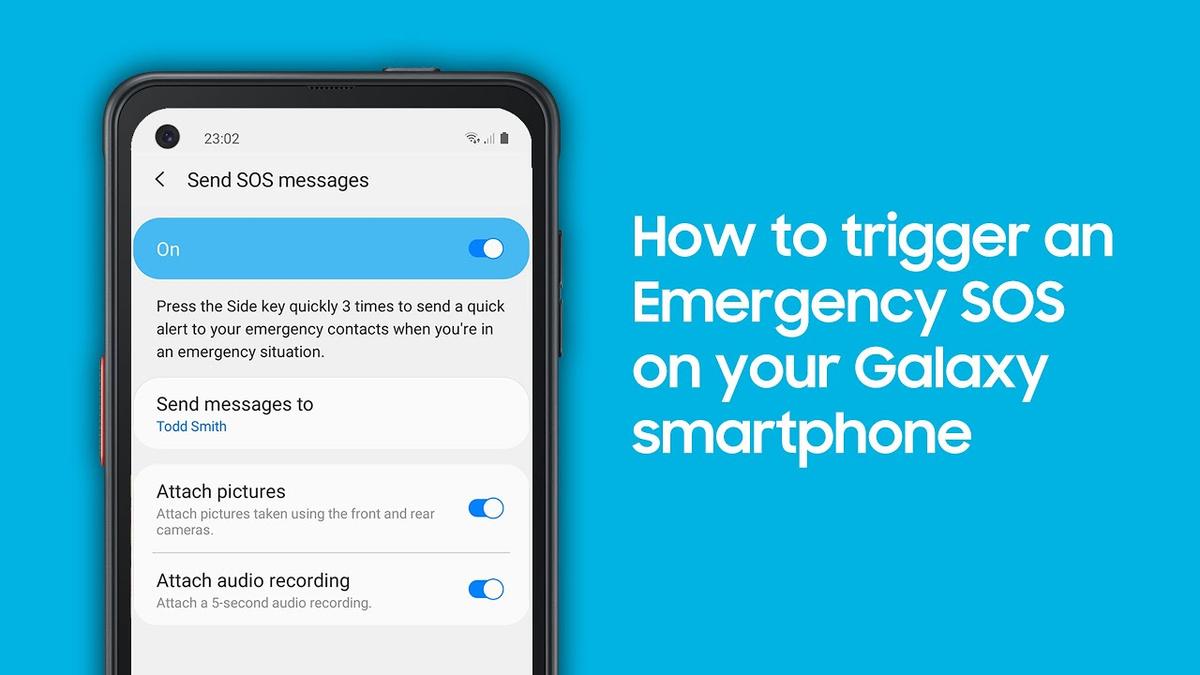
By quickly pressing the power key button 3 times, you are able to send a quick alert to your emergency contacts. 


Not only that, but you are also able to attach a 5 second audio recording and pictures from both the front and rear cameras. Once the SOS message is sent, your emergency contacts will be able to locate your exact location and view your photos and audio files via MMS messages.


1. Launch your Settings > Advanced features

2. Scroll down the page and tap on Send SOS message

3. Toggle on Send SOS message

4. Read through the Terms and Conditions and tap the Agree button to proceed to the next step

5. Tap Add to create an emergency contact

6. Select your preferred emergency contacts then tap on Done

7. Toggle on or off Attach pictures or Attach audio recording.

If you decide to add more emergency contacts in the future, tap Send messages to and add your preferred emergency contact.


Medical conditions

Additional to this, if you have a medical condition, it’s a good idea to store this information in your Galaxy phone so first responders can provide appropriate treatment if you are incapacitated. To save your medical information:

  1. Open “Settings” and select “Safety and emergency”
  2. Tap “Medical info”
  3. Note down any conditions, allergies and current medications in the fields provided

First responders will be able to find this information even if your phone is locked, simply by tapping the “Emergency call” tab on the home screen.

Save the Date

Gallery Image