
Accountability

Learning Behaviour Rubric
As part of our 2026 reporting process, the Learning Behaviour Rubric (LBR) will be completed each term by all classroom teachers and twice a year by Specialist teachers.
Simeon is currently organising the access to the LBR on Compass and more information on how to access it will come shortly.
Please note that the LBR will be available for families to access on Wednesday of week 10.
In the meantime, with your team (especially if you have new/returning colleagues please:
- review each area's descriptors
- discuss how you would choose the score that best reflects each student's learning behaviours in each area
- read the following from the CPS reporting guidelines:
LEARNING BEHAVIOUR RUBRIC - NEW ADDITION AS OF SEMESTER 2 2025
As part of our SWPBS approach, the Learning Behaviour Rubric (LBR) is designed to support students in developing positive classroom habits and to show positive attitudes towards their learning. It helps teachers, students, and parents understand how well students are concentrating, working independently, showing respect, and contributing to their learning environment. Each area is scored on a scale from 2 (Needs Attention) to 10 (Excellent), with statements that describe what the behaviours look like.
The LBR is to be completed every term, with a PDF being sent to the parents at the end of each term. When completing the LBR on Compass, the scores provided are processed to create a graph, unique to each student, representing their attitude towards learning for each term, and in every learning area of the school. This includes:
- The English classroom
- The French classroom
- The 4 specialist classes
By the end of the year, the graph will include / display the 4 terms. This will allow us to track progress, adjust our approaches, and also discuss attitudes towards learning with students and parents if need be.
An example of a graph in Term 3:
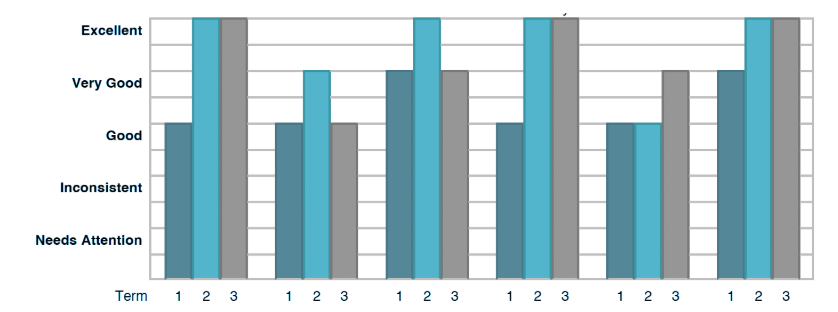
Please note that the vast majority of our students would stand at an 8 in the LBR. You can use the “fill down” option on Compass to facilitate the input.
How to complete your LBR for your classes -
Long on to Compass → Semester Reports → Select the report or LBR Report needed → Select your class → FR Curric Ov - LBR or Engl Curric OV. - LBR → Input your data.