Click Smart. Think Sharp. Stay Safe.









 St. Augustine's Catholic Primary School, Somerville Road, Yarraville

WELCOME TO OUR NEW PAGE!
There has been a lot happening around our school so far in 2026 in regards to Digital Technology. With the help from Oscar Mo (Yr 5), for the past 6 months, we have been working together to update our school website. This is almost ready to go fully live! Some small changes can already be seen on the main page of our website.
Our next biggest project for the year is teamied up with Inform & Empower’s Cyber Safety & Digital Wellbeing program.
As part of our commitment to the program, all students across Prep - 6 will take part in termly live-streamed incursions that focus on topics such as : Digital Literacy Healthy Digital Habits Critical Thinking Cyberbullying Online Security Upstanders Help-seeking Consent Artificial Intelligence.
Parent Webinar
On Thursday 19th, a Parent's webinar was held. Thank you to those families who registered and attended the Raising Kids in a Digital World parent webinar offered by Inform & Empower. It was great to see so many of our parents take up this free opportunity. The webinar offered practical, research-informed guidance to help families manage today’s digital landscape. We see this as a starting point and encourage you to continue having open conversations with your children about safe, healthy and positive technology use at home.
If you were unable to attend or missed the opportunity to register, you can still access the replay and resources here: https://www.informandempower.com.au/schools-webinars/2026
(Those who registered should also have received a replay link directly via email.)
We encourage all adults to take the time to watch the session, as working together helps ensure our students are safe, informed and responsible digital citizens. Please note that this webinar is strictly for adults only.
Thankyou to those who have completed the short feedback survey that was sent out last week with the link to the replay. Your feedback has been extremely valuable.
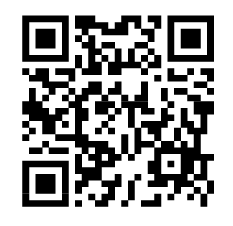
If you are yet to do so, we would greatly appreciate any feedback on the webinar, whether you attended the live session or watched the replay, it only takes a few minutes to complete: https://forms.gle/HCJHyPW5o2inLzVd6 or click/scan the QR code:
AN OPEN LETTER FOR PARENTS OF PRIMARY SCHOOL STUDENTS
Have a read of the open letter from Inform and Empower’s Carly McGauran about RAISING KIDS IN A DIGITAL WORLD. Open Letter (2025).pdf
“Too many times I've sat with children, young people and their families dealing with the devastating fallout when children have been exposed to unsafe situations and inappropriate content. I've been moved to write this letter to parents of primary school age children.”
Inform & Empower’s Termly Newsletters for families
Each term, teachers will send out the Termly newsletter to families to support them in understanding the content of the Termly student sessions that classes participate in.
The termly newsletters for Term 1 can be located here:
Yr 3_4 Adventures Online Term 1.pdf
Yr 5_6 Thrive Online Term 1.pdf
Overview of each session per level
😊 The Prep session covered:
- It is important to take regular movement breaks between screen time to keep their bodies active and healthy.
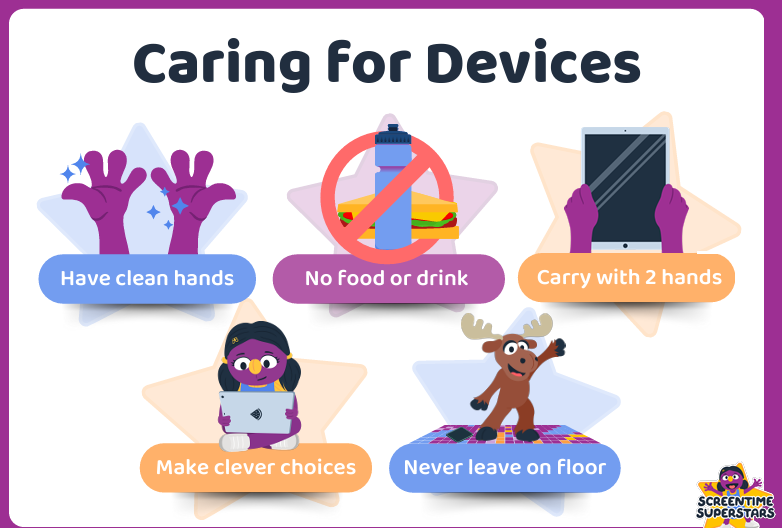
- five important rules to help take care of our devices. To help us remember, we use the phrase “Silly Goose, the Moose!”
- Use clean hands on devices (no sticky hands)
- Keep food and drinks away from devices
- Do not leave devices on the floor
- Always carry devices with two hands
- Devices stay at home and are not taken out and about
Students also practised the Driver and Navigator strategy:
- The Driver holds and uses the device
- The Navigator watches, supports and gives directions
- We keep our hands off when it is not our turn
- We swap roles and take turns
This strategy helps students work cooperatively, share fairly and use technology responsibly.
😊The Year 1/2 session covered:
- What the internet is (Wi-Fi, routers, satellites, networks)
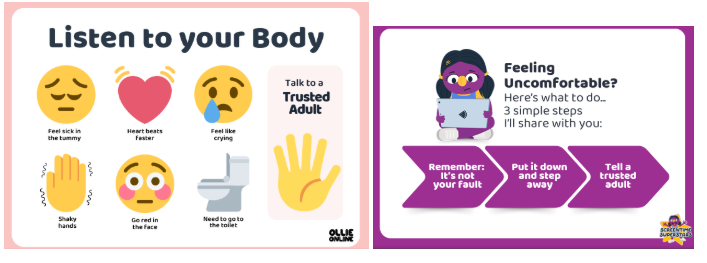
- Understanding early warning signs (body signals like a racing heart or “butterflies”)
- The importance of telling a trusted adult
- Reinforcing that “it’s not your fault”
- Encouraging students to be aware, clever, brave and kind online
It normalised uncomfortable feelings and clearly explained to students to:
- Listen to their body
- Recognise unsafe situations
- Seek help from trusted adults
😊The Year 3/4 session focussed on being aware, clever, brave and kind online. Key take ways included:
- Understanding why strong passwords are important
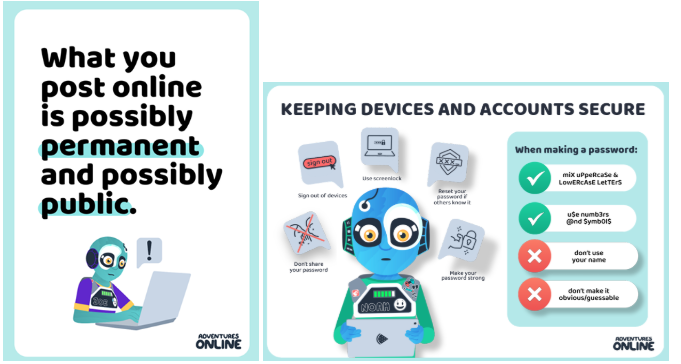
- Learning how to create secure passwords (not sharing them, signing out, using lock screens, mixing letters, numbers and symbols)
- Exploring what a digital footprint is
- Recognising that online posts, comments and photos can be public and permanent
- Understanding how digital footprints shape how others see us
- Discussing how to respond when mistakes are made online (taking responsibility, apologising and making better choices)
- Identifying ways to create a positive digital footprint through respectful and kind online behaviour
What students in 3/4L & 3/4S Learned About Staying Safe & Smart Online from their session:
- Don’t share your password with anyone (even friends).
- Don’t use your name as your password.
- Don’t make your password obvious or easy (e.g. 1234, 0000, Password1234).
- Use a strong password with a mix of letters, numbers and symbols.
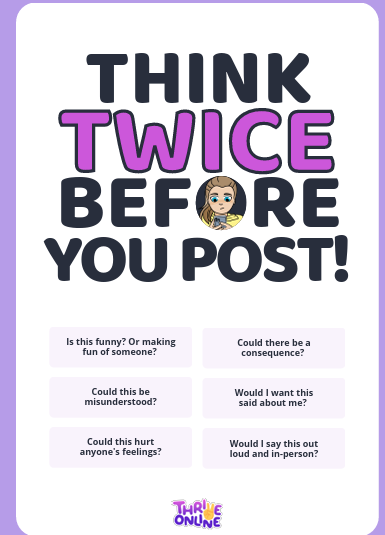
- Think before you post or send anything online.
- Don’t post or share rude or inappropriate comments.
- If you make a mistake online, think about how you can fix it and make it right.
- Always be smart, clever, brave and kind online.
😊The Year 5/6 session focussed on building safe and responsible digital habits. Key take aways included:
- Acknowledging respectful online behaviour through the keystones: aware, clever, brave and kind
- Discussing Australia’s new under-16 social media law and exploring different perspectives on why it was introduced
- Understanding the difference between the internet, gaming and social media
- Learning how to keep devices and accounts secure:
- Creating strong passwords (not obvious or easy to guess)
- Not sharing passwords (except with trusted adults where appropriate)
- Signing out of shared devices
- Using screen locks and two-factor authentication (2FA)
- Exploring what a digital footprint is and how online actions shape our digital identity
- Recognising that posts can be public and permanent (even if deleted)
- Reflecting on how online behaviour can impact opportunities (e.g. leadership roles)
- Understanding that while mistakes happen, what matters most is how we respond and move forward
💡Do you want to know more about how to start the chat about online safety issues and strategies with your child? 💡
Head to the e-safety commissioner parent page
https://www.esafety.gov.au/parents/resources In the meantime, check out the informative read on: 5 tips to keep your family safe online.pdf
Head to Inform & Empower’s Parent Resource Hub
https://www.informandempower.com.au/resource-hub In the meantime, check out the informative read at: https://www.informandempower.com.au/post/what-is-the-1-thing-to-help-keep-your-children-safe-online
💻~ Natalie Librizzi: Digital Technology Coordinator ~💻