
Operations (Admin, HR, Finance, IT & Facilities/OHS) Update

Administration Update
Timetables & Staff Lists
The 2026 PLT and Active Supervision timetables are ready (see links below).
If you notice any issues with any timetables, please message Matt as soon as possible so changes can be made prior to the start of the year commencing.
You can also access:
Staffroom Duty (Keeping it nice for everyone!)
We’ve created a staffroom duty roster to help keep the space clean and shared fairly
A quick reminder of expectations:
- Everyone: after each recess/lunch, please put dishes in the dishwasher and throw out rubbish.
- Rostered staff: wipe benches/tables/sink and start/unload the dishwasher — not to tidy up after everyone else.
- If you take cups/plates/cutlery out, please return them after the break so others can use them.
Stationery Packs
Staff and student stationery packs (from COS) will be ready for collection from the staffroom on Wednesday 28 January, from 1:00 pm
If your class needs extra stationery not included in the bookpacks:
- Check with Karen for any surplus in the archive room, or
- Raise a PO and order through COS.
Excursions & Camps
Please follow the process guide and templates in our excursions guide to help meet requirements.
A few key points:
The Department has updated the excursion policy as part of the government's commitment to reducing staff's administrative workload.
We have updated the Excursion Guidelines & Processes guide to reflect the updates and form changes. Some of the changes include: Medical forms no longer need to be completed for day excursions, unless the excursion includes adventure activities.
- We’ll continue using Xuno for all day and overnight (camp) excursions.
- Please ensure excursion requests are submitted on Xuno at least 3 weeks prior to the excursion occuring.
- Jo Garofalo will continue reviewing and authorising all excursions (including swimming) in Xuno before they go to the Principal team for final approval.
Excursions Mandatory Training
If you’re responsible for organising an excursion/camp, you must complete the mandatory excursions elearn module in eduPay.
Staff are encouraged to complete this module annually.
School Buses – Quick Reminders
If you’re using a school bus, please make sure you:
- Book it through Xuno
- Complete the Bus Journey + Pre-Trip Inspection Form before leaving
- If you spot a defect → the bus cannot be used, and you must log it using the Bus Defect Form
Bus Housekeeping:
- No food is to be consumed on buses
- Remove any rubbish after each use
- Fueling is handled centrally by Lorenda each afternoon
Further vehicles, including replacement 22-seater buses and a Toyota hybrid RAV4, have been approved by School Council and the Department and will be procured during 2026. The school vehicle will be available for staff use for outreach services, home visits and external offsite meetings.
Feedback
The admin team is constantly looking for ways to improve our processes for staff.
If you have any feedback on our current processes or recommend enhancements for admin, finance, or HR processes, please fill out the form below.
HR Update
eduPay details (important!)
Please take a moment to make sure your contact details and emergency contacts are up to date in eduPay. These flow into other systems and matter in emergencies.
You can also check what’s on file via the Personal Details section on your Xuno Staff Dashboard.
If anything is wrong, update in eduPay.
Vehicle registration additions/changes → email Kristina Kamenar.
VIT / WWCC
Please make sure your VIT or WWCC details are up to date in eduPay, including uploading a copy of your current card (WWCC only).
If you have yet to renew & upload your latest VIT/WWCC details in eduPay, can you please do this as a matter of urgency. Please note, you are not able to work unless you hold a valid VIT or WWCC.
Staff absences
If you’re going to be absent:
- Complete the Staff Absence Form on the portal, and
- Call the absence line (03 9366 4322, Option 2) by 7:00 am
Also:
- Enter leave into eduPay within 5 business days
- Upload/submit medical certificates/stat decs as needed
A reminder: appointment “attendance certificates” are not accepted as medical certificates. If a doctor can’t provide a medical certificate, please use a stat dec instead.
LSL / LWOP
Applying for Long Service Leave or Leave Without Pay?
Please submit via the LSL/LWOP request form (no earlier than 2 terms ahead). Anthony will approve/decline based on operational requirements, and you’ll receive an email with the outcome.
Where long service leave is not granted, arrangements will be made to support taking the leave at an alternative date in the future.
Time-in-lieu (TIL)
TIL needs to be agreed in advance with the Principal before you submit it in eduPay.
If it hasn’t been agreed beforehand, it may not be approved.
From 2026, TIL for whole-school events (e.g., SSG meetings) excluding the end-of-year concert will no longer be managed centrally, and staff will need to submit TIL requests through eduPay. The acquittal of this TIL will consist of either payment, use in place of personal leave or use for leave outside of personal leave if approved by Anthony prior.
Defer / Payout Time in Lieu
Any TIL accrued in 2025 or deferred from 2024 will automatically be paid out on Friday 1st March 2026.
Please either request your TIL to be paid out or deferred by no later than 28 February 2026.
A new reference guide has been developed to support staff with TIL accruals and acquittals in eduPay, including examples of the Time in Lieu Request Details for camps/excursions/school events and details how to defer your TIL.
Induction
New staff starting in 2026: please complete onboarding and induction tasks by Week 3, then complete the self-certification form.
Support: see Gabrielle Maher or Rebecca McGann.
Finance Update
Budgets + Purchase Orders
Budgets open from 28 January.
Big reminder: a purchase order must be completed and approved before ordering anything.
Invoices without a PO won’t be paid, and virtual card requests won’t be approved without a PO.
Also:
- Most items include GST (fresh food is the main exception)
- Please forward invoices to accounts@jacksons.vic.edu.au with the PO number (no printing required)
- Review the 2026 Finance Reference Guide for budget allocations, correct expenditure GL codes to use on your purchase order and guides on how to raise a purchase order and virtual purchase card
- Staff can’t use personal loyalty programs (FlyBuys/Everyday Rewards) on work purchases.
Need help? See Matt or Anna.
Procurement Reminders
If a purchase will total over $2,500, please see Anna, Karen or Matt first — extra paperwork/quotes may be required.
Karen will continue to oversee the whole school's purchasing and procurement processes.
Fundraising & Trading Operations Programs
If you’re planning a fundraising event, please use the fundraising request form.
School Council approval is required before anything can proceed (this can take up to two months).
Similarly, with the exception of the Year 9/10 Cafe and Coffee programs, if you wish to run a program that involves requesting money from staff or students (e.g., Car Wash, Cooking Programs), please see Matt. School Council approval is required before anything can proceed (this can take up to two months). The first school council meeting is scheduled for Tuesday, 24th February.
IT Updates
Systems & Logins
All online platforms have rolled over into 2026 and are ready to go.
Student login info is now available in Xuno, and printable login sheets can be generated via student dashboards.
If student class allocations look wrong or anything is missing → please log an IT help desk call.
SeeSaw
Classroom teachers:
- Please print parent invites for new families not yet connected
- Please send a short intro message + classroom visual timetable (this opens the messaging channel)
We’re aiming for 100% family connection to SeeSaw and Xuno.
1:1 Student Devices
Student 1:1 devices will be available by 28 January.
Please keep storage/charging cabinets locked each night and don’t share combinations with students (see Pushp if you need the combo changed).
New Phone System
A new cloud-based phone system (3CX) and new phone handsets (Fanvil V65/V66) have been installed over the holidays.
Things to note about the new system:
- Similar setup to the previous phone system
- Use buttons on the handset to make PA announcements, call the behaviour line or medical assistance. Dialling #40 no longer makes PA announcements
- No longer need to dial 0 to make an external call
- Classroom teachers no longer have an individual voicemail. 1 central voicemail mailbox; any received voicemails will be forwarded.
- Staff who have the ST500 app previously will need to download the new 3CX app
- Classroom staff members can connect their iPads to their classroom phone/extension. Instructions will be released early in Term 1
In our continuing effort to reduce the number of PA announcements made, please use one of the following options when requiring behaviour support:
- Press the Behaviour Button on the Landline Phones
- Call the dedicated Behaviour Support Line from any phone 03 9364 3751. Save this to your mobile contacts.
Call the main Jackson phone number on 03 9366 4322 from any phone and Press 9 for the Behaviour Support Line.
Staff can also now bypass the menu options when calling the main Jackson phone number on 03 9366 4322. Press 8 to speak directly to the school office reception when you hear the menu options.
Download on the Apple Appstore
Download on the Google Play Store
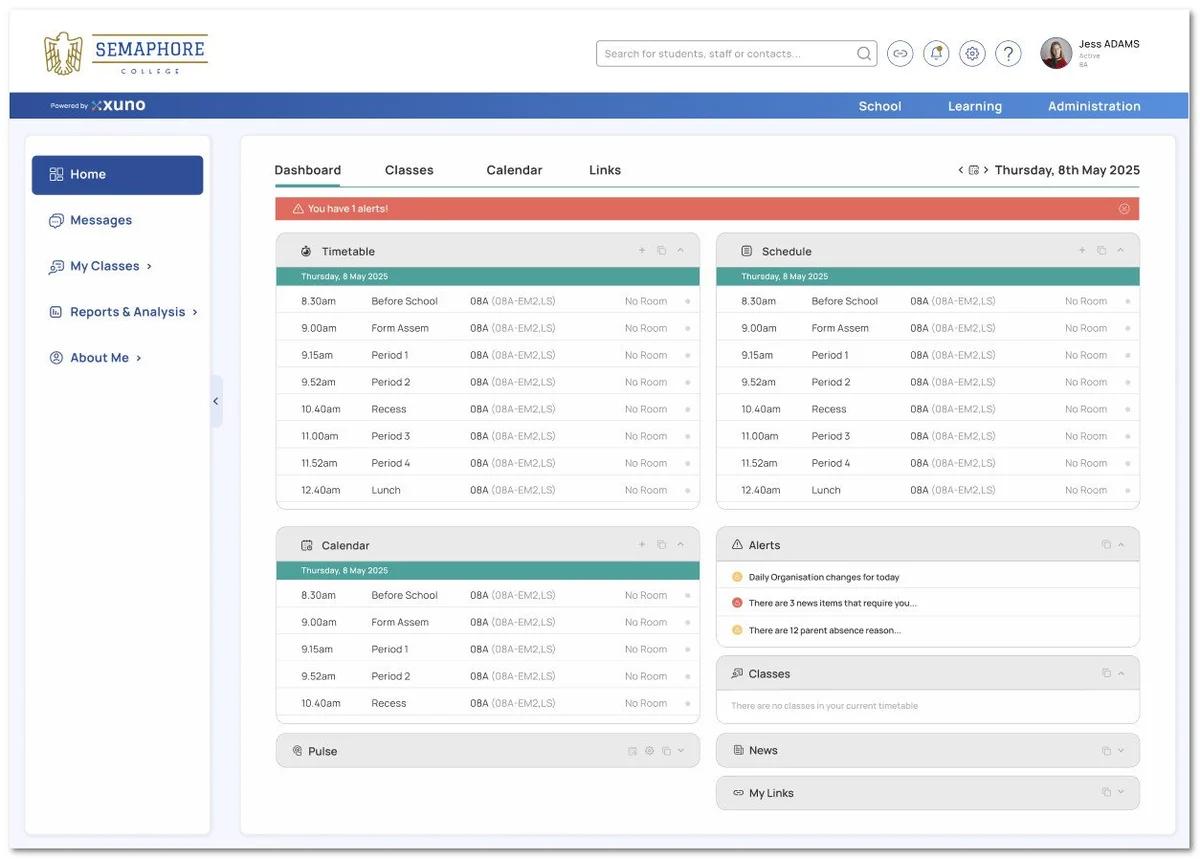
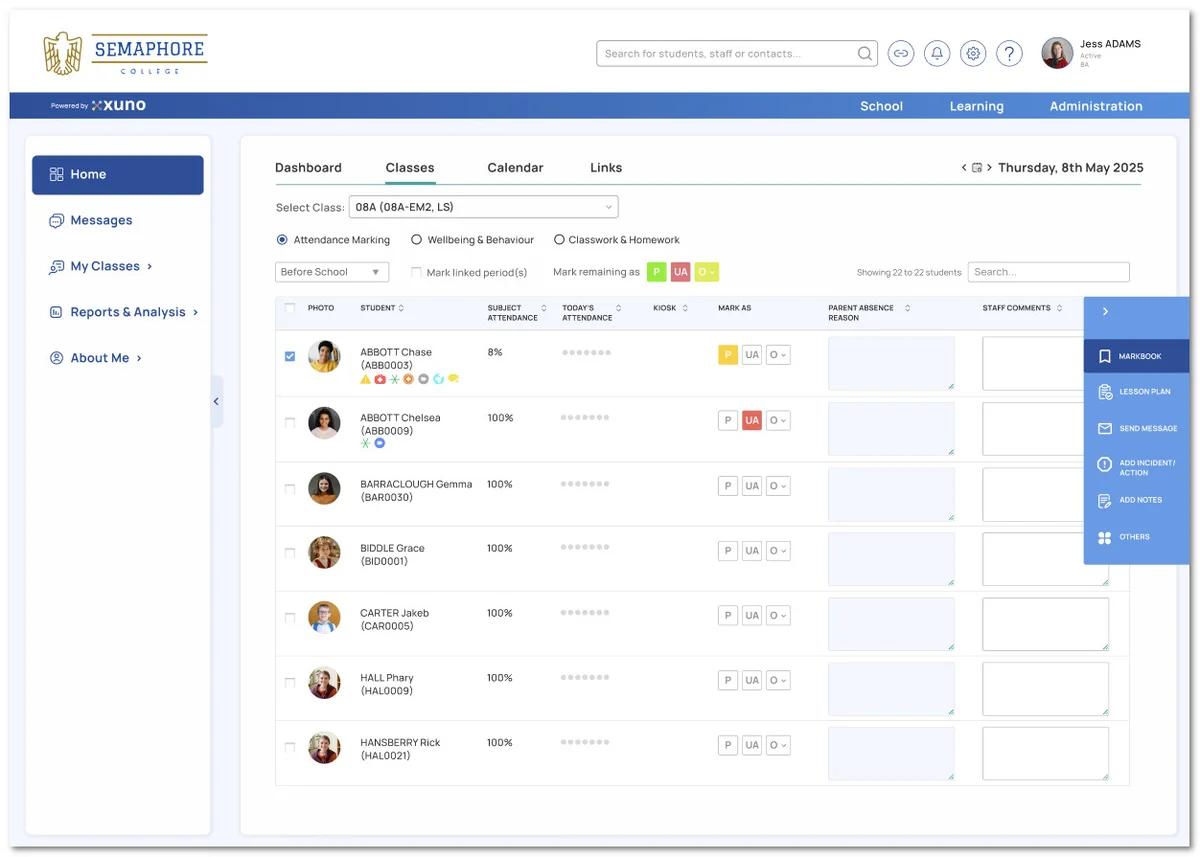
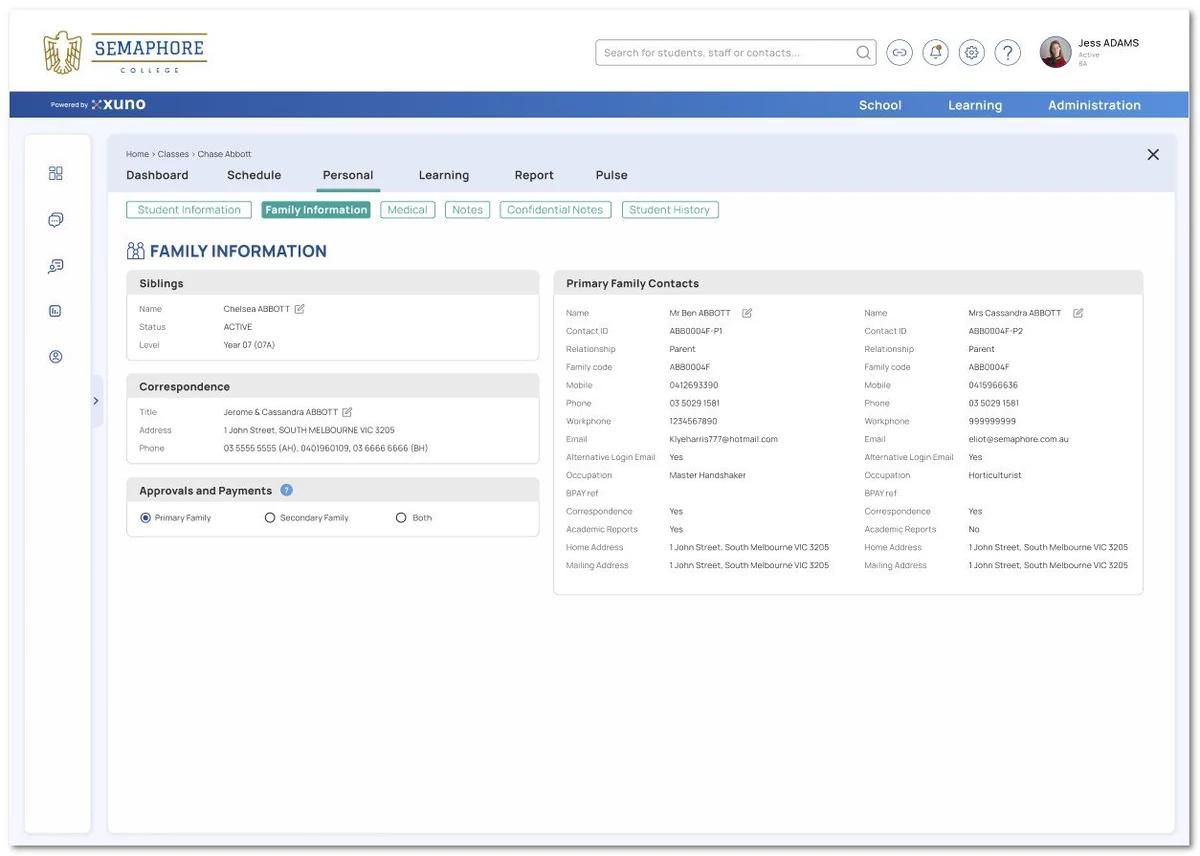
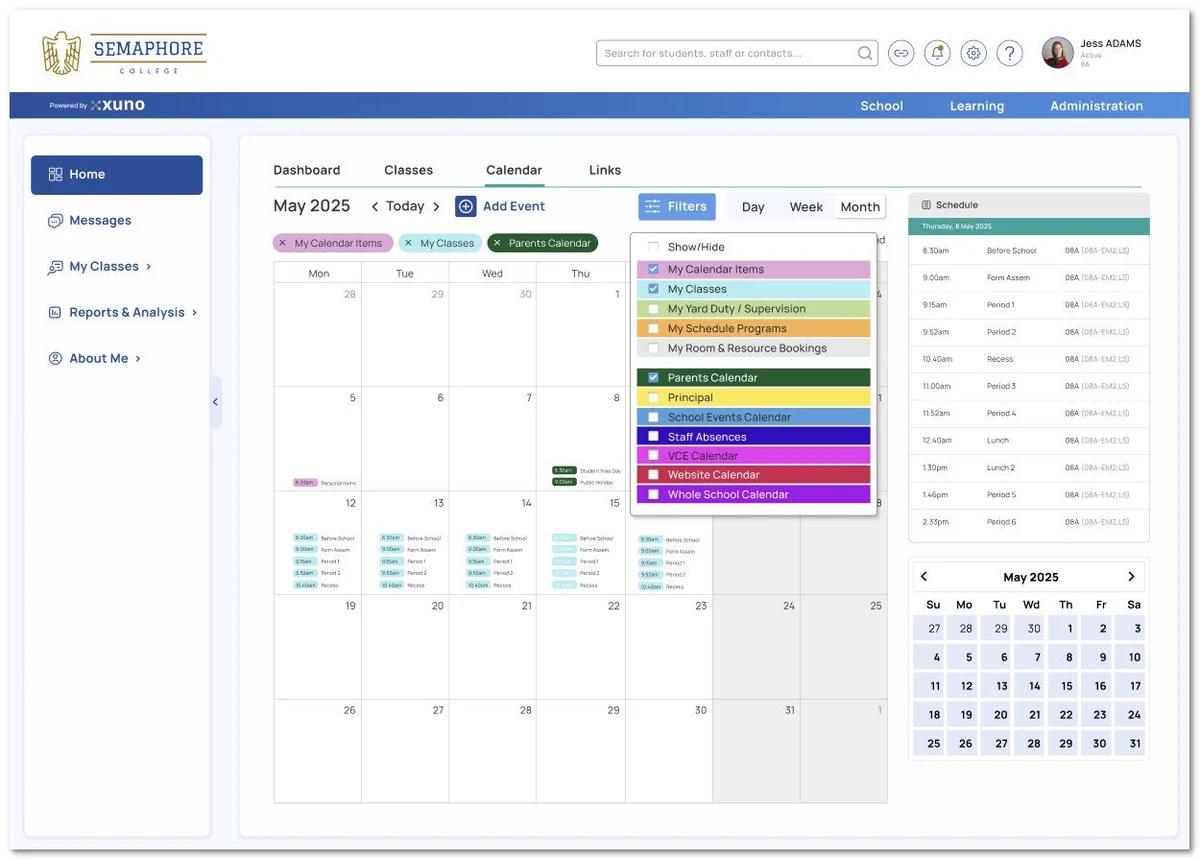
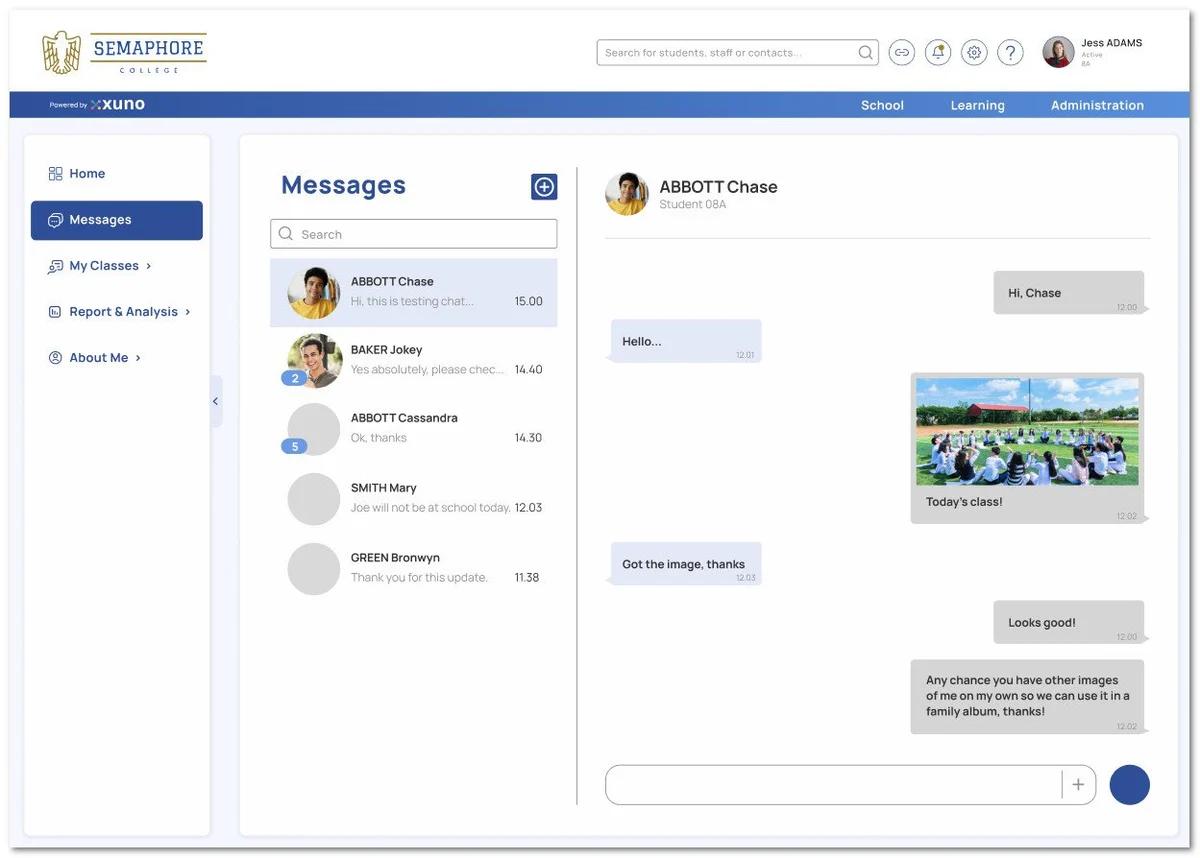
Xuno’s 2026 Interface Redesign
During 2026, a sleeker, smarter, and more intuitive user interface/experience will be rolled out to Xuno; Redesigned for faster navigation, improved accessibility, and a modern look that puts your data front and center.
Check out the exclusive screenshot previews below.
IT Support
Please log IT issues via the portal (especially Term 1 when demand is high).
Urgent support: call ext. 216.
IT Security (Really Important)
- Students must never use staff devices
- Staff devices must have lock codes
Don’t use department email for personal subscriptions, recovery emails, or other personal use.
(See the DE acceptable use policy for full details.)
Feedback
The IT team is constantly looking for ways to improve our processes or systems.
If you have any feedback or enhancements you recommend to improve our IT systems, please fill out the form below.
Facilities & OHS Update
Maintenance / OHS issues
If you spot a building/grounds or OHS issue, please log it via the portal using the OHS/Maintenance request form.
Dan/Michael will action your request as soon as possible, and or provide updates where possible.
If you believe your request has not been actioned quickly or satisfactorily, please raise your concern directly with either Matt or Helen P. (HSR)
Emergency Management (Please Read Carefully)
In the event of an emergency at Jackson School, we will enact our Emergency Management Plan (EMP). Clear announcements and tones will be used to guide staff and students, and it’s important that we follow instructions exactly as given.
Red Emergency Announcement (Initial Response)
When the EMP is first activated, you will hear the following announcement:
“Attention, attention. This is a red announcement. Please assemble where you are and await further instructions. All staff not in the act of teaching, please report to the Emergency Control Point (ECP).”
You will also hear an alert tone (beep beep).
What you should do:
- Stop teaching and turn off any equipment if safe to do so
- Keep students with you and calm
- Do not evacuate at this stage
- Await further instructions from the Chief Warden or Emergency Management Team
Evacuation Announcement
If evacuation is required, you will hear a second announcement:
“Attention. This is a red emergency announcement. Could all teachers and students please calmly move to the Evacuation Assembly Area (named area). Please avoid (specific location). Follow the directions of the wardens.”
This will be followed by the evacuation tone (whoop whoop).
What you should do:
- Evacuate your classroom immediately following the nominated paths on the evacuation diagrams, avoiding any nominated areas
- Proceed calmly to the nominated evacuation area (Oval, Hall, Front Carpark or Offsite)
Follow all instructions from wardens
Emergency Codes & What They Mean
Jackson School uses the following emergency announcements/codes:
- Green Announcement / Green Lockdown – Medical Emergency
- Orange Announcement / Orange Lockdown – Major Student Behaviour
- Yellow Announcement – Missing Student
- Mr Lock White – External Risk, Localised Onsite
- Mr Lock Black – External Risk Moving Throughout the School
Please familiarise yourself with the required actions for each code using the emergency management posters and evacuation diagrams displayed throughout the school.
Emergency Drill & PEEPs
Our first emergency management drill for the year will take place on:
📅 Tuesday 3rd March
- Please review Personal Emergency Evacuation Plans (PEEPs) for your students in Xuno under the Individual Education Plan section on the student dashboard
- If you believe a student requires a PEEP and does not have one, please create one as soon as possible
If you need support with PEEPs or emergency procedures, please see Helen or Matt.
Chemical Register + Spill Kits
We’ve standardised chemicals and storage across the school.
Please:
- Only order approved chemicals (COS/Zart Art)
- Remove non-standard chemicals from rooms ASAP
- Use spill kits as instructed on SWP; call the office for urgent biohazard cleans
Safety Reminders
- All electrical items must be tested and tagged
- No working above 2m unless qualified (use step ladders, not chairs!)
- Use the S.M.A.R.T. lifting method when handling bulky items, and use trolleys for loads over 5kg
Mandatory eLearning Modules
Please complete all mandatory eduPay eLearning modules ASAP. Staff will receive a list of outstanding modules early in Term 1.