SECONDARY NEWS
From the Assistant Principal
Miss Kim Bailey
kbailey@arm.catholic.edu.au
SECONDARY NEWS
From the Assistant Principal
Miss Kim Bailey
kbailey@arm.catholic.edu.au
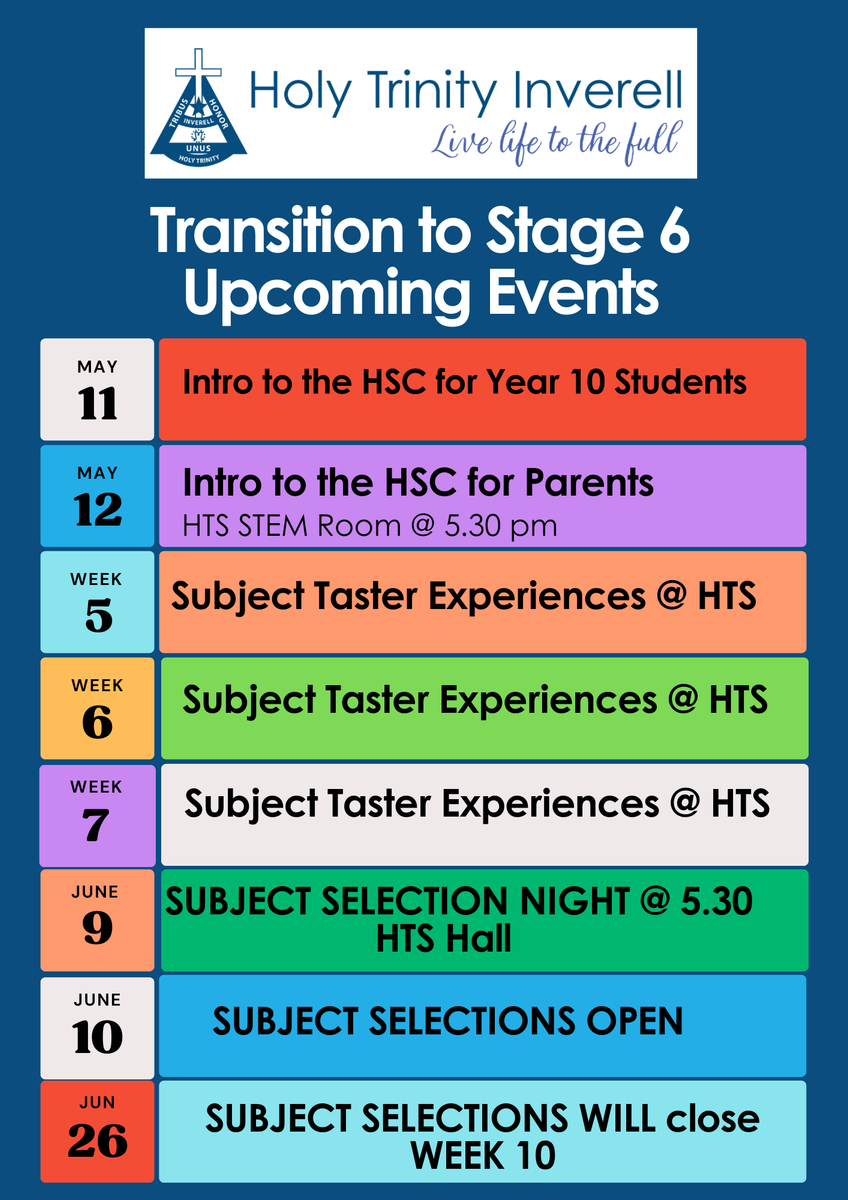
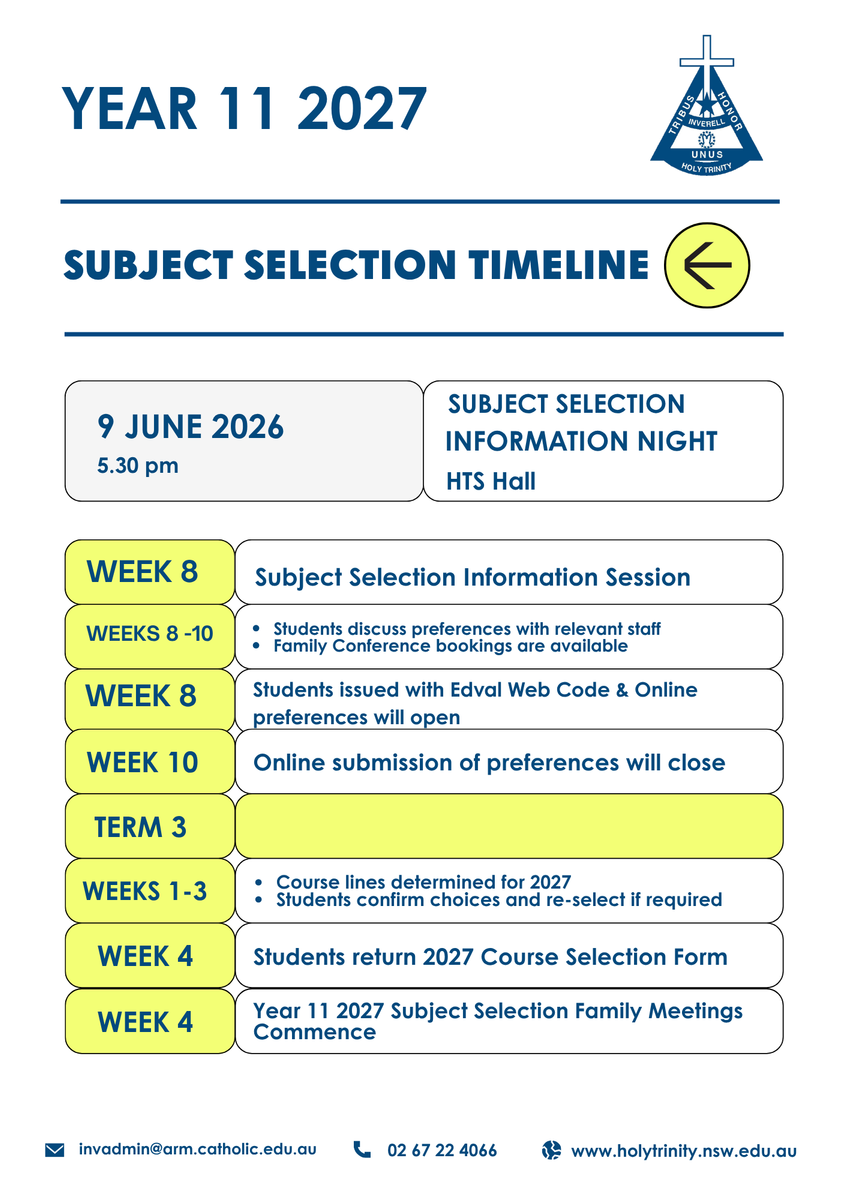
Subject selection is a significant milestone, and we encourage you to start having these conversations at home.
We look forward to partnering with you and your child as they shape their senior schooling pathway.
Transition to Stage 6 Upcoming Events
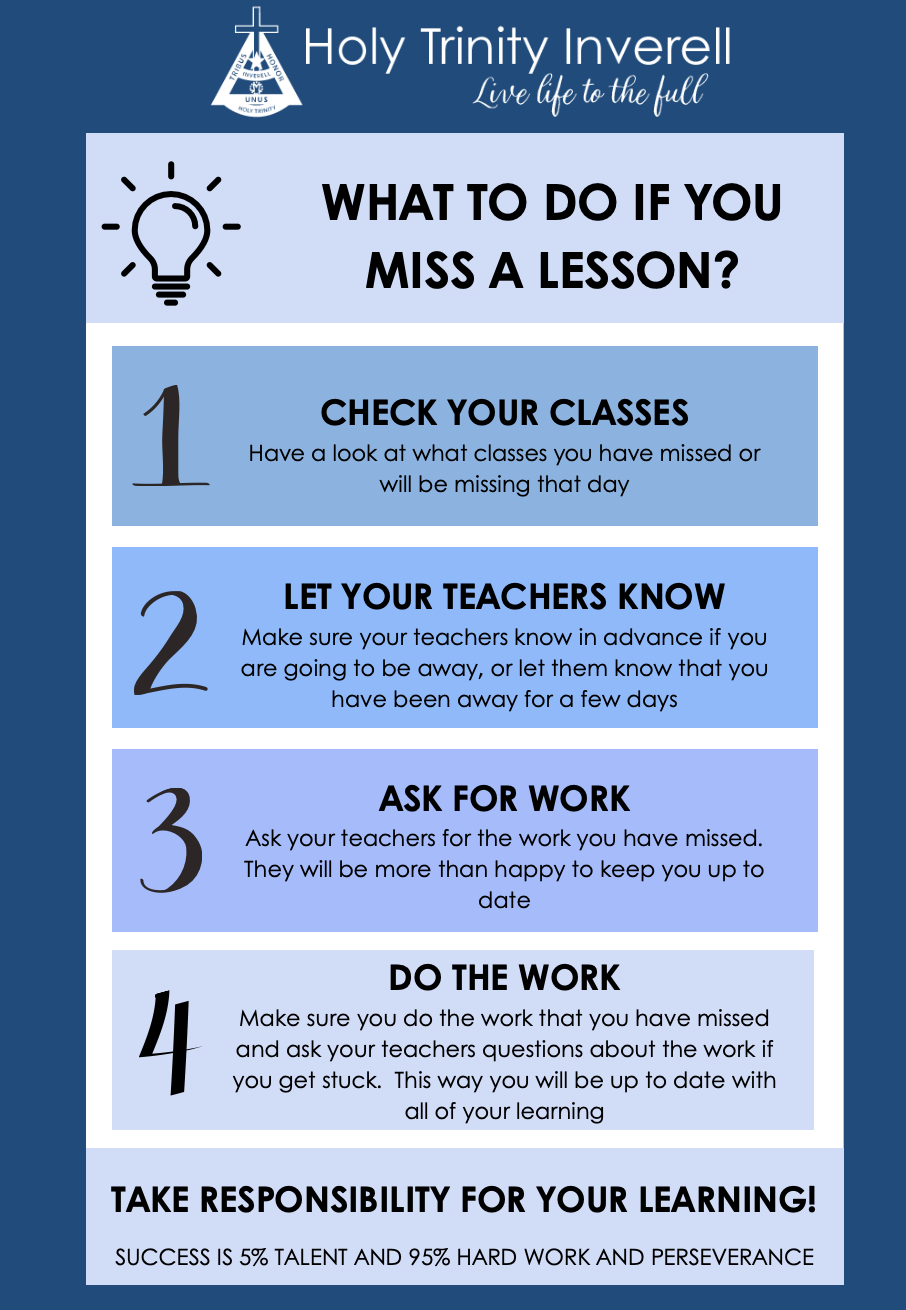
Students will be reminded this term of their responsibilities if they miss a lesson. We ask that you also have this conversation with your children if they are absent from school for any reason, including school events.
Winter uniform was compulsory from Monday 1 June . All students are required to be in full winter uniform by next Monday. Many students are already wearing the winter uniform and deserve congratulations for dressing according to the uniform policy. If students are not correctly attired, they are required to present a note to their Pastoral Care teacher and to remedy the situation as soon as practicable.
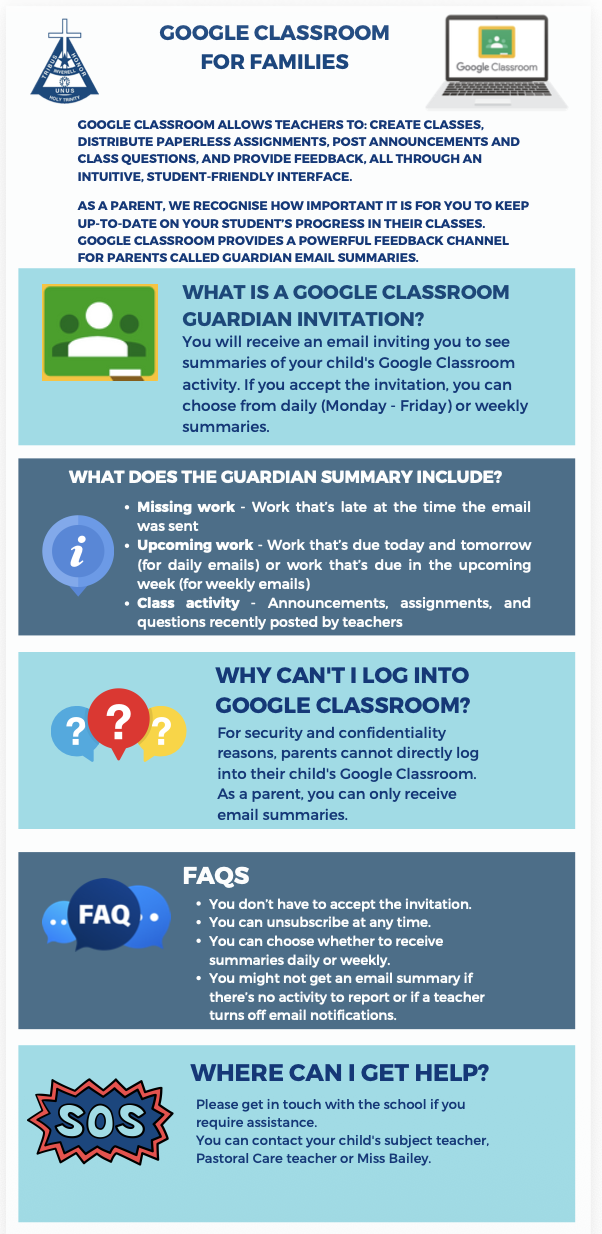
Google Classroom allows teachers to create classes, distribute paperless assignments, post announcements and class questions, and provide feedback, all through an intuitive, student-friendly interface.
PLEASE NOTE THAT GOOGLE CLASSROOM IS ONLY ONE METHOD OF LESSON DELIVERY.
STUDENTS ALSO USE OTHER PLATFORMS, TEXTS AND WORKBOOKS TO COMPLETE LEARNING TASKS, AND THE CONTENT DELIVERY METHOD VARIES BETWEEN SUBJECTS.
The flyer and link below provide you with more information about Guardian Summaries. Please contact Miss Bailey if you have any further questions or issues.
As schoolwork becomes more content-heavy, some students rely on re-reading or highlighting to study — but these passive techniques don’t help the brain remember information effectively. Retrieval maps are a powerful alternative. They combine elements of mind mapping with active recall, helping you test what you know while organising it visually. Retrieval maps strengthen memory, deepen understanding, and make study time far more efficient.
1. Start with a blank page
Unlike mind maps that begin by copying notes, retrieval maps start with nothing on the page except the main topic.
• Write the central concept in the middle of your page.• Try to recall the first key ideas without looking at your notes.• Add only what you remember — no peeking yet!
Starting from memory forces your brain to retrieve information, which is the most effective way to learn.
Tip: If nothing comes to mind at first, jot down just one idea. The act of beginning often triggers more memories.
2. Map the main branches from memory
Once you’ve written the central topic, add the major categories or headings you remember.
• Think of the big sections: causes, impacts, formulas, characters, themes or processes.• Draw short branches labelled with these headings.• Keep them simple — one or two words per branch is enough.
Even if your recall isn’t perfect, the goal is to test what your brain can retrieve without support.
Tip: If you leave a branch blank, that’s helpful feedback — it shows where to focus your revision.
3. Fill in sub-points and details
Now add the smaller branches that sit underneath each main heading.
• Include definitions, examples, steps, diagrams or key terms.• Only write what you can remember before checking your notes.• Add quick sketches or symbols to help your brain link ideas.
Building the map in layers helps you see the structure of the topic more clearly.
Tip: Don’t worry if the layout isn’t perfect — retrieval maps are for learning, not for display.
4. Check your notes and fill the gaps
Once you’ve recalled as much as you can, open your notes and compare.
• Highlight missing information and add it into the map.• Correct anything you remembered inaccurately.• Look for patterns: which areas were strong, and which were weak?
This step is crucial — filling gaps strengthens memory and deepens understanding.
Tip: Use a different colour for added information so you can clearly see what you forgot.
5. Repeat the retrieval map later
Revisiting the same topic over time cements it in long-term memory.
• Redo the entire retrieval map another day without looking at the first version.• Aim to recall more than you did last time.• Use your improved map to quiz yourself or summarise the topic aloud.
Spaced repetition combined with retrieval practice makes studying more effective and reduces the need for cramming before exams.
Tip: Do a quick retrieval map the night before a test to warm up your memory and build confidence.
Visual recall that works
Retrieval maps help you learn faster by making your brain actively work for the information. They show you what you know, highlight what you don’t, and give you a visual structure that makes complex topics easier to understand. By starting from memory, adding details in layers, and revisiting your maps regularly, you’ll strengthen your recall and study more efficiently.
Please note this also applies to Year 9 Elective Subjects.
https://sites.google.com/arm.catholic.edu.au/htsstudentcurriculumhandbook/home
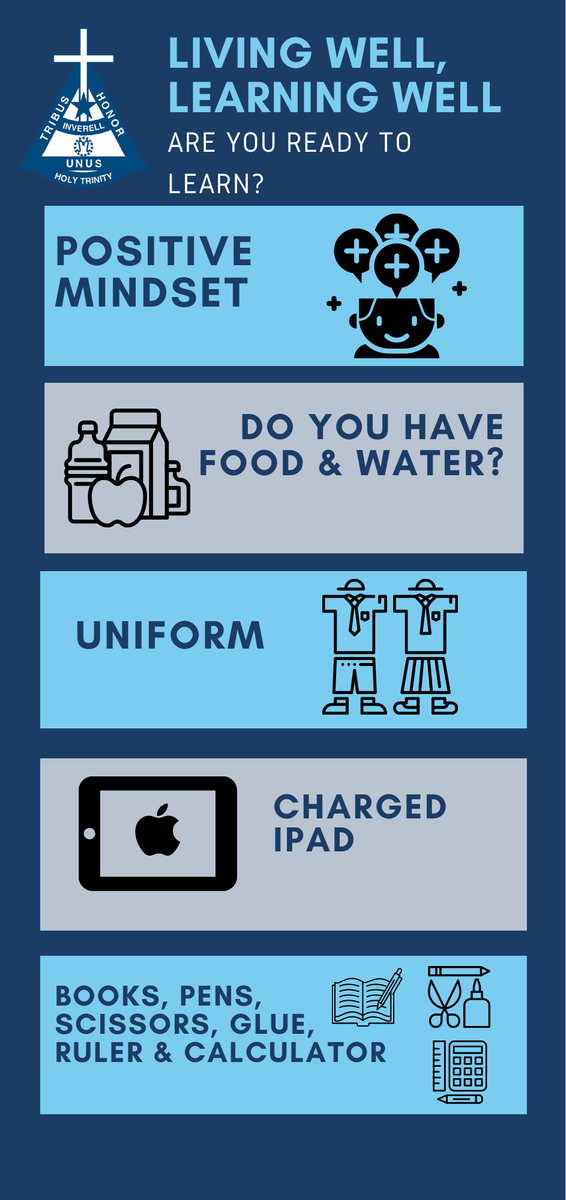
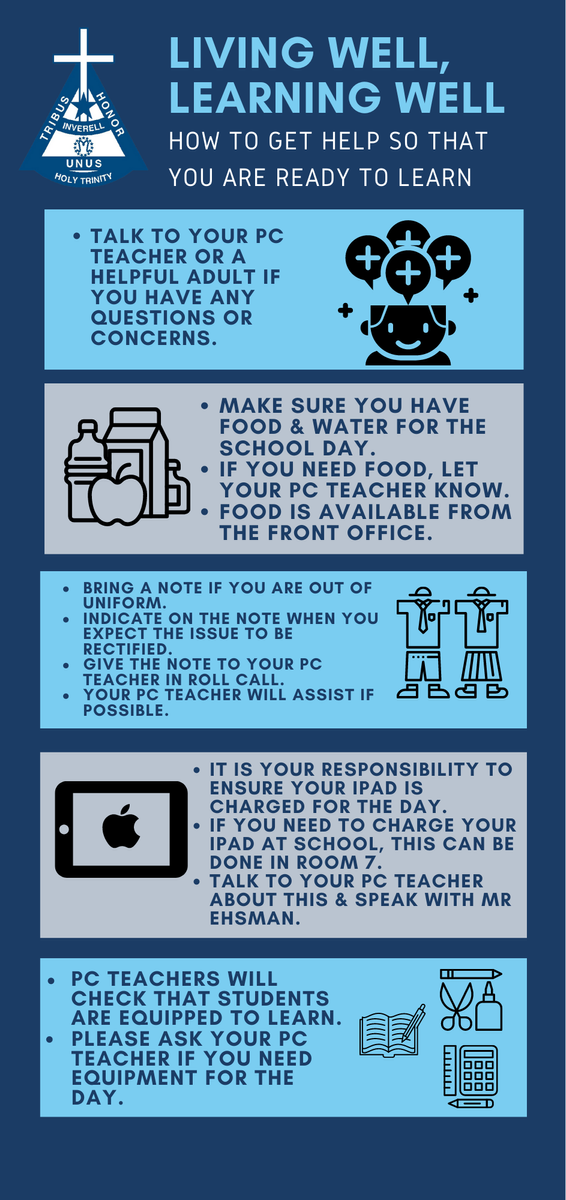
Pastoral Care teachers will be checking in with the students in their class each morning to ensure that they are Ready2Learn. All students have received the information below and were encouraged to show their families and discuss how to be Ready2Learn each day. Pastoral Care teachers will be able to help students start the day in a positive way. Please ask your child about this and support them to be Ready2Learn.
Students are being asked to ensure that they understand these elements and have all their equipment and uniforms by the start of Week 6. The infographic also outlines what to do if there is a problem with doing this and who you can go to for assistance.
Year 7:
7J – Mr Jack Jeffery
7M – Mrs Veronica McCormick
7R – Mrs Katrina Richardson
7W – Miss Lisa Wilson
Year 8:
8K - Miss Kristina Majetic
8M – Mr Ricky Muggleton
8T- Mrs Jane Taylor
8W – Mr Sam White
Year 9:
9C – Mrs Claudia Marshall
9E – Mr Jeremy East
9G – Miss Lauren Green
9M – Mrs Christine McLachlan
Year 10:
10E – Mr Peter Ehsman
10G – Mrs Hannah Graham/Mrs Nicole Simpson
10S – Mrs Kristen Smith
10U – Mr Blake Uebergang.
Students and parents are encouraged to approach the relevant Pastoral Care teacher for assistance.
We ask that all correspondence with staff is via the Compass portal.
Student Wellbeing
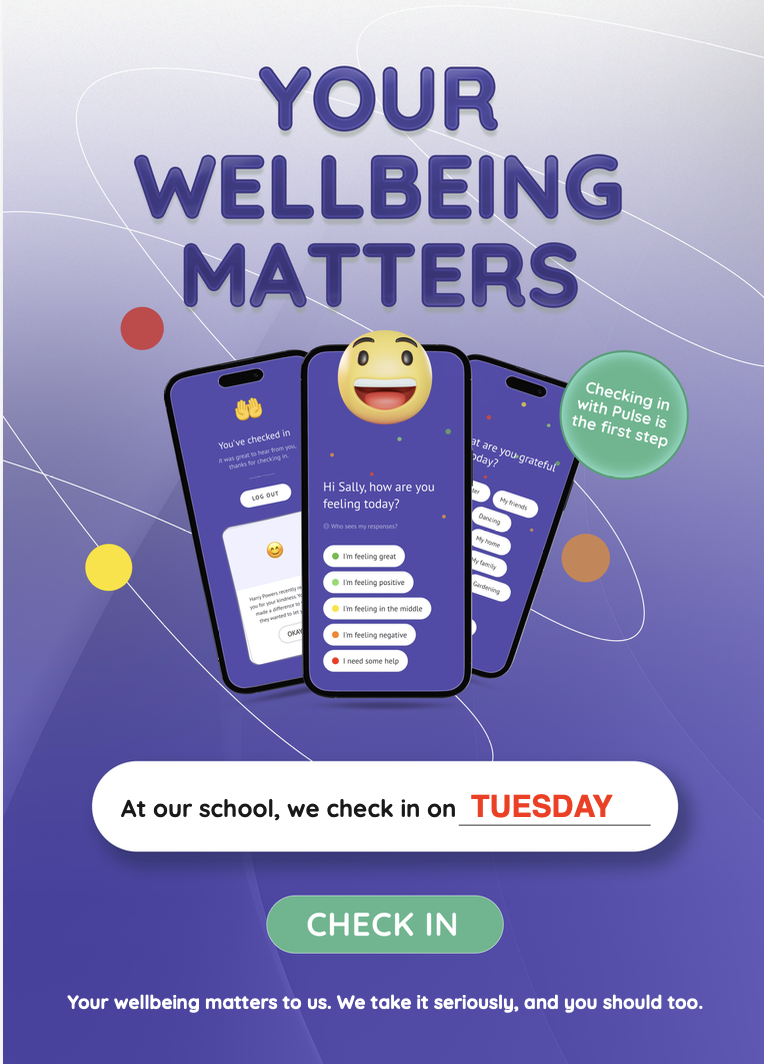
Check In Tuesday with the Pulse Wellbeing App
Pulse is a tool for measuring the week-to-week wellbeing and engagement of all our students. It tracks the wellbeing of an individual so that the school can respond if needed. It also tracks engagement with the school so we can make intervene if necessary.