
Digital Learning
Resources to support families and students to be safe and responsible digital citizens

Digital Learning
Resources to support families and students to be safe and responsible digital citizens
Hi WPS Families,
Our 3-6 Digital Learning program is up and running, with all students now accessing their school devices or continuing to build positive daily routines of bringing their personal device from home. Our P-2 students will access digital devices later in the year when required,
Students are reminded daily to come to school with a charged iPad ready for the day. If parents could assist students with reminders, that would be great.
When students arrive at school, they are not to access their iPad at all and should only take it out of their bag when preparing for the day. This also continues after school, with students required to keep their iPads in their bags until they get home. Could parents please continue having these supportive conversations at home to ensure students are hearing the same message.
Over the past few weeks, students have been busy joining their 2026 classroom’s Google Classroom. Each year, students receive new login credentials and join new classes linked to their new grades.
It was wonderful to see our Grade 4 students step up as leaders this week, guiding our Grade 3 students into logging on for the first time.
Google Classroom is an online app that helps teachers share work and online resources with their students. Students can also submit work back to their teacher.
Finally, a reminder to all parents of Grade 3 and 5 students, if your child has a compatible iPad, they will need to download the NAP App 2026. Please refer to letter sent home this week.
Kind Regards,
Steven PuharWarm regrards,
Steven Puhar
Attached is the school’s digital statement outlining the online platforms and their privacy policies that the school uses on a day-to-day basis.
As part of the school’s ongoing student education, the school will further enhance key understandings around user privacy, as well as the tools available on selected devices.
This will be embedded within the current school’s eSafety program that currently sees students undertake numerous digital workshops run by both school leadership, classroom teachers and external providers such as the Alannah and Madeline Foundation’s eSmart organisation.
Parents are advised of a key iPad feature to turn tracking off. This feature will be explicitly demonstrated to students within the school-based workshops.
Go to Settings > Privacy > Tracking.
The list shows the apps that requested permission to track you. You can turn permission on or off for any app on the list.
To stop all apps from asking permission to track you, turn off Allow Apps to Request to Track (at the top of the screen).
Below is a link to the schools Digital Learning page. This page contains key information about the school's implementation of the digital technology curriculum as a tool within a blended learning environment.
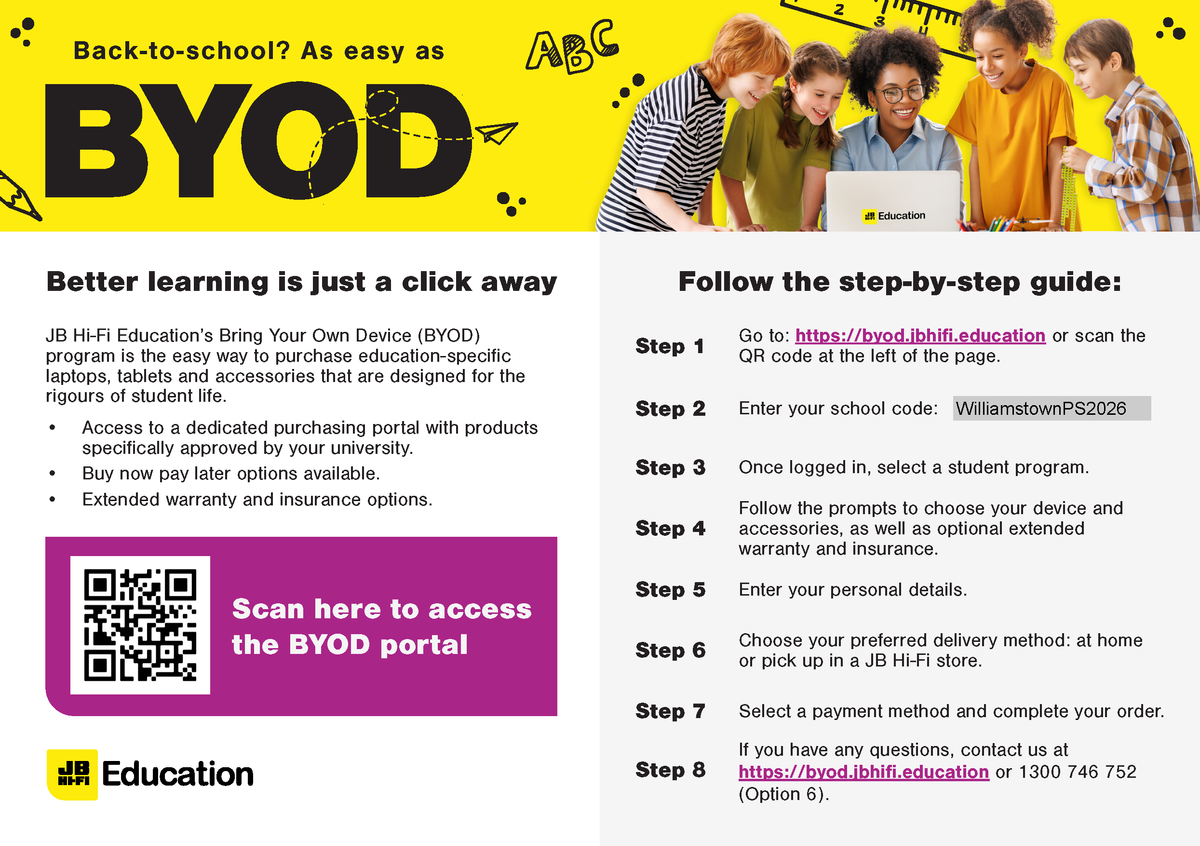
The JB HiFi purchase portal is again available for Willy PS families. The schools recommended minimum specification device is the iPad Gen 9, but the portal does also offer a range of iPad models and accessories. Although students have access to bluetooth keyboards we also recommend the Smart Keyboard or a 3rd party keyboard incorporated within the cover. This accessory will add value to the users experience.
Please also note the change in School Code.
Although the portal is set up through JB HI-FI on behalf of the school, we encourage families to explore all purchase options.
Please find attached documents released by DET.
The first document gives a deeper understanding of the DET licences G Suite for Education, how it is set up and how it differs from the public Google platform.
The second document provides families with supporting resources on how to protect individuals privacy online.
The Department of Education information pack for parents is available from the following link: