
Front Office

Welcome to this week’s edition of our Front Office Newsletter! Here you'll find the latest reminders, important updates, and helpful information to keep you connected with what’s happening around the school.
Thanks for staying in the loop with us!
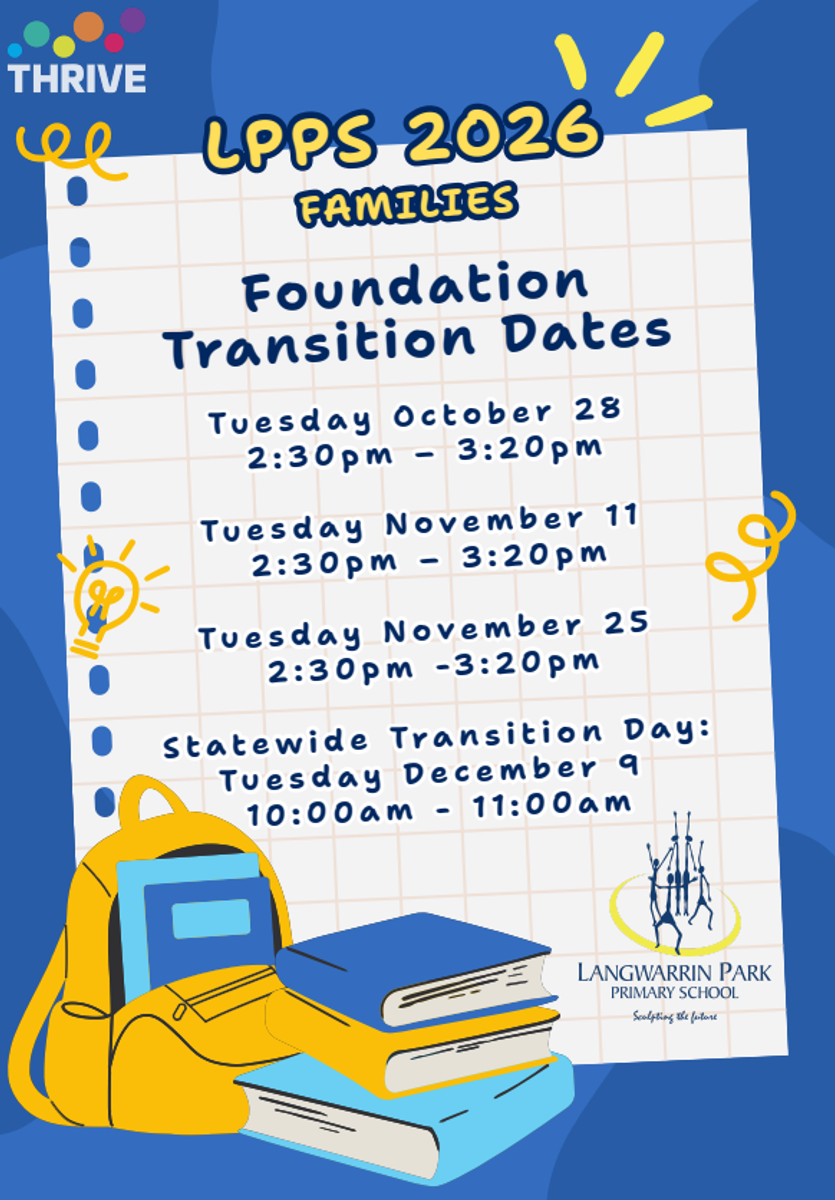
2026 Foundation Transition Dates
Keep an eye out on COMPASS for further information!
Let Us Know About Your Child’s Enrolment Plans
If your plans have changed and you do not intend to have your child enrolled at Langwarrin Park Primary School in 2026, in any year level, please notify the school by email as soon as possible.
In your email, please include the following information:
- Your child’s last day at our school
- The name of the school your child will be re-enrolling with
This information helps us manage our enrolments and plan for the coming year.
Before your child leaves, our administration team will also require you to complete and sign the student exit documents. These documents are necessary to finalise your child’s departure from the school.
We appreciate your assistance in providing this information promptly, which helps ensure a smooth transition for your child and accurate records for the school.
Medication at School – Keeping Your Child Safe
At Langwarrin Park Primary School, we encourage parents to give medication outside school hours whenever possible. However, we understand that some students may need to take medication during the school day or at school activities. Here’s how we support this safely:
Providing Permission
- If your child needs medication at school, we need written instructions from their doctor or health practitioner. This should include:
- The name of the medication
- Dosage and timing
- How it should be taken
- Dates the medication is needed, or if it’s ongoing
- Any special storage requirements
- This information is usually provided using our Medication Authority Form (available from the Front Office).
If a doctor’s form isn’t available, the Principal may accept written instructions from parents.
Administering Medication
- All medication must be clearly labelled with your child’s name, dosage, and time to be taken.
- Medication must be within its expiry date. If it isn’t, we’ll contact you to provide a replacement.
- Staff will give the medication according to the instructions, keep a record, and, where possible, two staff members will supervise.
- Teachers will be informed and may release students from class to take medication if needed.
Storing Medication
- Medication is stored securely in the Front Office or Sickbay, away from other students, and according to storage instructions.
In certain cases, medication may be kept in the classroom for quick access or carried by the student, if safe.
If you have any questions about medication at school, please contact the Front Office.

Before and After School Activities – Drop-Off and Pick-Up Reminder
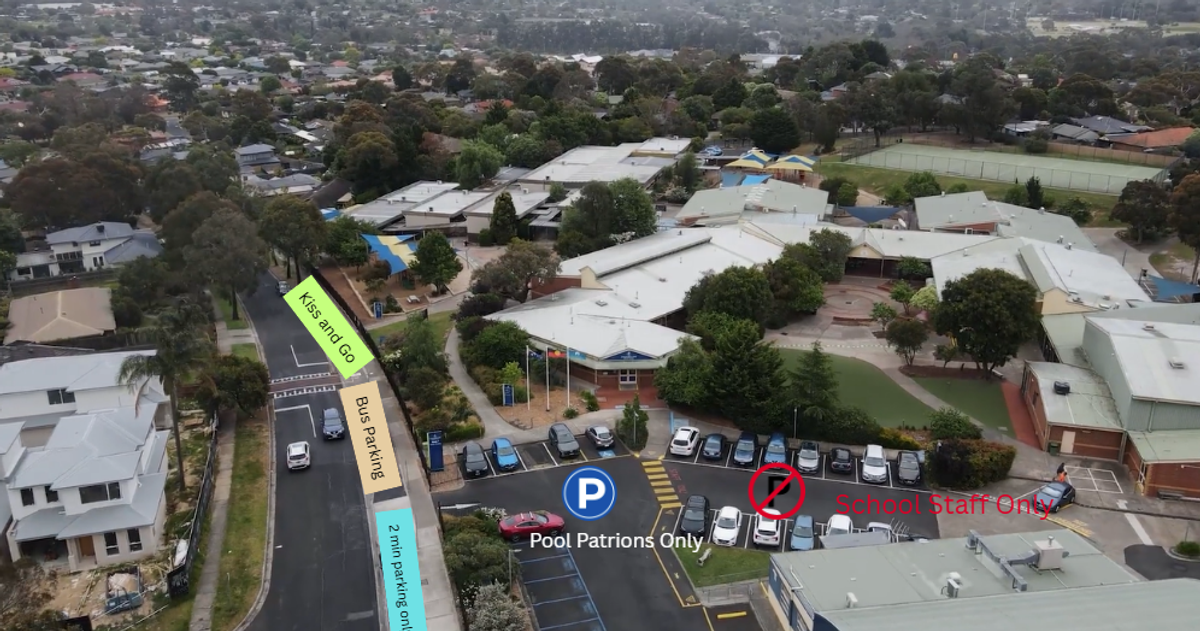
Families are kindly reminded that all drop-offs and pick-ups for before and after school activities should be made via the Kiss and Go zone at Gate 2.
To ensure the safety of our students and staff, please avoid using the staff car park and the swimming pool car park for drop-off or pick-up purposes. These areas are not designated for family access and can become congested or unsafe during busy times.
We appreciate your support in helping us maintain a safe and efficient environment for our school community.
After Camp Collection
For child safety reasons, students will not be released directly from the classroom after camp. To ensure the safety and accountability of all students, parents are required to sign out their child at the front office before collecting them from the classroom. We appreciate you're understanding and cooperation in helping us keep all children safe.
New visitor Policies/Sign in procedure- Swim Helpers
Parents who wish to be Volunteer, will need to express their interest to the classroom teacher who will send an invitation via Compass.
VISITORS/SPECTATORS:
● Will be required to sign in their attendance on the attendance sheet, which then allows them to sit on the pool deck to watch the swimming classes.
● Spectators are not required to sign in at the front office.
● Visitors are not to be in the changing rooms or directly involved with the care of the students at any time
VOLUNTEERS:
● Will be required to present a current Working with Children’s Check (WWCC) at least 2 weeks in advance of a session to the front office and to meet verification and record keeping obligations.
● Will be required to complete the LPPS Volunteer Child Safe training.
● Will be required to sign-in at the school front office each day of volunteering before they attend the pool.
● Will be required to wear a brown lanyard at all times designating that they are a volunteer helper not simply a spectator. This will allow for easy identification of helper parents by teachers who may not be familiar with the class, e.g CRTs and specialist teachers.
● Will be required to notify the class teacher at least one week in advance of a lesson if they are able to help assist with the supervision of changing of students. This supports efficient management of volunteers in advance of activity dates
● King Swim’s policy is that children over the age of 7 cannot go into the changeroom of the opposite sex, which of course covers adults as well. However, families may use the disabled/family facilities to change their children
● Langwarrin Park Primary School policy is that Foundation to Year 2 classes may have verified volunteers to help in the change rooms, but from Year 3 onwards, parents volunteers should not be in the change rooms unless given written permission from a principal class officer.
● There must be at least two adults in a changing room at any one time (two deep supervision)
● Volunteers must carry their current WWCC when onsite for any volunteering reason.
Late Arrival Procedure
If your child arrives after the designated start time, please ensure they report directly to the front office. Our staff will assist with signing them in and issue a late pass, which is required for them to enter class. This process helps us maintain accurate attendance records and ensures a smooth transition into the school day.
Toileting and Accidents
We understand that some children may experience toileting accidents, and we are here to support them—and you—through this part of their development.
Occasionally, the front office is fortunate to receive generous donations of new underwear to keep on hand as spares. However, these supplies often run out. To help us support your child effectively, we kindly ask that you pack a spare change of clothes and underwear in a discreet bag. While we do our best to maintain a supply through donations, your support truly makes a big difference.
We also welcome donations of plastic bags, which are essential for handling soiled or muddy clothing. These are increasingly difficult to come by, and your contributions are greatly appreciated.
Lost Property Notice
Each week, the front office receives numerous items of school uniform that cannot be returned to their owners because they are not labelled.
We kindly ask all families to ensure that their children's clothing is clearly labelled with their name to help us return lost items promptly
COMPASS TIP OF THE WEEK
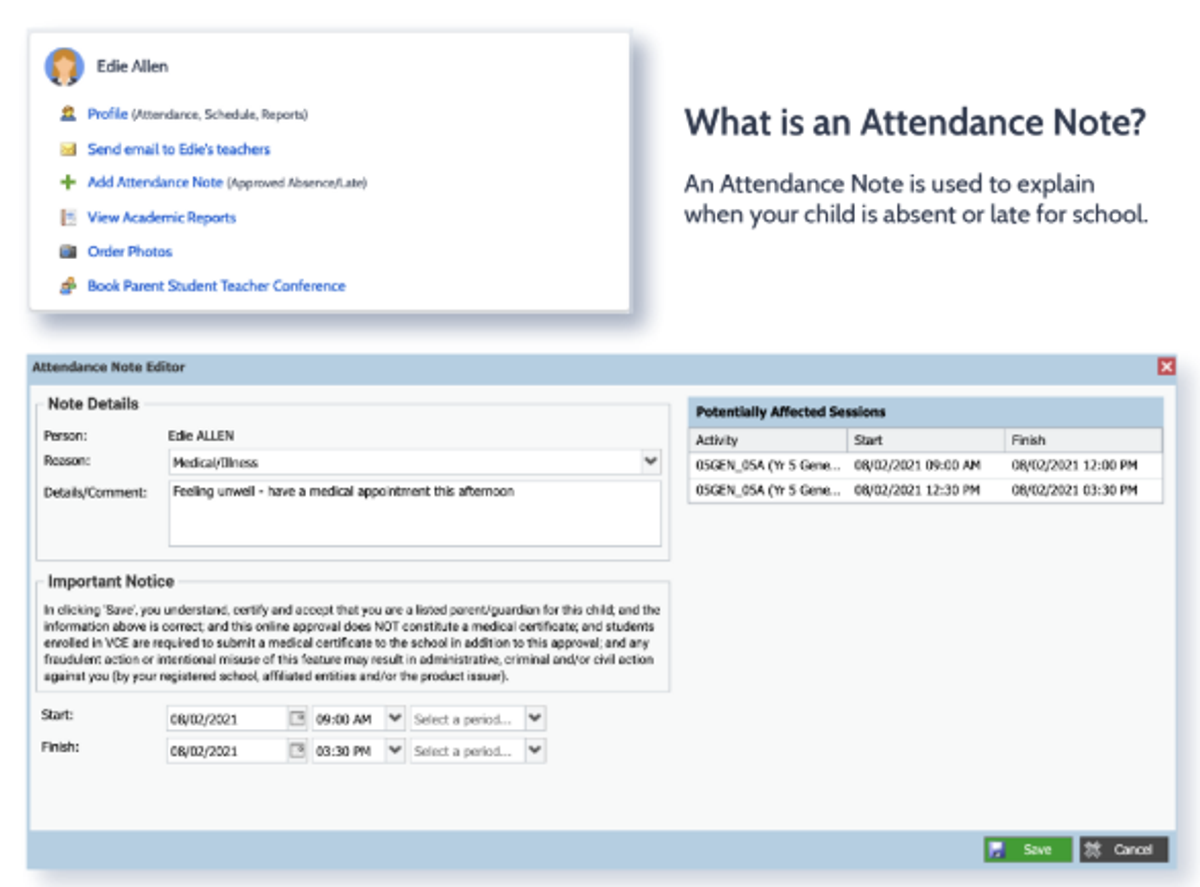
As cold and flu season approaches, we kindly remind parents to please submit an attendance note through Compass if your child is unwell and unable to attend school. Your cooperation helps us keep accurate records and ensure the wellbeing of all students.
Entering an Attendance Note
From the Compass home screen (or from your student’s profile), click the Add Attendance Note item.
From the pop-up window, Select the reason
Enter a brief description of the absence
Select the start and finish time
Click the ‘Save’ button
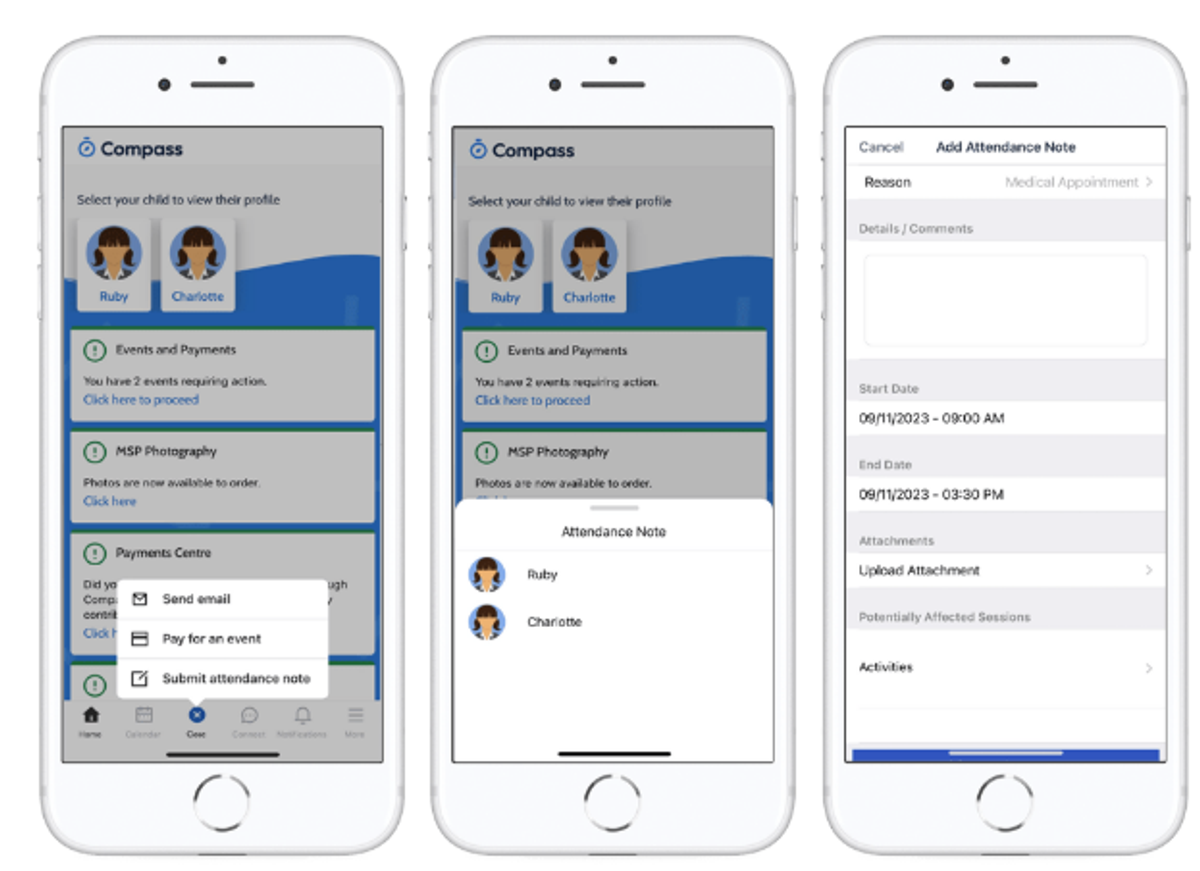
Using the Compass App
From the homepage, click on the blue shortcuts button from the bottom taskbar
Click on ‘Submit Attendance Note’
Select the reason
Enter a brief description of the absence
Select the start and finish time
Click the ‘Save’ button
Thank you for your continued support and partnership.
Warm regards,
The Front Office Team