Compass Learning Tasks
Learning Tasks in Compass are the main method of communicating academic results with students and parents/carers at Norwood.
Staff are encouraged to set up Learning Tasks within School Resources on Compass and push them out to the relevant classes to ensure consistency.
Communicating with Parents
- Once you have updated the results in a Compass Learning Task, you are able to notify parents that the result is available
- To send communications, click on the ‘Spanner icon’ next to the Learning Task > Edit > Click on the ‘Components’ tab > Click on ‘Save & send communications’ > Select the communication method and who you want to send the communications to (example attached).
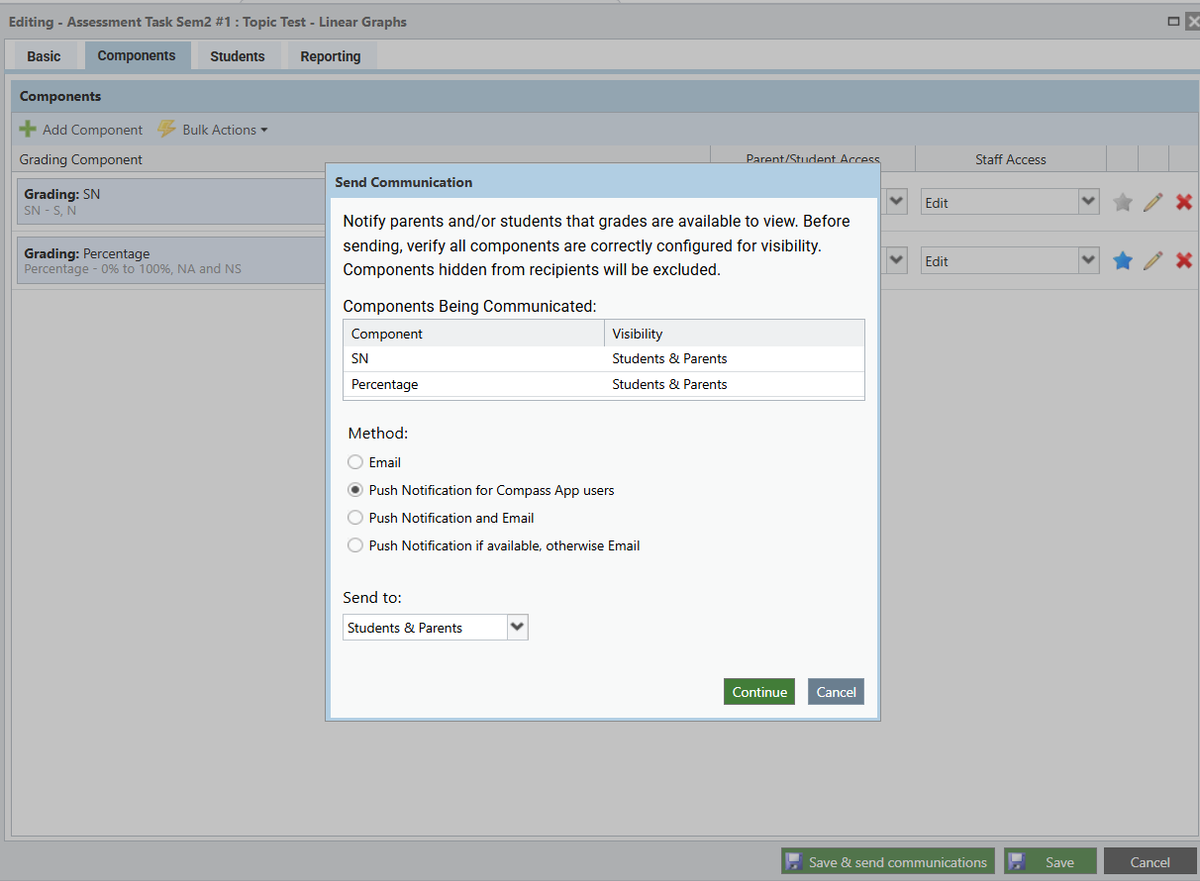
- Please note, the decision was made by Curriculum Committee to only use the ‘push notification for Compass app users’ for both students and parents (the purpose of this is to avoid parents receiving an overload of emails & they have the option to turn the notification off).